Shape Collage
Shape Collage: A focused collage maker for custom shapes, manual control, and large exports. Ranked #15 of 34 in Collage Maker Software by our editors (7.6/10); pricing: Free plan; best for shape-based collages and high-resolution output.
At a glance
- Editor score7.6 / 10
- PricingFree plan
- Best forShape-based collages and high-resolution output
- Free planYes
- Paid from$40 one-time
- PlatformsDesktop
- Founded2007
- Facts checked20 Sep 2026
Where it wins
- Automatically creates rectangular, heart, circle, letter, and custom-shape collages
- Exports JPEG, PNG, and Photoshop PSD files, with output up to 200 megapixels
- Runs on Windows, macOS, Linux, and iOS with web-connected photo sources
Where it doesn't
- The free edition is intended for personal use
- Manual editing and project saving require a Pro license
- Pro pricing starts at a $40 one-time purchase
Our verdict on Shape Collage
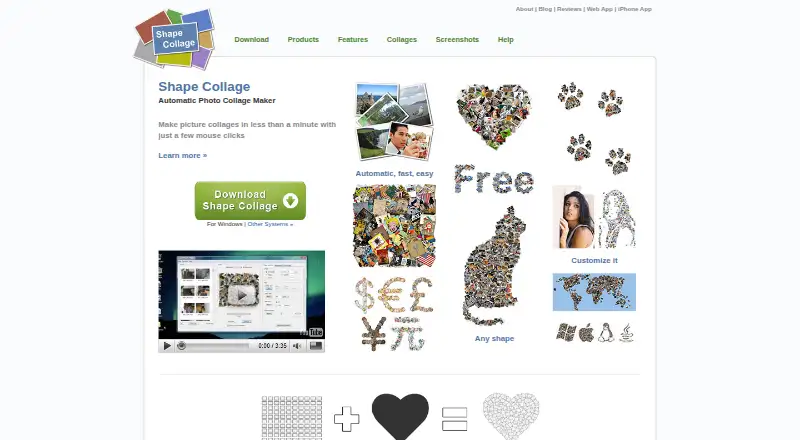
Shape Collage is a desktop photo-collage maker for people who want to arrange images into more than standard grids. It automatically creates rectangular, heart, circle, letter, and custom-shape collages, while letting users adjust collage size, photo size, photo count, spacing, backgrounds, borders, and shadows. Photos can be imported from a computer or the web, and listed integrations include Facebook, Instagram, Flickr, Dropbox, Google Drive, Google+, Twitter, Tumblr, and Google Search. It is best suited to personal creators, designers, and small businesses that need shape-based layouts and export flexibility.
Pricing is straightforward. The free edition is intended for personal use. Shape Collage Pro Personal costs $40 one time and adds no watermarks, high-resolution collages, manual editing, Photoshop PSD export, and the ability to save and load projects. Shape Collage Pro Commercial costs $75 one time and includes those capabilities plus commercial-use rights. The paid tiers therefore matter most when watermark-free output, editable project files, manual placement, or business usage is required. The published plans show a single-purchase model rather than a recurring subscription.
Its standout capability is automatic shape composition combined with detailed output controls. Pro workflows let users move, rotate, and reorder photos manually, while the product supports JPEG, PNG, and PSD exports and output up to 200 megapixels. Coverage across Windows, macOS, Linux, and iOS gives it a broad platform footprint, although the product is positioned primarily as desktop software. Choose Shape Collage for custom-shaped collages, large exports, and Photoshop-oriented workflows. Choose an alternative if AI-assisted creation, subscription-based collaboration, or a broader design suite is the main requirement.
Your product? Our editors can test Shape Collage in depth and publish a review, labelled as paid · from $149/mo →
Shape Collage pricing
All 2 Shape Collage plans and prices →
Shape Collage fact sheet
| Free plan | Yes |
|---|---|
| Paid from | $40 one-time |
| Platforms | Desktop |
| Maximum photos | Not verified |
| Custom layouts | Yes |
| Video collages | Not verified |
| Text overlays | Yes |
| Watermark-free exports | Yes |
| Export formats | JPEG, PNG, Photoshop PSD |
| Deployment | Desktop, Mobile |
| Platforms | Windows, macOS, Linux, iOS |
| Support | Email, Docs |
| Built for | Solo, Small business (editorial estimate) |
| Integrations | 9 integrations: Facebook, Instagram, Flickr, Dropbox, Google Drive, Google+ … |
| Pricing | Free plan (source) |
| Website | shapecollage.com |
| Facts checked | 20 Sep 2026 |
Shape Collage integrations
Shape Collage lists 9 integrations on its own site.
- Flickr
- Dropbox
- Google Drive
- Google+
- Tumblr
- Google Search
Alternatives to Shape Collage
- PicCollageA broad collage tool for photos, videos, social graphics, and personal designs.9.3
- PhotoGridA broad collage editor for photos, videos, social visuals, and AI-assisted layouts.9.1
- SCRLA flexible collage maker for polished Instagram and TikTok carousel designs.8.9



See all Shape Collage alternatives →
Used Shape Collage? Be the first to review it
The editor score above is our own research. What this page doesn't have yet is a reader's view — what you used Shape Collage for, what worked and what didn't. No stars are seeded and no review is paid for; an editor reads every one before it appears.
Write a reviewTwo minutes · verified accounts only · read by an editor before it appears
Featured on iTechGuides

Shape Collage is listed in our Collage Maker Software directory. Add the badge to your site — it links back to this page.
<a href="https://www.itechguides.com/products/shape-collage/"><img src="https://www.itechguides.com/best/badge/shape-collage.svg" alt="Featured on iTechGuides" width="230" height="46"></a>
Reviewed by iTechGuides Editors · Editorial team · Updated Oct 2026
Advertiser disclosure: iTechGuides is reader-supported. Vendors can pay for top positions in our rankings and for a place on other products' pages, and we may earn a commission when you click some links. Bought places stand at the number bought; this page and our disclosure say so. Paying vendors may get a fuller, more detailed review from our editors, and that review can change their score. How we rank.
Last updated · How we research and update