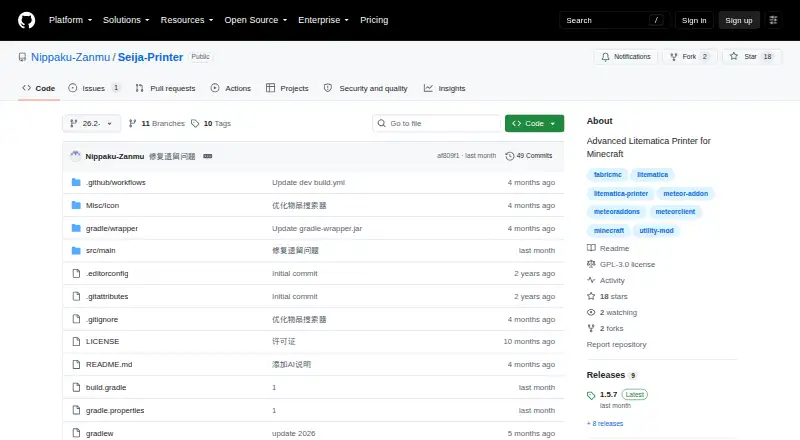
Seija-Printer
Seija-Printer: A focused, open-source printer for players who need precise Litematica control. Ranked #38 of 42 in Minecraft Schematic Tools by our editors (4.0/10); pricing: Open source; best for advanced Litematica printing controls.
At a glance
- Editor score4.0 / 10
- PricingOpen source
- Best forAdvanced Litematica printing controls
- Paid fromFree
- Facts checked22 Sep 2026
Where it wins
- Places projected blocks and fluids automatically
- Corrects block states and supports custom replacements
- Adds bridge, surface, air, and ray-trace controls
Where it doesn't
- Requires Meteor Client and Litematica-related dependencies
- Fluid placement can be unstable
- Project maintenance is approaching a semi-maintained state
Our verdict on Seija-Printer
Seija-Printer is an open-source, client-side Minecraft mod for automating block and fluid placement from Litematica projections. It is aimed at solo and small-scale players who want more control over in-game schematic printing, particularly when ordinary placement behavior does not match projected block states. The addon runs through a Meteor Client entrypoint and is distributed as source code under a GPL-3.0 license for desktop use.
Its strongest area is printing control. Seija-Printer simulates local block placement to help match projected block states, then attempts interactions to correct incorrect states. Custom block replacement supports substitutions during printing, while bridge mode places support blocks around suspended blocks. Surface mode narrows printing to selected projection layers, and configurable air-placement and ray-trace checks provide additional control over how placement decisions are made. Together, these features make the product more focused on placement behavior than on general schematic management.
The ecosystem fit is specific but clear: Seija-Printer works with Meteor Client, Litematica, and MaLiLib, so it suits players already using that toolchain rather than those seeking a standalone application. Its server-oriented options account for environments with or without anti-cheat plugins, but fluid placement may be unstable. The project is also close to semi-maintained status, which matters for buyers who prioritize ongoing development. Choose Seija-Printer for configurable Litematica printing, block-state correction, and specialized bridge or surface workflows. Choose an alternative if you need a standalone tool, broad platform coverage, or a more actively maintained project.
Your product? Our editors can test Seija-Printer in depth and publish a review, labelled as paid · from $149/mo →
Seija-Printer pricing
Seija-Printer fact sheet
| Free plan | Not verified |
|---|---|
| Paid from | Free |
| Supported file formats | Not verified |
| Available platforms | Plugin |
| 3D preview | Not verified |
| Placement workflow | In-game |
| World import | Not verified |
| Format conversion | Not verified |
| Batch processing | Not verified |
| Deployment | Desktop |
| Built for | Solo, Small business (editorial estimate) |
| Integrations | 3 integrations: Meteor Client, Litematica, MaLiLib |
| Pricing | Open source |
| Website | github.com |
| Facts checked | 22 Sep 2026 |
Seija-Printer integrations
Seija-Printer lists 3 integrations on its own site.
- Meteor Client
- Litematica
- MaLiLib
Alternatives to Seija-Printer
- Schematic UtilityA focused free plugin for command-based WorldEdit schematic placement.9.1
- ServerSideBuildsA self-hosted plugin for projecting and managing schematics without client-side mods.8.5
- Easy Block EditorA free in-game editor with collaboration, projections and broad schematic-format support.8.4


See all Seija-Printer alternatives →
Used Seija-Printer? Be the first to review it
The editor score above is our own research. What this page doesn't have yet is a reader's view — what you used Seija-Printer for, what worked and what didn't. No stars are seeded and no review is paid for; an editor reads every one before it appears.
Write a reviewTwo minutes · verified accounts only · read by an editor before it appears
Featured on iTechGuides

Seija-Printer is listed in our Minecraft Schematic Tools directory. Add the badge to your site — it links back to this page.
<a href="https://www.itechguides.com/products/seija-printer/"><img src="https://www.itechguides.com/best/badge/seija-printer.svg" alt="Featured on iTechGuides" width="230" height="46"></a>
Reviewed by iTechGuides Editors · Editorial team · Updated Oct 2026
Advertiser disclosure: iTechGuides is reader-supported. Vendors can pay for top positions in our rankings and for a place on other products' pages, and we may earn a commission when you click some links. Bought places stand at the number bought; this page and our disclosure say so. Paying vendors may get a fuller, more detailed review from our editors, and that review can change their score. How we rank.
Last updated · How we research and update