SeePaint
SeePaint: A capable free mobile canvas for sketching, painting, and common file exports. Ranked #39 of 46 in Digital Painting Software by our editors (6.0/10); pricing: Free plan; best for free mobile sketching with common exports.
At a glance
- Editor score6.0 / 10
- PricingFree plan
- Best forFree mobile sketching with common exports
- Free planYes
- Paid fromNone
- Layer supportYes
- Facts checked21 Sep 2026
Where it wins
- 100+ brushes plus custom brush creation
- Layer groups, blend modes, and layered editing
- PSD, PDF, JPG, PNG, and GIF export
Where it doesn't
- Available only on iOS and Android
- Desktop coverage is not included
- Advanced workflows may require another painting app
Our verdict on SeePaint
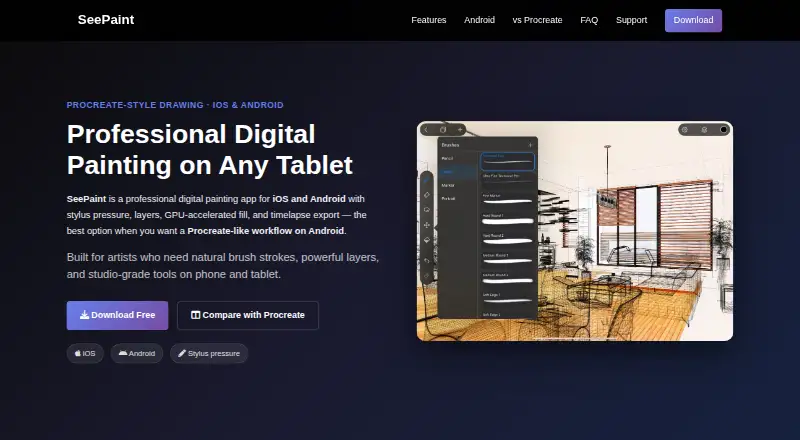
SeePaint is a free mobile drawing and painting application for artists, illustrators, comic creators, and stylus users. It combines customizable brushes, layered editing, blend modes, stroke stabilization, color tools, image import, and multi-touch gestures in an app for iPhone, iPad, and Android devices. On iOS, Apple Pencil support includes pressure, tilt, and palm rejection, making the app especially relevant to stylus-based sketching and painting.
The Free plan includes 100+ brushes, custom brush creation, layered editing, and PSD export. The broader toolset adds layer groups, blend modes, color picking, palettes, bucket fill, color adjustments, and image import for editing, tracing, or reference work. Multi-touch canvas gestures support mobile navigation, while stroke stabilization can help with controlled marks. Export options cover JPG, PNG, GIF, PSD, and PDF, giving artists several ways to continue work or share finished images.
SeePaint fits users who want a no-cost mobile painting tool with familiar layer-based workflows and exports that connect with Photoshop, SAI, and Clip Studio Paint. Its focus is narrower than a cross-device desktop-and-mobile setup: the listed platforms are iOS and Android, and desktop coverage is not included. Artists who primarily sketch on a phone or tablet should find the feature mix aligned with that use case, while those who need desktop production, broader platform coverage, or a more extensive ecosystem should consider an alternative designed for those requirements.
Your product? Our editors can test SeePaint in depth and publish a review, labelled as paid · from $99/mo →
SeePaint pricing
All 1 SeePaint plans and prices →
SeePaint fact sheet
| Free plan | Yes |
|---|---|
| Paid from | None |
| Brush customization | Yes |
| Layer support | Yes |
| Pressure sensitivity | Yes |
| Supported platforms | ios, android |
| Color management | Not verified |
| Stroke stabilization | Yes |
| Deployment | Mobile |
| Platforms | iOS, Android |
| Support | Email, Phone |
| Built for | Solo, Small business (editorial estimate) |
| Integrations | 3 integrations: Photoshop, SAI, Clip Studio Paint |
| Pricing | Free plan (source) |
| Website | sketchflowlab.com |
| Facts checked | 21 Sep 2026 |
SeePaint integrations
SeePaint lists 3 integrations on its own site.
- Photoshop
- SAI
- Clip Studio Paint
Alternatives to SeePaint
- KritaA broad, professional-grade painting toolkit with no paid plan and wide platform coverage.9.4
- Clip Studio PaintA broad digital art workspace spanning illustration, comics, 3D, animation, and cloud tools.9.3
- ProcreateA polished iPad painting workflow with broad creative tools and limited platform coverage.9.1



See all SeePaint alternatives →
Used SeePaint? Be the first to review it
The editor score above is our own research. What this page doesn't have yet is a reader's view — what you used SeePaint for, what worked and what didn't. No stars are seeded and no review is paid for; an editor reads every one before it appears.
Write a reviewTwo minutes · verified accounts only · read by an editor before it appears
Featured on iTechGuides

SeePaint is listed in our Digital Painting Software directory. Add the badge to your site — it links back to this page.
<a href="https://www.itechguides.com/products/seepaint/"><img src="https://www.itechguides.com/best/badge/seepaint.svg" alt="Featured on iTechGuides" width="230" height="46"></a>
Reviewed by iTechGuides Editors · Editorial team · Updated Oct 2026
Advertiser disclosure: iTechGuides is reader-supported. Vendors can pay for top positions in our rankings and for a place on other products' pages, and we may earn a commission when you click some links. How we rank.
Last updated · How we research and update