
Seavus Project Viewer
Seavus Project Viewer: A focused .mpp viewer for stakeholders who need schedule visibility and progress updates. Ranked #184 of 188 in Project Management Software by our editors (3.0/10); pricing: 15-day trial; best for teams viewing and reviewing Microsoft Project files.
At a glance
- Editor score3.0 / 10
- Pricing15-day trial
- Best forTeams viewing and reviewing Microsoft Project files
- Free planNo
- Paid from$39/device one-time
- Founded2003
- Facts checked24 Sep 2026
Where it wins
- Opens .mpp files without Microsoft Project installed
- Task Update supports submitting progress to project managers
- Filters, reports and version comparison aid schedule review
Where it doesn't
- Primarily read-only rather than a full project-planning system
- No built-in automation rules or time tracking
- Standard licenses require workstation installation and activation
Our verdict on Seavus Project Viewer
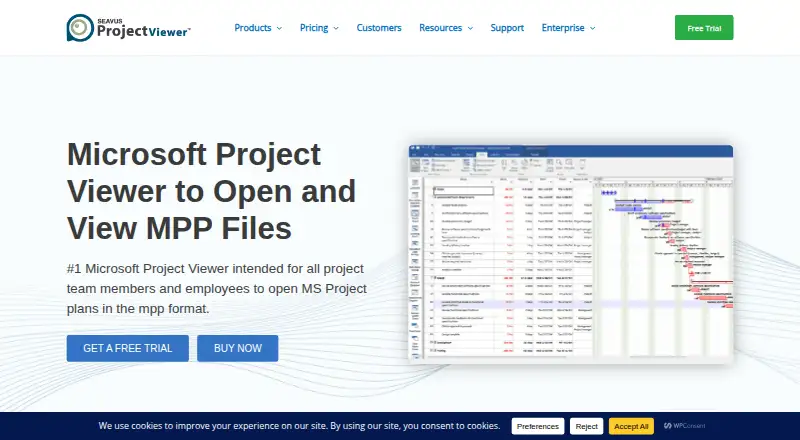
Seavus Project Viewer is a desktop application for opening and reviewing Microsoft Project plans without installing Microsoft Project. It is aimed at project team members, executives and other stakeholders who need to inspect schedules, assignments, resources and reports. Microsoft Project views, including user-defined views saved in a plan, are supported, and Task Update lets contributors submit task progress to project managers. Windows and macOS versions are available for desktop or self-hosted deployment.
The published plans use perpetual licensing. The Windows Standard License costs $39 per license and requires a separate installation on each workstation plus end-user activation. The Concurrent License costs $89 per license, runs from a network server and does not require end-user activation. On macOS, the Single License costs $114 per license, while the Concurrent License costs $89 per license. Company Licensing provides a custom silent-deployment package, requires a minimum of 50 licenses and includes one year of software maintenance and assurance. Enterprise Unlimited supports deployment across divisions, subsidiaries and wholly owned entities, with volume discounting and one year of maintenance and assurance. A 15-day free trial is available without a card. SharePoint and OneDrive integrations, along with the Microsoft Project Task Update add-in, fit Microsoft-centered environments.
Its scope is intentionally narrower than a general project-management system. The viewer can filter, sort and group task or resource data, produce graphical reports and dashboards, compare project versions, and open formats such as .ssv, .xml, .xls, .mdb and .mpd. However, it is primarily read-only and does not provide automation rules or time tracking. Teams that mainly review schedules, distribute project files or collect progress updates should find the focused feature set appropriate; teams needing planning, editing, workflow automation or time capture should choose a broader project-management platform.
Your product? Our editors can test Seavus Project Viewer in depth and publish a review, labelled as paid · from $149/mo →
Seavus Project Viewer pricing
All 6 Seavus Project Viewer plans and prices →
Seavus Project Viewer fact sheet
| Free plan | No |
|---|---|
| Paid from | $39/device one-time |
| Task views | Not verified |
| Automation rules | No |
| Time tracking | No |
| Guest access | Yes |
| Free-plan user limit | Not verified |
| Native integrations | 2 integrations |
| Free trial | 15 days · no card needed |
| Deployment | Desktop, Self-hosted |
| Platforms | Windows, macOS |
| Compliance & security | ISO 27001 |
| Support | Email, Docs |
| Built for | Small business, Mid-market, Enterprise (editorial estimate) |
| Integrations | 3 integrations: Microsoft SharePoint, Microsoft OneDrive, Microsoft Project (Task Update add-in) |
| Pricing | 15-day trial (source) |
| Website | seavusprojectviewer.com |
| Facts checked | 24 Sep 2026 |
Seavus Project Viewer integrations
Seavus Project Viewer lists 3 integrations on its own site.
- Microsoft SharePoint
- Microsoft OneDrive
- Microsoft Project (Task Update add-in)
Alternatives to Seavus Project Viewer
- ClickUpBroad project control with tasks, Docs, automations, reporting, time tracking, and AI.9.4
- JiraA mature choice for agile delivery teams needing boards, backlogs, workflows, and automation.9.3
- AsanaA mature project hub with flexible views, automation, reporting, and AI features.9.2


See all Seavus Project Viewer alternatives →
Used Seavus Project Viewer? Be the first to review it
The editor score above is our own research. What this page doesn't have yet is a reader's view — what you used Seavus Project Viewer for, what worked and what didn't. No stars are seeded and no review is paid for; an editor reads every one before it appears.
Write a reviewTwo minutes · verified accounts only · read by an editor before it appears
Featured on iTechGuides

Seavus Project Viewer is listed in our Project Management Software directory. Add the badge to your site — it links back to this page.
<a href="https://www.itechguides.com/products/seavus-project-viewer/"><img src="https://www.itechguides.com/best/badge/seavus-project-viewer.svg" alt="Featured on iTechGuides" width="230" height="46"></a>
Reviewed by iTechGuides Editors · Editorial team · Updated Oct 2026
Advertiser disclosure: iTechGuides is reader-supported. Vendors can pay for top positions in our rankings and for a place on other products' pages, and we may earn a commission when you click some links. Bought places stand at the number bought; this page and our disclosure say so. Paying vendors may get a fuller, more detailed review from our editors, and that review can change their score. How we rank.
Last updated · How we research and update