ScreenGuard
ScreenGuard: A focused open-source option for screen-time rules, without app blocking or location tools. Ranked #80 of 106 in Parental Control Apps by our editors (3.0/10); pricing: Free plan; best for technical families wanting free open-source controls.
At a glance
- Editor score3.0 / 10
- PricingFree plan
- Best forTechnical families wanting free open-source controls
- Free planYes
- Paid fromFree
- Content filteringYes
- Facts checked22 Sep 2026
Where it wins
- Free and open-source with self-hosted deployment options
- Daily limits, weekly schedules, locking, and usage history
- Web administration with Android remote management
Where it doesn't
- Focused on screen time rather than full parental controls
- No verified app-blocking or location features
- Linux setup requires a systemd agent on managed computers
Our verdict on ScreenGuard
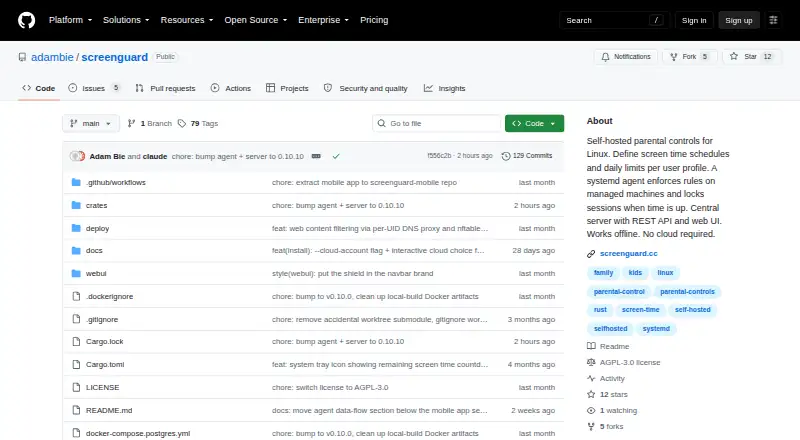
ScreenGuard is an open-source parental-control system for families and administrators managing screen time on Linux machines. It supports user profiles with daily limits and weekly schedules, then automatically locks sessions when allotted time expires. Parents can manage profiles, devices, schedules, and daily limits through a web administration interface, while the Android companion app provides remote management. Deployment options include self-hosted LAN use, desktop and mobile environments, and a hosted cloud account.
The product’s main strength is its focused screen-time toolkit. Profiles can combine daily limits with weekly schedules, desktop warnings before lockout, usage tracking, and history. Optional domain blocking is available through a local DNS proxy, and mDNS discovery can help identify devices on local networks. This makes ScreenGuard a practical fit for technical households that want open-source controls and direct management of Linux computers. Its free plan also keeps the core system accessible without introducing separate paid tiers into the decision.
Setup is more involved than with a purely consumer-oriented parental-control app. Managed computers require a systemd agent, and families choosing self-hosted LAN deployment must handle the surrounding administration. ScreenGuard also stays narrower than broader parental-control suites: its published feature set centers on screen-time enforcement, scheduling, usage history, and optional domain blocking rather than app blocking or location tools. Choose it when Linux support, open-source licensing, and control over deployment matter most. Families seeking a wider set of monitoring and device-management capabilities should consider an alternative with broader coverage.
Your product? Our editors can test ScreenGuard in depth and publish a review, labelled as paid · from $149/mo →
ScreenGuard pricing
ScreenGuard fact sheet
| Free plan | Yes |
|---|---|
| Paid from | Free |
| Device platforms | Not verified |
| Content filtering | Yes |
| Screen-time schedules | Yes |
| App blocking | Not verified |
| Activity reports | Yes |
| Location tracking | Not verified |
| Device limit | Not verified |
| Deployment | Cloud, Self-hosted, Mobile, Desktop |
| Platforms | Web, Linux, Android |
| Support | Docs, Community |
| Built for | Solo, Small business (editorial estimate) |
| Pricing | Free plan |
| Website | github.com |
| Facts checked | 22 Sep 2026 |
Alternatives to ScreenGuard
- BarkA broad cross-platform monitor with schedules, blocking, alerts, and location tools.9.2
- QustodioA broad parental-control suite with AI safety alerts and five-platform coverage.9.0
- OurPactA broad parental-control toolkit for families managing up to 20 child devices.8.9



See all ScreenGuard alternatives →
Used ScreenGuard? Be the first to review it
The editor score above is our own research. What this page doesn't have yet is a reader's view — what you used ScreenGuard for, what worked and what didn't. No stars are seeded and no review is paid for; an editor reads every one before it appears.
Write a reviewTwo minutes · verified accounts only · read by an editor before it appears
Featured on iTechGuides

ScreenGuard is listed in our Parental Control Apps directory. Add the badge to your site — it links back to this page.
<a href="https://www.itechguides.com/products/screenguard/"><img src="https://www.itechguides.com/best/badge/screenguard.svg" alt="Featured on iTechGuides" width="230" height="46"></a>
Reviewed by iTechGuides Editors · Editorial team · Updated Oct 2026
Advertiser disclosure: iTechGuides is reader-supported. Vendors can pay for top positions in our rankings and for a place on other products' pages, and we may earn a commission when you click some links. Bought places stand at the number bought; this page and our disclosure say so. Paying vendors may get a fuller, more detailed review from our editors, and that review can change their score. How we rank.
Last updated · How we research and update