ScreenAI
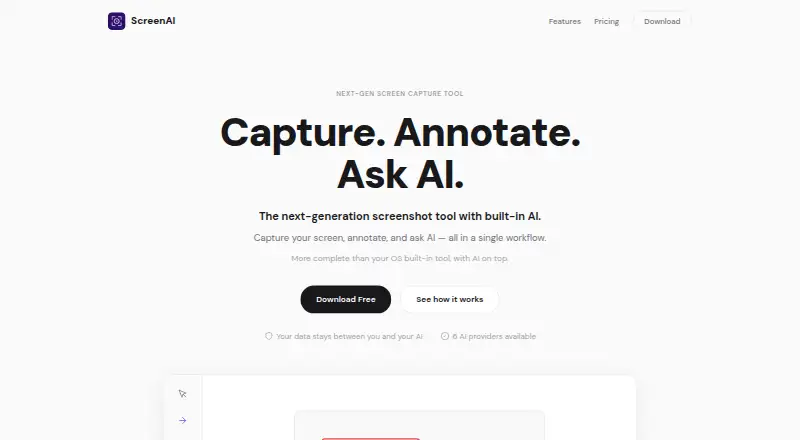
ScreenAI: A free desktop capture and annotation app with OCR, automatic masking, and optional AI features. Ranked #19 of 75 in Screenshot Annotation Software by our editors (7.3/10); pricing: Free plan; best for desktop users wanting free OCR and privacy masking.
At a glance
- Editor score7.3 / 10
- PricingFree plan
- Best forDesktop users wanting free OCR and privacy masking
- Free planYes
- Paid from$7/mo
- Redaction toolsYes
- Facts checked24 Sep 2026
Where it wins
- Captures regions, windows, full screens, freeform areas, and scrolling content
- OCR, Quick Redact, and PNG, JPEG, PDF, or GIF export
- Runs on Windows, macOS, and Linux with a free plan
Where it doesn't
- Free plan limits AI requests to 10 per day
- AI provider choice and document upload require Premium
- Desktop-only deployment; no browser or mobile app
Our verdict on ScreenAI
ScreenAI is a desktop screenshot and screen-capture application for people who need to capture, annotate, and work with screen content. It supports Windows, macOS, and Linux, and its free plan combines capture modes with annotation tools, OCR text extraction, Quick Redact, and exports to PNG, JPEG, and PDF. Solo users and small teams looking for a desktop tool with text recognition and privacy masking can start without a subscription.
Capture options include regions, full screens, windows, freeform selections, and scrolling content. Annotation tools cover pencil, arrows, shapes, text, step numbering, highlighting, blur, crop, and eraser. ScreenAI also automatically masks sensitive information such as emails, numbers, and IP addresses. OCR-indexed captures, batch processing, capture history, and a color picker that copies HEX, RGB, or HSL values extend its usefulness beyond marking up a single image. Exports also include animated GIF, offering a choice of formats for different capture needs.
The free plan allows 10 AI requests per day. According to the published plans, Premium costs $7 per month and adds unlimited AI requests, provider choice, persistent memory, Best Answer mode, document upload, and web search. Supported providers include Claude, GPT-4o, Gemini, Mistral, Grok, and Ollama. This makes the paid tier relevant when AI work on captures is central; users focused on capture, annotation, OCR, and masking can remain on Free. ScreenAI is desktop-only, so it is not a fit for workflows that require a browser-based or mobile capture app.
Your product? Our editors can test ScreenAI in depth and publish a review, labelled as paid · from $149/mo →
ScreenAI pricing
All 2 ScreenAI plans and prices →
ScreenAI fact sheet
| Free plan | Yes |
|---|---|
| Paid from | $7/mo |
| Redaction tools | Yes |
| Measurement tools | Not verified |
| Team collaboration | Not verified |
| Browser extension | Not verified |
| Export formats | PNG, JPEG, PDF, animated GIF |
| Maximum file size | Not verified |
| Deployment | Desktop |
| Platforms | Windows, macOS, Linux |
| Built for | Solo, Small business (editorial estimate) |
| Integrations | 6 integrations: Claude, GPT-4o, Gemini, Mistral, Grok, Ollama |
| Pricing | Free plan (source) |
| Website | getscreenai.com |
| Facts checked | 24 Sep 2026 |
ScreenAI integrations
ScreenAI lists 6 integrations on its own site.
- Claude
- GPT-4o
- Gemini
- Mistral
- Grok
- Ollama
Alternatives to ScreenAI
- SnagitA paid desktop suite for detailed screenshot capture, annotation, OCR, and short video creation.9.3
- ShareXA highly configurable Windows capture tool for annotation, OCR, recording, and automated sharing.9.1
- ScreenpressoA broad Windows capture toolkit with strong annotation, OCR, document, and sharing features.8.9



See all ScreenAI alternatives →
Used ScreenAI? Be the first to review it
The editor score above is our own research. What this page doesn't have yet is a reader's view — what you used ScreenAI for, what worked and what didn't. No stars are seeded and no review is paid for; an editor reads every one before it appears.
Write a reviewTwo minutes · verified accounts only · read by an editor before it appears
Featured on iTechGuides

ScreenAI is listed in our Screenshot Annotation Software directory. Add the badge to your site — it links back to this page.
<a href="https://www.itechguides.com/products/screenai/"><img src="https://www.itechguides.com/best/badge/screenai.svg" alt="Featured on iTechGuides" width="230" height="46"></a>
Reviewed by iTechGuides Editors · Editorial team · Updated Oct 2026
Advertiser disclosure: iTechGuides is reader-supported. Vendors can pay for top positions in our rankings and for a place on other products' pages, and we may earn a commission when you click some links. Bought places stand at the number bought; this page and our disclosure say so. Paying vendors may get a fuller, more detailed review from our editors, and that review can change their score. How we rank.
Last updated · How we research and update