SchemConvert
SchemConvert: A focused, free converter for desktop and scripted Minecraft schematic workflows. Ranked #22 of 42 in Minecraft Schematic Tools by our editors (5.8/10); pricing: Open source; best for desktop batch format conversion.
At a glance
- Editor score5.8 / 10
- PricingOpen source
- Best forDesktop batch format conversion
- Paid fromFree
- Facts checked20 Sep 2026
Where it wins
- Converts four Minecraft schematic formats
- Offers both GUI and command-line operation
- Preserves supported entities and block entities
Where it doesn't
- Provides no preview workflow
- Does not place schematics in Minecraft
- Requires Java 21 or later
Our verdict on SchemConvert
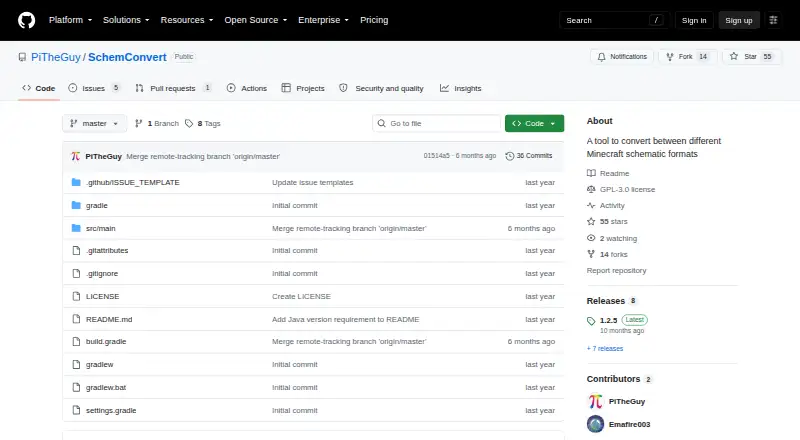
SchemConvert is a Java desktop utility for converting Minecraft schematic files between four supported formats: vanilla structure-block .nbt, Sponge .schem, Litematica .litematic, and Axiom .bp. It is aimed at builders, mod users, server administrators, and technical workflows that need to move files between tools. Windows, macOS, and Linux are supported, and the project is open source under the GPL-3.0 license.
Its main strength is workflow flexibility. The graphical interface lets users select one or multiple input files and choose an output format, while command-line conversion supports scripted operations. Batch processing makes it suitable for handling several schematic files in one operation. Supported conversions also preserve schematic entities and block entities, which matters when those elements are part of a build. The published project is free and open source rather than organized around paid tiers, making its value straightforward for users who want local conversion without a subscription.
SchemConvert stays focused on format conversion rather than becoming a complete schematic editor or placement tool. It exports converted files but does not provide a preview or placement workflow, so users who need to inspect builds visually or place them directly should choose a tool with those capabilities. The Java 21-or-later requirement adds a setup consideration, particularly for users who do not already have a compatible Java environment. Pick SchemConvert for desktop batch conversion and command-line automation across its four documented formats; look elsewhere for in-app visualization, editing, or Minecraft placement.
Your product? Our editors can test SchemConvert in depth and publish a review, labelled as paid · from $149/mo →
SchemConvert pricing
SchemConvert fact sheet
| Free plan | Not verified |
|---|---|
| Paid from | Free |
| Supported file formats | .nbt, .schem, .litematic, .bp |
| Available platforms | Desktop |
| 3D preview | Not verified |
| Placement workflow | Export-only |
| World import | Not verified |
| Format conversion | Yes |
| Batch processing | Yes |
| Deployment | Desktop |
| Platforms | Windows, macOS, Linux |
| Support | Community, Docs |
| Built for | Solo, Small business (editorial estimate) |
| Pricing | Open source |
| Website | github.com |
| Facts checked | 20 Sep 2026 |
Alternatives to SchemConvert
- Schematic UtilityA focused free plugin for command-based WorldEdit schematic placement.9.1
- ServerSideBuildsA self-hosted plugin for projecting and managing schematics without client-side mods.8.5
- Easy Block EditorA free in-game editor with collaboration, projections and broad schematic-format support.8.4


See all SchemConvert alternatives →
Used SchemConvert? Be the first to review it
The editor score above is our own research. What this page doesn't have yet is a reader's view — what you used SchemConvert for, what worked and what didn't. No stars are seeded and no review is paid for; an editor reads every one before it appears.
Write a reviewTwo minutes · verified accounts only · read by an editor before it appears
Featured on iTechGuides

SchemConvert is listed in our Minecraft Schematic Tools directory. Add the badge to your site — it links back to this page.
<a href="https://www.itechguides.com/products/schemconvert/"><img src="https://www.itechguides.com/best/badge/schemconvert.svg" alt="Featured on iTechGuides" width="230" height="46"></a>
Reviewed by iTechGuides Editors · Editorial team · Updated Oct 2026
Advertiser disclosure: iTechGuides is reader-supported. Vendors can pay for top positions in our rankings and for a place on other products' pages, and we may earn a commission when you click some links. Bought places stand at the number bought; this page and our disclosure say so. Paying vendors may get a fuller, more detailed review from our editors, and that review can change their score. How we rank.
Last updated · How we research and update