
ScanToPDF
ScanToPDF: A Windows-focused scanner and document workflow tool with strong batch automation. Ranked #12 of 27 in Document Scanning Software by our editors (7.6/10); pricing: 30-day trial; best for windows scanning with unattended processing.
At a glance
- Editor score7.6 / 10
- Pricing30-day trial
- Best forWindows scanning with unattended processing
- Founded1993 · United Kingdom
- Facts checked22 Sep 2026
Where it wins
- OCR creates searchable PDF documents
- Barcode and OCR separation supports batch workflows
- Unattended server processing handles folder-based jobs
Where it doesn't
- Windows is the only listed platform
- TWAIN-compatible scanners are required for scanner capture
- Subscription and Concurrent licenses expire yearly
Our verdict on ScanToPDF
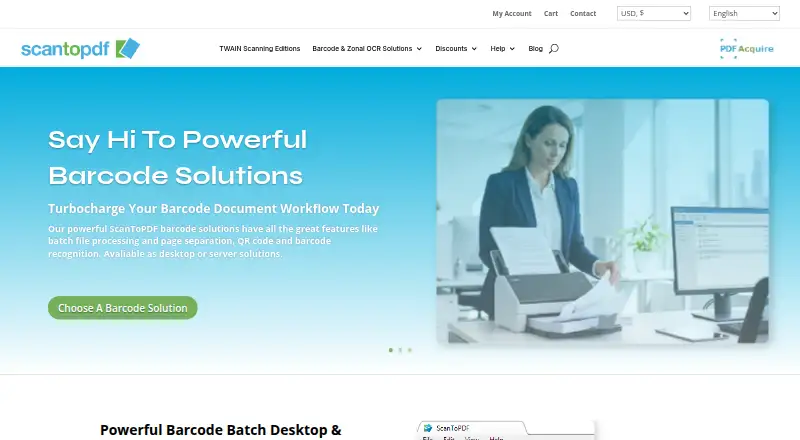
ScanToPDF is Windows desktop and server-oriented software for capturing documents from TWAIN-compatible scanners or importing files from local and network folders. It creates PDF and PDF/A documents, with an OCR edition that adds searchable text layers. Individuals, offices, and organizations can use it for business archives, invoices, records, and other document workflows that need scanning, file preparation, and batch handling.
Its strongest area is document-processing depth. Suitable scanners support multi-page and duplex capture, while page rotation, deletion, insertion, and reordering help prepare files before export. Automatic file naming, blank-page removal, and barcode or OCR-based batch separation reduce repetitive sorting in larger scanning jobs. Unattended server processing is particularly relevant for recurring folder-based workflows, and export options include PDF, PDF/A, TIFF, JPEG, GIF, and BMP. TWAIN, WebDAV, and SMTP support connect the product to scanner hardware, file locations, and email workflows.
The licensing options cover different ownership and sharing needs. Subscription and Concurrent licenses expire every year; Concurrent licensing can be shared between multiple users. The Perpetual (Lifetime) + Support option does not expire for the purchased version. Each listed plan includes one year of priority support, while Subscription and Perpetual plans include major upgrades and minor updates for one year. A 30-day free trial is available. ScanToPDF suits Windows teams that need OCR, batch separation, and unattended processing in one workflow. Organizations requiring macOS or another listed platform should choose a different document-scanning product.
Questions about ScanToPDF
Is there a free trial of ScanToPDF? Yes: a 30-day free trial.
What does ScanToPDF run on? Windows. It runs as a desktop app.
What does ScanToPDF integrate with? 3 integrations: TWAIN, WebDAV and SMTP.
Does ScanToPDF offer a money-back guarantee? Yes: 30 days.
Who is ScanToPDF built for? Small businesses, mid-market companies and enterprises (our editorial estimate).
Your product? Our editors can test ScanToPDF in depth and publish a review, labelled as paid · from $149/mo →
ScanToPDF pricing
All 3 ScanToPDF plans and prices →
ScanToPDF fact sheet
| Free plan | Not verified |
|---|---|
| Paid from | Not verified |
| OCR languages | Not verified |
| Scanner support | Yes |
| Camera capture | Not verified |
| Batch scanning | Yes |
| Searchable PDF | Yes |
| Supported platforms | Windows |
| Export formats | PDF, PDF/A, TIFF, JPEG, GIF, BMP |
| Free trial | 30 days |
| Money-back guarantee | 30 days |
| Deployment | Desktop |
| Platforms | Windows |
| Support | Email, Live chat, Phone, Docs |
| Built for | Small business, Mid-market, Enterprise (editorial estimate) |
| Integrations | 3 integrations: TWAIN, WebDAV, SMTP |
| Pricing | 30-day trial (source) |
| Website | scantopdf.com |
| Facts checked | 22 Sep 2026 |
ScanToPDF integrations
ScanToPDF lists 3 integrations on its own site.
- TWAIN
- WebDAV
- SMTP
Alternatives to ScanToPDF
- NAPS2A capable no-cost scanner app with broad driver support, OCR, and automation.9.4
- ScanSnap HomeA free ScanSnap companion for organized scanning, OCR, search, and cloud export.9.2
- Brother iPrint&ScanA capable free companion app for Brother owners who need everyday scanning tools.9.0


See all ScanToPDF alternatives →
Used ScanToPDF? Be the first to review it
The editor score above is our own research. What this page doesn't have yet is a reader's view — what you used ScanToPDF for, what worked and what didn't. No stars are seeded and no review is paid for; an editor reads every one before it appears.
Write a reviewTwo minutes · verified accounts only · read by an editor before it appears
Featured on iTechGuides

ScanToPDF is listed in our Document Scanning Software directory. Add the badge to your site — it links back to this page.
<a href="https://www.itechguides.com/products/scantopdf/"><img src="https://www.itechguides.com/best/badge/scantopdf.svg" alt="Featured on iTechGuides" width="230" height="46"></a>
Reviewed by iTechGuides Editors · Editorial team · Updated Nov 2026
Advertiser disclosure: iTechGuides is reader-supported. Vendors can pay for top positions in our rankings and for a place on other products' pages, and we may earn a commission when you click some links. Bought places stand at the number bought; this page and our disclosure say so. Paying vendors may get a fuller, more detailed review from our editors, and that review can change their score. How we rank.
Last updated · How we research and update