
ScanDoc
ScanDoc: A private, free browser scanner for turning document photos into PDFs and images. Ranked #45 of 46 in PDF Converter Software by our editors (4.5/10); pricing: Free plan · 14-day trial; best for private browser-based document scanning.
At a glance
- Editor score4.5 / 10
- PricingFree plan · 14-day trial
- Best forPrivate browser-based document scanning
- Free planYes
- Paid fromFree
- Facts checked21 Sep 2026
Where it wins
- Processes document photos in the browser without uploading them
- Creates multipage PDFs with cropping, adjustments, text, and signatures
- Supports uploads, drag-and-drop, and device-camera capture
Where it doesn't
- Does not provide OCR
- Focuses on photo and image conversion rather than broad file formats
- Requires a compatible desktop or mobile web browser
Our verdict on ScanDoc
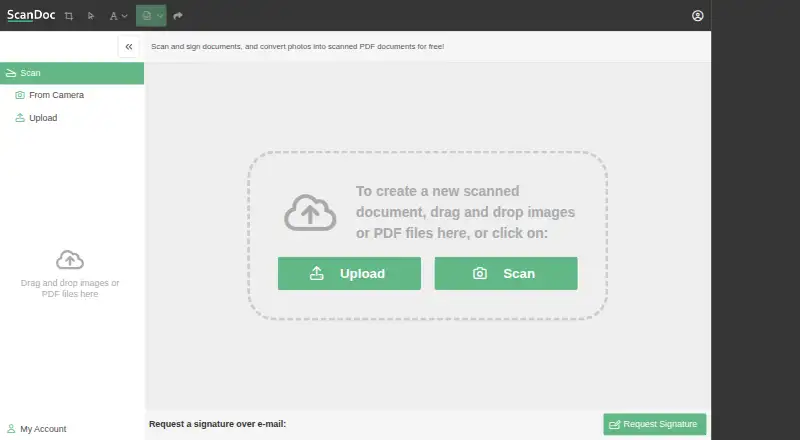
ScanDoc is a browser-based document scanning service for people who need to turn photos of physical documents into PDF or image files. It supports uploads, drag-and-drop, and device-camera capture, making it suitable for scanning from desktop or mobile browsers. Users can crop pages, adjust brightness or orientation, add text and signatures, rearrange pages, and download completed documents. Its free model makes it a focused option for occasional document preparation without installing desktop software.
Privacy is a central part of ScanDoc's fit. The service processes content in the browser rather than uploading it to a web server, which suits users who want document photos handled locally during conversion. The workflow also covers more than a basic image-to-PDF step: multipage documents can be assembled and reordered, while scanned documents can be exported as images. This combination is useful for receipts, forms, notes, and other physical pages that need light cleanup before sharing or storing.
ScanDoc is narrow by design. It converts document photos into PDFs or images, but it does not provide OCR and is not a broad document-format conversion tool. That limits its usefulness for buyers who need searchable text, editable output, or conversions among office and other file formats. Choose ScanDoc for private, browser-based scanning with basic editing, signatures, and multipage assembly. Choose an alternative when text recognition or wider conversion support is a core requirement.
Your product? Our editors can test ScanDoc in depth and publish a review, labelled as paid · from $149/mo →
ScanDoc pricing
ScanDoc fact sheet
| Free plan | Yes |
|---|---|
| Paid from | Free |
| Conversion targets | photo/image to PDF; photo/image to image |
| OCR conversion | Not verified |
| Batch conversion | Yes |
| Maximum file size | Not verified |
| Supported platforms | web |
| API access | Not verified |
| Free trial | 14 days |
| Deployment | Cloud |
| Platforms | Web |
| Support | |
| Built for | Solo, Small business (editorial estimate) |
| Pricing | Free plan · 14-day trial (source) |
| Website | scandoc.io |
| Facts checked | 21 Sep 2026 |
Alternatives to ScanDoc
- Wondershare PDFelementA full PDF workbench with conversion, OCR, forms, security, signatures, and AI tools.9.3
- Adobe PDF Services APIA broad PDF automation API with a useful free tier and quote-based paid scaling.9.1
- ConvertioA broad cloud converter for documents, media, images, and automated workflows.9.0



See all ScanDoc alternatives →
Used ScanDoc? Be the first to review it
The editor score above is our own research. What this page doesn't have yet is a reader's view — what you used ScanDoc for, what worked and what didn't. No stars are seeded and no review is paid for; an editor reads every one before it appears.
Write a reviewTwo minutes · verified accounts only · read by an editor before it appears
Featured on iTechGuides

ScanDoc is listed in our PDF Converter Software directory. Add the badge to your site — it links back to this page.
<a href="https://www.itechguides.com/products/scandoc/"><img src="https://www.itechguides.com/best/badge/scandoc.svg" alt="Featured on iTechGuides" width="230" height="46"></a>
Reviewed by iTechGuides Editors · Editorial team · Updated Oct 2026
Advertiser disclosure: iTechGuides is reader-supported. Vendors can pay for top positions in our rankings and for a place on other products' pages, and we may earn a commission when you click some links. Bought places stand at the number bought; this page and our disclosure say so. Paying vendors may get a fuller, more detailed review from our editors, and that review can change their score. How we rank.
Last updated · How we research and update