Scan2PDF Professional 20
Scan2PDF Professional 20: A focused Windows scanner for OCR, PDF/A creation, and document archiving. Ranked #19 of 27 in Document Scanning Software by our editors (6.7/10); pricing: Paid; best for basic Windows scanning with document archiving.
At a glance
- Editor score6.7 / 10
- PricingPaid
- Best forBasic Windows scanning with document archiving
- Free planNo
- Facts checked22 Sep 2026
Where it wins
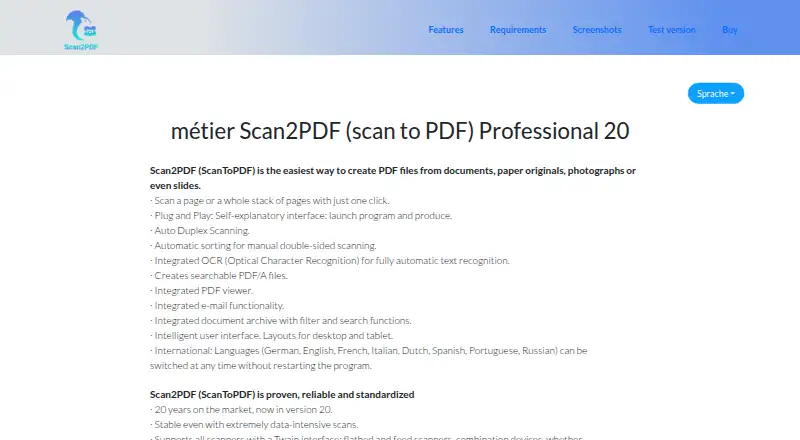
- Supports TWAIN, WIA, duplex, batch, camera, and network scanning
- Creates OCR-enabled searchable PDF/A files
- Adds archive search, password protection, viewing, and email tools
Where it doesn't
- Available only for Windows
- No free plan is included
- The free test version is non-functional
Our verdict on Scan2PDF Professional 20
Scan2PDF Professional 20 is Windows desktop software for turning paper documents, photographs, slides, and scanner input into PDF files. It is aimed at individuals and organizations that need straightforward document scanning with OCR, searchable PDF/A output, and an integrated archive. Support for TWAIN and WIA devices covers flatbed, feed-in, duplex, network, camera, and smartphone-related input devices, giving it a broader input range than a scanner-only utility.
Its strongest area is the scanning and document-processing workflow. Duplex scanning and automatic sorting after stack feeding help organize manually scanned double-sided documents, while OCR text recognition makes the resulting files searchable. The software also includes searchable PDF/A generation, an integrated PDF viewer, PDF password protection, and integrated email functionality. Together, these features make it suitable for creating and managing a local collection of searchable documents without relying on a subscription model.
The main trade-off is platform scope: Scan2PDF Professional 20 is Windows-only, so it is not a fit for teams that need native support across multiple desktop operating systems. The product is paid, with a Professional plan that includes the OCR module and no subscription, while the available test version is non-functional. Choose it when Windows compatibility, scanner-device support, OCR, and local document archiving are the priorities. Look elsewhere if a free working edition or a broader platform range is essential.
Your product? Our editors can test Scan2PDF Professional 20 in depth and publish a review, labelled as paid · from $149/mo →
Scan2PDF Professional 20 pricing
All 1 Scan2PDF Professional 20 plans and prices →
Scan2PDF Professional 20 fact sheet
| Free plan | No |
|---|---|
| Paid from | Not verified |
| OCR languages | Not verified |
| Scanner support | Yes |
| Camera capture | Yes |
| Batch scanning | Yes |
| Searchable PDF | Yes |
| Supported platforms | Windows |
| Export formats | PDF, PDF/A |
| Deployment | Desktop |
| Platforms | Windows |
| Support | |
| Built for | Solo, Small business (editorial estimate) |
| Pricing | Paid (source) |
| Website | scan2pdf.org |
| Facts checked | 22 Sep 2026 |
Alternatives to Scan2PDF Professional 20
- NAPS2A capable no-cost scanner app with broad driver support, OCR, and automation.9.4
- ScanSnap HomeA free ScanSnap companion for organized scanning, OCR, search, and cloud export.9.2
- Brother iPrint&ScanA capable free companion app for Brother owners who need everyday scanning tools.9.0


See all Scan2PDF Professional 20 alternatives →
Used Scan2PDF Professional 20? Be the first to review it
The editor score above is our own research. What this page doesn't have yet is a reader's view — what you used Scan2PDF Professional 20 for, what worked and what didn't. No stars are seeded and no review is paid for; an editor reads every one before it appears.
Write a reviewTwo minutes · verified accounts only · read by an editor before it appears
Featured on iTechGuides

Scan2PDF Professional 20 is listed in our Document Scanning Software directory. Add the badge to your site — it links back to this page.
<a href="https://www.itechguides.com/products/scan2pdf-professional-20/"><img src="https://www.itechguides.com/best/badge/scan2pdf-professional-20.svg" alt="Featured on iTechGuides" width="230" height="46"></a>
Reviewed by iTechGuides Editors · Editorial team · Updated Oct 2026
Advertiser disclosure: iTechGuides is reader-supported. Vendors can pay for top positions in our rankings and for a place on other products' pages, and we may earn a commission when you click some links. Bought places stand at the number bought; this page and our disclosure say so. Paying vendors may get a fuller, more detailed review from our editors, and that review can change their score. How we rank.
Last updated · How we research and update