Salesforce Code Builder
Salesforce Code Builder: A cloud IDE with Salesforce tooling for developers working inside Salesforce orgs. Ranked #37 of 137 in Coding Playgrounds by our editors (5.7/10); pricing: Free; best for salesforce-specific cloud development.
At a glance
- Editor score5.7 / 10
- PricingFree
- Best forSalesforce-specific cloud development
- Free planNo
- Paid fromFree
- Facts checked24 Sep 2026
Where it wins
- Apex, SOQL, and Lightning Web Components support with IntelliSense
- Build, test, deploy, and query from a browser-based VS Code-style IDE
- Git, DevOps Center, org switching, and Open VSX extensions
Where it doesn't
- Requires access through an eligible paid Salesforce org
- Focused on Salesforce rather than general-purpose development
- Support channels are community and documentation
Our verdict on Salesforce Code Builder
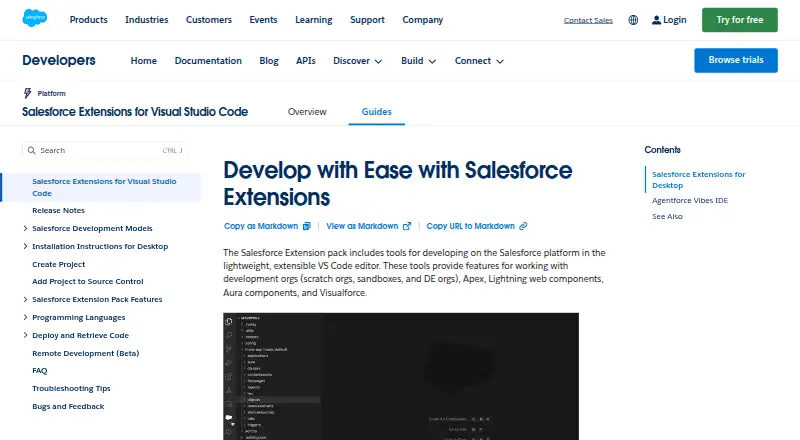
Salesforce Code Builder is a cloud-hosted, browser-based development environment for developers, admins, and architects working on Salesforce applications. Its VS Code-style editor comes preconfigured with Salesforce extensions, Salesforce CLI, Node.js, NPM, and Git. The focus is clear: teams building on Salesforce can work with Apex, SOQL, and Lightning Web Components without treating the environment as a general-purpose coding playground.
The tool covers a connected Salesforce workflow. Developers can use code completion, IntelliSense, refactoring, and search; create and run queries with SOQL Builder; and build, test, and deploy Apex and Lightning Web Components. Git source control and DevOps Center workflow support add paths for managing source and delivery, while connections to multiple Salesforce orgs make switching among them possible. Open VSX extensions offer a way to add third-party tools. This breadth is useful within the Salesforce ecosystem, but it does not change the product’s platform-specific orientation.
According to Salesforce’s published description, Code Builder is included at no additional cost with Professional editions and above, but access requires an eligible paid Salesforce org. It is therefore not a standalone free playground. The listed support channels are community and documentation. Salesforce-focused teams that want a browser-based environment tied to orgs, deployment, and source control should consider it; developers looking for a general-purpose cloud IDE, or anyone without eligible Salesforce org access, should look elsewhere.
Your product? Our editors can test Salesforce Code Builder in depth and publish a review, labelled as paid · from $149/mo →
Salesforce Code Builder pricing
Salesforce Code Builder fact sheet
| Free plan | No |
|---|---|
| Paid from | Free |
| Real-time collaboration | Not verified |
| Private projects | Not verified |
| Full-stack runtime | Not verified |
| Deployment options | Full_stack |
| Project limit | Not verified |
| Runtime languages | Not verified |
| Sharing controls | Not verified |
| Deployment | Cloud |
| Platforms | Web |
| Support | Community, Docs |
| Built for | Small business, Mid-market, Enterprise (editorial estimate) |
| Integrations | 4 integrations: Salesforce orgs, GitHub, DevOps Center, Open VSX Registry |
| Pricing | Free |
| Website | developer.salesforce.com |
| Facts checked | 24 Sep 2026 |
Salesforce Code Builder integrations
Salesforce Code Builder lists 4 integrations on its own site.
- Salesforce orgs
- GitHub
- DevOps Center
- Open VSX Registry
Alternatives to Salesforce Code Builder
- ReplitA mature browser-based workspace with persistence, publishing, AI assistance, and team features.9.3
- CodeSandboxA flexible coding playground for collaborative development, automation, and AI workflows.9.2
- Firebase StudioA free, AI-assisted cloud workspace for prototyping and deploying full-stack apps.9.1


See all Salesforce Code Builder alternatives →
Used Salesforce Code Builder? Be the first to review it
The editor score above is our own research. What this page doesn't have yet is a reader's view — what you used Salesforce Code Builder for, what worked and what didn't. No stars are seeded and no review is paid for; an editor reads every one before it appears.
Write a reviewTwo minutes · verified accounts only · read by an editor before it appears
Featured on iTechGuides

Salesforce Code Builder is listed in our Coding Playgrounds directory. Add the badge to your site — it links back to this page.
<a href="https://www.itechguides.com/products/salesforce-code-builder/"><img src="https://www.itechguides.com/best/badge/salesforce-code-builder.svg" alt="Featured on iTechGuides" width="230" height="46"></a>
Reviewed by iTechGuides Editors · Editorial team · Updated Oct 2026
Advertiser disclosure: iTechGuides is reader-supported. Vendors can pay for top positions in our rankings and for a place on other products' pages, and we may earn a commission when you click some links. Bought places stand at the number bought; this page and our disclosure say so. Paying vendors may get a fuller, more detailed review from our editors, and that review can change their score. How we rank.
Last updated · How we research and update