RVM-Web
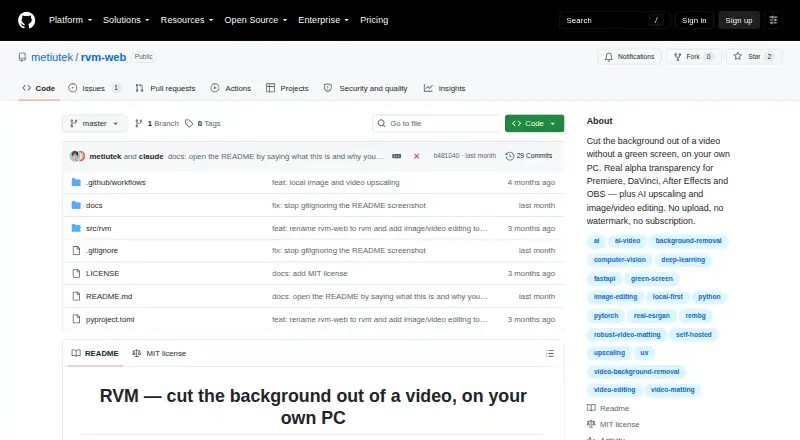
RVM-Web: A free local editor for AI cutouts, transparent video, upscaling, and media conversion. Ranked #1 of 30 in Green Screen Software by our editors (9.4/10); pricing: Free plan; best for free editors needing video and image cutouts.
At a glance
- Editor score9.4 / 10
- PricingFree plan
- Best forFree editors needing video and image cutouts
- Free planYes
- Paid fromFree
- AI background removalYes
- Facts checked20 Sep 2026
Where it wins
- Free, open-source, and cross-platform across Windows, macOS, Linux, and web
- Exports alpha video, alpha masks, and PNG sequences for compositing
- Includes AI cutouts, upscaling, image editing, and video editing tools
Where it doesn't
- No stated batch processing or API access
- Local processing requires the application to run on the user's computer
- CUDA acceleration is optional; CPU fallback is available
Our verdict on RVM-Web
RVM-Web is a local, open-source application for removing backgrounds from video and images without a green screen or cloud upload. It runs through a browser-based local interface on the user's computer and supports Windows, macOS, Linux, and web access. Video background removal uses RobustVideoMatting, while image removal uses rembg and U2Net. It is suited to free editors, creators, and compositing workflows that need cutouts without a subscription or cloud upload.
Its strongest area is transparent-media output and downstream workflow fit. RVM-Web can export alpha-transparent video, alpha masks, and PNG sequences, giving editors multiple formats for compositing. The published integrations include Adobe Premiere Pro, DaVinci Resolve, Adobe After Effects, and OBS. CUDA acceleration is available, with CPU fallback for systems without CUDA support. This makes the product relevant for users moving cutout footage into established editing, compositing, or streaming tools.
RVM-Web also covers more than background removal. It provides image editing with crop, resize, filters, and format conversion; video editing with trimming, cropping, speed changes, compression, and GIF export; and image and video upscaling at 2× or 4× using Real-ESRGAN. That breadth is useful for small media workflows, although the product remains oriented toward local processing rather than batch or API-driven production pipelines. Choose RVM-Web if you want free, open-source cutouts and transparent exports across major desktop platforms. Choose another tool if your workflow depends on stated batch processing or API access.
Your product? Our editors can test RVM-Web in depth and publish a review, labelled as paid · from $149/mo →
RVM-Web pricing
RVM-Web fact sheet
| Free plan | Yes |
|---|---|
| Paid from | Free |
| Input media | Both |
| AI background removal | Yes |
| Max export resolution | Not verified |
| Max video length | Not verified |
| Transparent export | Yes |
| Batch processing | Not verified |
| API access | Not verified |
| Deployment | Self-hosted |
| Platforms | Web, Windows, macOS, Linux |
| Support | Docs |
| Built for | Solo, Small business (editorial estimate) |
| Integrations | 4 integrations: Adobe Premiere Pro, DaVinci Resolve, Adobe After Effects, OBS |
| Pricing | Free plan |
| Website | github.com |
| Facts checked | 20 Sep 2026 |
RVM-Web integrations
RVM-Web lists 4 integrations on its own site.
- Adobe Premiere Pro
- DaVinci Resolve
- Adobe After Effects
- OBS
Alternatives to RVM-Web
- AlphaCutAn open-source, cross-platform green screen tool for local and batch production workflows.9.3
- Knockout APIA developer-focused background API with alpha video output and self-hosting.9.2
- BGRemove.videoA free web tool for removing video backgrounds and exporting transparent WebM clips.9.1


See all RVM-Web alternatives →
RVM-Web vs the competition
- RVM-Web vs AlphaCut
- RVM-Web vs Knockout API
- RVM-Web vs BGRemove.video
- RVM-Web vs Bria Video Background Removal
- RVM-Web vs BackgroundRemover
- RVM-Web vs Video Background Remover CLI

Compare RVM-Web with any tool side by side →
Used RVM-Web? Be the first to review it
The editor score above is our own research. What this page doesn't have yet is a reader's view — what you used RVM-Web for, what worked and what didn't. No stars are seeded and no review is paid for; an editor reads every one before it appears.
Write a reviewTwo minutes · verified accounts only · read by an editor before it appears
Featured on iTechGuides

RVM-Web is listed in our Green Screen Software directory. Add the badge to your site — it links back to this page.
<a href="https://www.itechguides.com/products/rvm-web/"><img src="https://www.itechguides.com/best/badge/rvm-web.svg" alt="Featured on iTechGuides" width="230" height="46"></a>
Reviewed by iTechGuides Editors · Editorial team · Updated Oct 2026
Advertiser disclosure: iTechGuides is reader-supported. Vendors can pay for top positions in our rankings and for a place on other products' pages, and we may earn a commission when you click some links. Bought places stand at the number bought; this page and our disclosure say so. Paying vendors may get a fuller, more detailed review from our editors, and that review can change their score. How we rank.
Last updated · How we research and update