
Rotato
Rotato: A focused mockup tool for turning digital designs into animated device presentations. Ranked #8 of 27 in Mockup Libraries by our editors (7.9/10); pricing: Freemium; best for device-focused 3D and animated mockups.
At a glance
- Editor score7.9 / 10
- PricingFreemium
- Best forDevice-focused 3D and animated mockups
- Editable formatsimage files, video files, audio files, Figma, browser
- Founded2019 · Zurich, Switzerland
- Facts checked20 Sep 2026
Where it wins
- Supports 3D mockups for phones, tablets, laptops, desktops, and websites
- Exports stills, video, PNG sequences, and transparent video
- Includes Figma workflows, App Store automation, and USB iPhone mirroring
Where it doesn't
- Its focus is narrower than a broad mockup or design asset library
- Figma is the listed integration, limiting broader ecosystem connections
- Local rendering is available on Mac, while other workflows use Rotato Web
Our verdict on Rotato
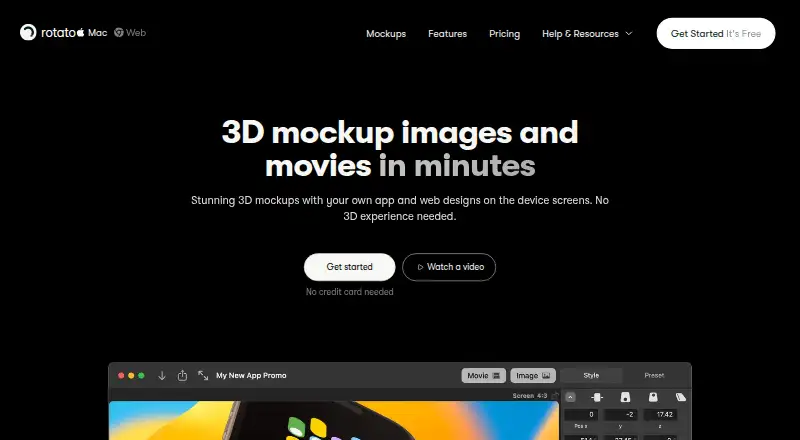
Rotato is software for creating 3D device mockups, still images, and animated videos from app screenshots, screen recordings, and other digital designs. It is aimed at hobbyists, in-house designers, agencies, freelancers, developers, and marketers producing presentations, portfolios, launch assets, and product demonstrations. Its device coverage includes phones, tablets, laptops, desktops, and websites, with support for image files, video files, audio files, Figma, and browser-based workflows.
The published plans show a freemium structure with Basic, Standard, and Premium options. Basic includes all phone mockups but no templates. Standard adds all 30+ mockup devices, one video template in the in-app gallery, and 18 premium video templates. Premium includes all 30+ mockup devices, 100 premium video templates, more than 50 video templates in the in-app gallery, and two premium website templates. The plan structure makes the choice primarily about device access and template depth, while Rotato Web provides browser-based access for Windows and other non-Mac desktops.
Rotato’s standout capability is the combination of editable 3D scenes and motion tools. Users can import images and video by drag and drop, build animations with a keyframe timeline, and adjust backgrounds, shadows, reflections, and clay mode. Exports include still images, video, PNG sequences, and transparent video. App Store screenshot export and automation support launch workflows, while the Figma plugin connects design work to mockup creation. iPhone mirroring and screen recording over USB, presentation mode, and offline local rendering on Mac extend its usefulness for product demonstrations. Choose Rotato when device presentation and animated mockups are central; choose an alternative if you need a broader asset library or many third-party integrations.
Your product? Our editors can test Rotato in depth and publish a review, labelled as paid · from $149/mo →
Rotato pricing
All 3 Rotato plans and prices →
Rotato fact sheet
| Free plan | Not verified |
|---|---|
| Paid from | Not verified |
| Mockup categories | phones, tablets, laptops, desktops, websites |
| Editable formats | image files, video files, audio files, Figma, browser |
| Asset count | Not verified |
| Commercial license | Not verified |
| Video mockups | Yes |
| Download limit | Not verified |
| Money-back guarantee | 30 days |
| Deployment | Cloud, Desktop |
| Platforms | Web, Windows, macOS |
| Support | Email, Docs, Community |
| Built for | Solo, Small business, Mid-market, Enterprise (editorial estimate) |
| Integrations | 1 integrations: Figma |
| Pricing | Freemium (source) |
| Website | rotato.app |
| Facts checked | 20 Sep 2026 |
Rotato integrations
Rotato lists 1 integrations on its own site.
- Figma
Alternatives to Rotato
- Artboard StudioA broad browser mockup library with AI creation, video support, and a free plan.9.4
- Mockuuups StudioA broad mockup library with plugins, API access, and a free tier.9.2
- LS GraphicsA broad mockup library with 3D, source-file, and unlimited-download options.8.9



Rotato vs the competition
- Rotato vs Artboard Studio
- Rotato vs Mockuuups Studio
- Rotato vs LS Graphics
- Rotato vs Presenta
- Rotato vs Monkr
- Rotato vs MockStage



Compare Rotato with any tool side by side →
Also Ranked In
Rotato is ranked in 2 of our directories.
Used Rotato? Be the first to review it
The editor score above is our own research. What this page doesn't have yet is a reader's view — what you used Rotato for, what worked and what didn't. No stars are seeded and no review is paid for; an editor reads every one before it appears.
Write a reviewTwo minutes · verified accounts only · read by an editor before it appears
Featured on iTechGuides

Rotato is listed in our Mockup Libraries directory. Add the badge to your site — it links back to this page.
<a href="https://www.itechguides.com/products/rotato/"><img src="https://www.itechguides.com/best/badge/rotato.svg" alt="Featured on iTechGuides" width="230" height="46"></a>
Reviewed by iTechGuides Editors · Editorial team · Updated Oct 2026
Advertiser disclosure: iTechGuides is reader-supported. Vendors can pay for top positions in our rankings and for a place on other products' pages, and we may earn a commission when you click some links. Bought places stand at the number bought; this page and our disclosure say so. Paying vendors may get a fuller, more detailed review from our editors, and that review can change their score. How we rank.
Last updated · How we research and update