
Room Arranger
Room Arranger: A low-cost desktop tool for multi-floor 2D/3D floor-plan editing. Ranked #14 of 38 in 3D Home Design Software by our editors (7.5/10); pricing: 30-day trial; best for low-cost desktop floor-plan editing.
At a glance
- Editor score7.5 / 10
- Pricing30-day trial
- Best forLow-cost desktop floor-plan editing
- Free planNo
- Paid from$24.95/device one-time
- Multi-floor designYes
- Facts checked21 Sep 2026
Where it wins
- One-time $24.95 license with future releases included
- Multi-floor 2D plans, 3D views, measurements and walkthroughs
- Runs on Windows, macOS, Linux and iPad
Where it doesn't
- Rendering and export options are relatively limited
- Dropbox is the only listed integration
- The iPad app locks project saving until purchase
Our verdict on Room Arranger
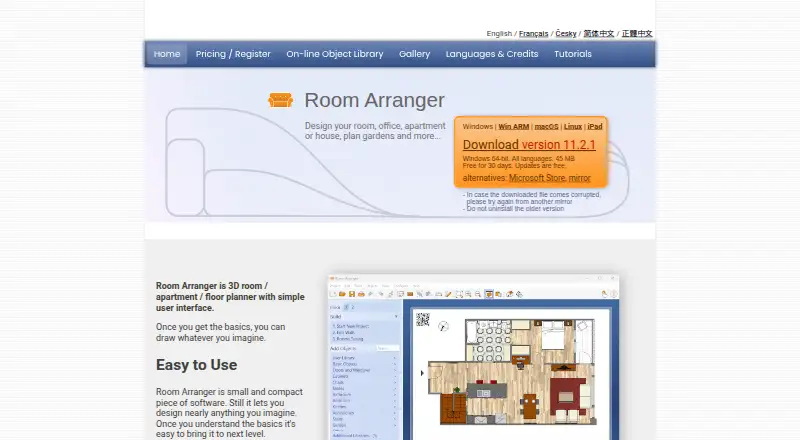
Room Arranger is software for designing rooms, apartments, houses, gardens and other layouts. It supports 2D floor-plan and wall editing, 3D visualization, walkthrough viewing, measurements, room-area calculations and multi-floor projects. Users can load, calibrate and trace existing floor-plan images, then place and resize furniture from an object library. It fits homeowners, remodelers and space planners who want a focused desktop tool for drafting layouts across Windows, macOS, Linux or iPad.
Pricing is straightforward: the Full license costs $24.95 as a one-time payment. The published plan includes an unlimited version, no subscription, future releases and technical support by email. Desktop users get a 30-day evaluation period before purchasing. The iPad app is free to install, while saving projects requires a purchase. This structure suits occasional and long-term users who prefer a single license over recurring software costs, with Dropbox listed as the integration for file access or storage workflows.
The strongest focus is floor-plan creation rather than a broad visualization ecosystem. Room Arranger combines image tracing, customizable furniture dimensions, measurement tools, 3D scene viewing and multi-floor design, with a catalog of 300 items. It can import external 3D models and object libraries, export PNG images and web pages with 3D scenes, and supports VRML in its listed export formats. Its rendering, integrations and export breadth are more limited, so users seeking a wider connected workflow or deeper rendering capabilities should choose another tool. Room Arranger is a good fit for practical layout editing at a low upfront cost.
Your product? Our editors can test Room Arranger in depth and publish a review, labelled as paid · from $149/mo →
Room Arranger pricing
All 1 Room Arranger plans and prices →
Room Arranger fact sheet
| Free plan | No |
|---|---|
| Paid from | $24.95/device one-time |
| Supported platforms | Windows, macOS, Linux, iPad |
| Floor plan import | Yes |
| AR visualization | Not verified |
| Catalog items | 300 items |
| Project limit | Not verified |
| Export formats | PNG, VRML |
| Multi-floor design | Yes |
| Free trial | 30 days |
| Deployment | Desktop, Mobile |
| Platforms | Windows, macOS, Linux, iOS |
| Support | Email, Docs |
| Built for | Solo, Small business (editorial estimate) |
| Integrations | 1 integrations: Dropbox |
| Pricing | 30-day trial (source) |
| Website | roomarranger.com |
| Facts checked | 21 Sep 2026 |
Room Arranger integrations
Room Arranger lists 1 integrations on its own site.
- Dropbox
Alternatives to Room Arranger
- Sweet Home 3DA flexible home design tool for detailed plans, 3D visualization and offline work.9.3
- Planner 5DA broad cross-platform planner with AI, rendering, walkthroughs, and CAD export.8.8
- HomestylerAffordable AI-powered 2D/3D design with strong rendering, tours, VR, and mobile access.8.6


See all Room Arranger alternatives →
Also Ranked In
Room Arranger is ranked in 2 of our directories.
Used Room Arranger? Be the first to review it
The editor score above is our own research. What this page doesn't have yet is a reader's view — what you used Room Arranger for, what worked and what didn't. No stars are seeded and no review is paid for; an editor reads every one before it appears.
Write a reviewTwo minutes · verified accounts only · read by an editor before it appears
Featured on iTechGuides

Room Arranger is listed in our 3D Home Design Software directory. Add the badge to your site — it links back to this page.
<a href="https://www.itechguides.com/products/room-arranger/"><img src="https://www.itechguides.com/best/badge/room-arranger.svg" alt="Featured on iTechGuides" width="230" height="46"></a>
Reviewed by iTechGuides Editors · Editorial team · Updated Oct 2026
Advertiser disclosure: iTechGuides is reader-supported. Vendors can pay for top positions in our rankings and for a place on other products' pages, and we may earn a commission when you click some links. Bought places stand at the number bought; this page and our disclosure say so. Paying vendors may get a fuller, more detailed review from our editors, and that review can change their score. How we rank.
Last updated · How we research and update