RomsManager
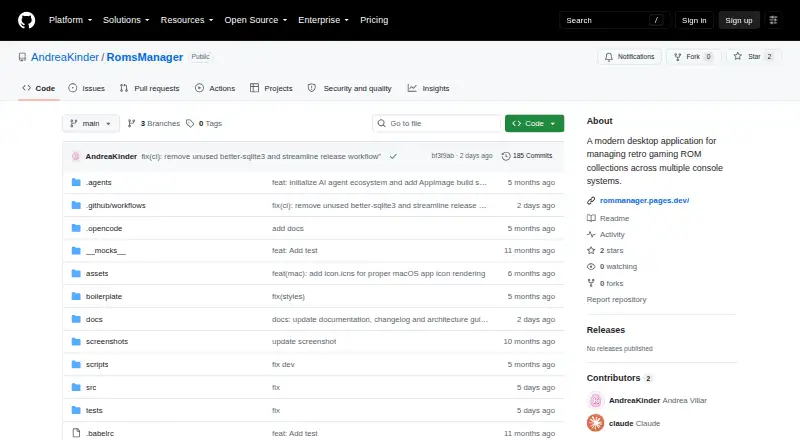
RomsManager: An open-source desktop library organizer with scraping, SD-card sync, and TV-friendly navigation. Ranked #21 of 39 in ROM Management Software by our editors (5.9/10); pricing: Free plan; best for gamepad-friendly desktop library organization.
At a glance
- Editor score5.9 / 10
- PricingFree plan
- Best forGamepad-friendly desktop library organization
- Free planYes
- Paid fromFree
- Metadata scrapingYes
- Facts checked24 Sep 2026
Where it wins
- Scrapes metadata from ScreenScraper and TheGamesDB
- Imports and exports ROMs to and from SD cards
- Offers Big Picture mode and gamepad navigation
Where it doesn't
- No DAT verification or duplicate-repair tools are specified
- Emulator configuration and direct launch are per-console
- The GitHub Releases page currently has no published releases
Our verdict on RomsManager
RomsManager organizes retro-game ROM collections across console systems in an open-source desktop application for Windows, macOS, and Linux. Its mix of library management and gamepad-friendly navigation suits solo collectors and small setups that want to browse a collection from a desktop or TV. It supports 18+ systems and includes search, editing, covers, saves, and export tools, alongside custom collections and tags across consoles.
Metadata comes from ScreenScraper and TheGamesDB, while bidirectional SD-card import and export gives the library a workflow for moving ROMs between a computer and a card. Emulator settings are configured per console, and the app can launch ROMs directly. Big Picture mode provides a fullscreen TV interface navigable with a gamepad or keyboard. These features make the product more than a catalog, though its strengths center on organizing and accessing a collection rather than validating its contents.
ZIP backup and restore can preserve the library, but the listed capabilities do not include DAT verification or duplicate repair, two functions that matter to collectors focused on auditing and cleaning large sets. The project documents installers for Windows, macOS, and Linux, but its GitHub Releases page currently has no published releases, which may complicate getting started. RomsManager is a fit for people who value SD-card synchronization, metadata, collections, and couch-friendly browsing; collectors whose priority is ROM verification or duplicate cleanup should consider a tool centered on those tasks instead.
Your product? Our editors can test RomsManager in depth and publish a review, labelled as paid · from $149/mo →
RomsManager pricing
RomsManager fact sheet
| Free plan | Yes |
|---|---|
| Paid from | Free |
| Metadata scraping | Yes |
| Duplicate detection | Not verified |
| File renaming | Not verified |
| Hash verification | Not verified |
| Archive support | Not verified |
| Supported platforms | Windows, macOS, Linux |
| Deployment | Desktop |
| Platforms | Windows, macOS, Linux |
| Support | Community |
| Built for | Solo, Small business (editorial estimate) |
| Integrations | 2 integrations: ScreenScraper, TheGamesDB |
| Pricing | Free plan |
| Website | github.com |
| Facts checked | 24 Sep 2026 |
RomsManager integrations
RomsManager lists 2 integrations on its own site.
- ScreenScraper
- TheGamesDB
Alternatives to RomsManager
- RomVaultA focused DAT-driven tool for verifying, repairing, and deduplicating ROM collections.7.9
- ClrMameProA focused freeware utility for repairing and organizing MAME collections.7.8
- JRomManagerA free, advanced tool for checksum-verified ROM scanning, repair, rebuilding and archive work.7.7

See all RomsManager alternatives →
Used RomsManager? Be the first to review it
The editor score above is our own research. What this page doesn't have yet is a reader's view — what you used RomsManager for, what worked and what didn't. No stars are seeded and no review is paid for; an editor reads every one before it appears.
Write a reviewTwo minutes · verified accounts only · read by an editor before it appears
Featured on iTechGuides

RomsManager is listed in our ROM Management Software directory. Add the badge to your site — it links back to this page.
<a href="https://www.itechguides.com/products/romsmanager/"><img src="https://www.itechguides.com/best/badge/romsmanager.svg" alt="Featured on iTechGuides" width="230" height="46"></a>
Reviewed by iTechGuides Editors · Editorial team · Updated Oct 2026
Advertiser disclosure: iTechGuides is reader-supported. Vendors can pay for top positions in our rankings and for a place on other products' pages, and we may earn a commission when you click some links. Bought places stand at the number bought; this page and our disclosure say so. Paying vendors may get a fuller, more detailed review from our editors, and that review can change their score. How we rank.
Last updated · How we research and update