
RESO
RESO: A focused plugin for finding and dynamically reducing harsh resonances. Ranked #28 of 41 in AI Audio Mixing Software by our editors (5.1/10); pricing: Paid; best for automatic resonance suppression.
At a glance
- Editor score5.1 / 10
- PricingPaid
- Best forAutomatic resonance suppression
- Free planNo
- Founded2016 · London, United Kingdom
- Facts checked22 Sep 2026
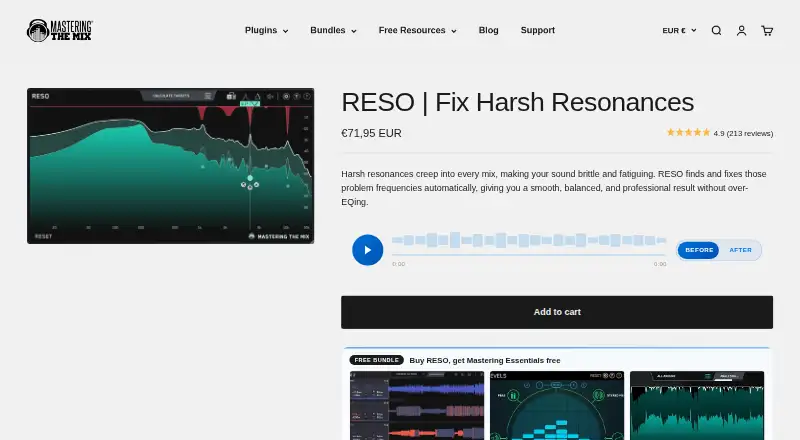
Where it wins
- Analyzes and suppresses harsh resonances dynamically
- Works on vocals, instruments, buses, and full mixes
- Includes Frequency Sweep and Calculate Targets tools
Where it doesn't
- Narrowly focused on resonance control
- Paid product with no free plan
- Requires a compatible macOS or Windows host
Our verdict on RESO
RESO is an audio plugin for producers and engineers who need to identify and reduce harsh, ringing, or boxy resonances. It can be inserted on vocals, instruments, buses, or full mixes during mixing and mastering. The plugin is available for macOS and Windows hosts in AU, VST 3, and AAX formats, making it suited to common production and mastering workflows where resonance control is a specific requirement.
RESO’s main strength is the depth of its resonance-focused processing. Automatic resonance analysis identifies problematic frequencies, while dynamic suppression reduces them without relying on a constant EQ cut. Frequency Sweep helps locate resonances, and Calculate Targets determines target frequencies for processing. Adjustable Q provides control over the suppression nodes, while mastering-grade filters support use beyond individual tracks. This gives engineers a focused set of tools for shaping harsh or congested material while retaining the plugin’s narrow purpose.
The product is sold as a single paid plan named RESO, with no free plan. Its platform fit is defined by host compatibility rather than a wider ecosystem: it functions as a plugin for supported macOS and Windows audio hosts and is offered in AU, VST 3, and AAX formats. Choose RESO if automatic resonance analysis and dynamic suppression are central to your workflow, especially across vocals, instruments, buses, and full mixes. Choose another tool if you need a broader mixing suite, a wider range of processors, or a product built around features beyond resonance management.
Your product? Our editors can test RESO in depth and publish a review, labelled as paid · from $149/mo →
RESO pricing
RESO fact sheet
| Free plan | No |
|---|---|
| Paid from | Not verified |
| DAW plugin | Yes |
| Stem separation | Not verified |
| Automatic EQ | Yes |
| Automatic dynamics | Yes |
| Spatial processing | Not verified |
| Maximum track count | Not verified |
| Plugin formats | Vst |
| Money-back guarantee | 30 days |
| Deployment | Desktop |
| Platforms | Windows, macOS |
| Support | Email, Docs |
| Built for | Solo, Small business (editorial estimate) |
| Pricing | Paid (source) |
| Website | masteringthemix.com |
| Facts checked | 22 Sep 2026 |
Alternatives to RESO
- iZotope Neutron 5A deep AI-assisted mixing suite for producers who want detailed control inside a DAW.9.2
- iZotope Nectar 4A focused vocal suite with AI assistance, harmonies, effects, and unmasking.7.9
- EZmix 3A flexible preset-led mixing tool, but not a complete automatic full-mix solution.7.9



Used RESO? Be the first to review it
The editor score above is our own research. What this page doesn't have yet is a reader's view — what you used RESO for, what worked and what didn't. No stars are seeded and no review is paid for; an editor reads every one before it appears.
Write a reviewTwo minutes · verified accounts only · read by an editor before it appears
Featured on iTechGuides

RESO is listed in our AI Audio Mixing Software directory. Add the badge to your site — it links back to this page.
<a href="https://www.itechguides.com/products/reso/"><img src="https://www.itechguides.com/best/badge/reso.svg" alt="Featured on iTechGuides" width="230" height="46"></a>
Reviewed by iTechGuides Editors · Editorial team · Updated Oct 2026
Advertiser disclosure: iTechGuides is reader-supported. Vendors can pay for top positions in our rankings and for a place on other products' pages, and we may earn a commission when you click some links. Bought places stand at the number bought; this page and our disclosure say so. Paying vendors may get a fuller, more detailed review from our editors, and that review can change their score. How we rank.
Last updated · How we research and update