Resident Tab
Resident Tab: A focused, auditable tenant portal with strong rental records and limited ecosystem breadth. Ranked #22 of 24 in Tenant Portal Software by our editors (6.8/10); pricing: Pricing on request; best for landlords wanting a simple auditable portal.
At a glance
- Editor score6.8 / 10
- PricingPricing on request
- Best forLandlords wanting a simple auditable portal
- Maintenance requestsYes
- Facts checked20 Sep 2026
Where it wins
- Append-only timelines and PDF exports support auditable unit records.
- Stripe payments, manual payment proofs, and rent reconciliation work together.
- Maintenance, notices, documents, signatures, and applications share one portal.
Where it doesn't
- Only Stripe is listed as an integration.
- The MVP is not adding new third-party integrations.
- Resident messaging and property-management integrations are not included.
Our verdict on Resident Tab
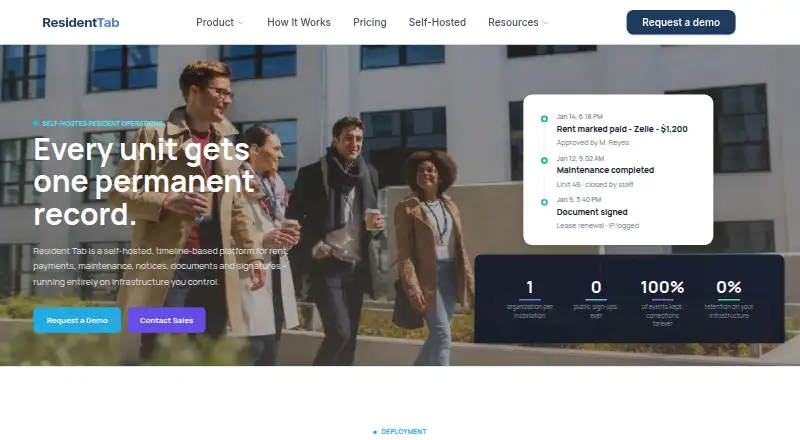
Resident Tab is a tenant and property-management platform built around an append-only timeline for each rental unit. It suits landlords and property managers who want a private resident portal for rent payments, repair requests, notices, documents, signatures, applications, and tenant invitations. Residents can access information for their unit, while managers can maintain rent charges and payments, track maintenance work orders, and export timeline records as PDFs. The product runs as vendor-hosted SaaS or on customer infrastructure through its self-hosted option.
Pricing is organized into SaaS and Self-Hosted plans, with both using contact-sales pricing. SaaS provides vendor-hosted deployment, unlimited units and properties, per-unit timelines, Stripe and manual payments, maintenance and notices, plus documents and e-signatures. Self-Hosted runs on customer infrastructure and offers No Source or With Source license options. It also includes unlimited units and properties, per-unit timelines, Stripe and manual payments, and maintenance and notices. The plan structure makes deployment preference a central buying decision: SaaS favors vendor hosting, while Self-Hosted is designed for organizations that want customer-controlled infrastructure.
The product’s strongest fit is recordkeeping. Rent ledgers with payment reconciliation, delivery records for notices, work-order status tracking, document uploads, e-signatures, and PDF timeline exports give each unit a clear operational history. Stripe is the listed integration, and the platform is web-based, including resident access. The trade-off is a narrow ecosystem: property-management integrations are not part of the offering, and the MVP is not adding new third-party integrations. Organizations seeking a focused, auditable portal should consider Resident Tab; teams that depend on broad integrations or resident messaging should choose a broader platform.
Your product? Our editors can test Resident Tab in depth and publish a review, labelled as paid · from $149/mo →
Resident Tab pricing
All 2 Resident Tab plans and prices →
Resident Tab fact sheet
| Free plan | Not verified |
|---|---|
| Paid from | Not verified |
| Maintenance requests | Yes |
| Online rent payments | Yes |
| Resident messaging | Not verified |
| Document sharing | Yes |
| Mobile access | Web |
| Property integrations | No |
| Deployment | Cloud, Self-hosted |
| Platforms | Web |
| Integrations | 1 integrations: Stripe |
| Pricing | Pricing on request (source) |
| Website | residenttab.com |
| Facts checked | 20 Sep 2026 |
Resident Tab integrations
Resident Tab lists 1 integrations on its own site.
- Stripe
Alternatives to Resident Tab
- Yardi RentCafeA broad resident portal for multifamily operators, especially those using Yardi Voyager.9.4
- BuildingLinkA broad resident portal suite spanning communication, payments, maintenance, access, and property operations.9.2
- ArthurA broad property management suite with tenant, finance, maintenance and compliance workflows.9.0


See all Resident Tab alternatives →
Used Resident Tab? Be the first to review it
The editor score above is our own research. What this page doesn't have yet is a reader's view — what you used Resident Tab for, what worked and what didn't. No stars are seeded and no review is paid for; an editor reads every one before it appears.
Write a reviewTwo minutes · verified accounts only · read by an editor before it appears
Featured on iTechGuides

Resident Tab is listed in our Tenant Portal Software directory. Add the badge to your site — it links back to this page.
<a href="https://www.itechguides.com/products/resident-tab/"><img src="https://www.itechguides.com/best/badge/resident-tab.svg" alt="Featured on iTechGuides" width="230" height="46"></a>
Reviewed by iTechGuides Editors · Editorial team · Updated Oct 2026
Advertiser disclosure: iTechGuides is reader-supported. Vendors can pay for top positions in our rankings and for a place on other products' pages, and we may earn a commission when you click some links. Bought places stand at the number bought; this page and our disclosure say so. Paying vendors may get a fuller, more detailed review from our editors, and that review can change their score. How we rank.
Last updated · How we research and update