
Rendry
Rendry: A Chrome extension for clean, stitched webpage captures, with extraction and markup in Pro. Ranked #41 of 61 in Screen Capture Software by our editors (4.2/10); pricing: Free plan · 7-day trial; best for chrome users capturing clean, structured webpages.
At a glance
- Editor score4.2 / 10
- PricingFree plan · 7-day trial
- Best forChrome users capturing clean, structured webpages
- Free planYes
- Paid from$20/yr
- Annotation toolsYes
- Facts checked24 Sep 2026
Where it wins
- Stitches full-page captures and loads lazy-loaded images before capture.
- Hides cookie banners, ads, and chat widgets before capture.
- Pro adds redaction, markup, element capture, and page-data extraction.
Where it doesn't
- Available as a browser extension, not a separate desktop or mobile app.
- Smart Redact and markup tools require Pro.
- No cloud sharing; capture processing is local.
Our verdict on Rendry
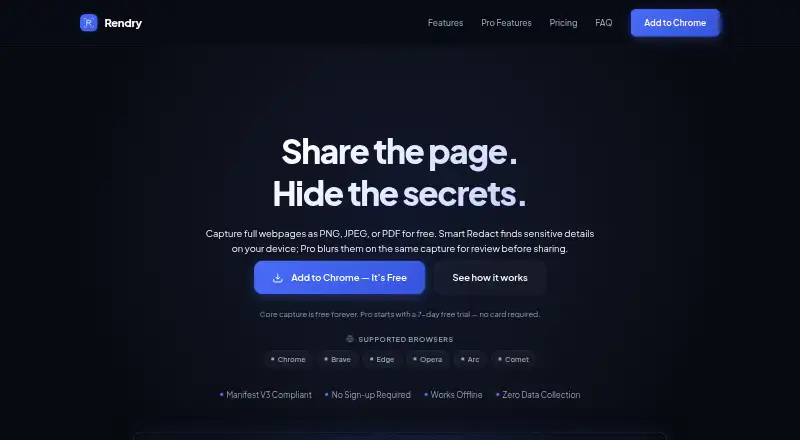
Rendry is a Chrome extension for people who need to document, share, or inspect web pages. It scrolls and stitches full-page captures, can load lazy images, and hides cookie banners, ads, and chat widgets before capture. The built-in editor supports cropping, copying, and exporting. Its local processing is a fit for people who prefer captures not to be uploaded, while the browser-only format makes it less suitable for workflows centered on desktop or mobile apps.
The free plan includes full-page scrolling capture, PNG, JPEG, and PDF export, plus the built-in editor. According to the published plans, Pro costs $2 per month or $20 per year and adds Smart Redact, text, link, and table extraction, element capture, WebP export, and editor markup tools. Pro markup includes blur, pixelate, arrows, shapes, and text. A seven-day free trial is offered without a card requirement; the vendor also lists a seven-day refund period. The free tier covers basic capture and editing, while recurring work with markup, redaction, or extraction points toward Pro.
Rendry's focus is the webpage itself: Pro can capture individual elements, including content below the fold, and extract design tokens alongside text, links, and tables. That makes it more than a simple image grabber for people organizing or inspecting page content, but the described text extraction is not OCR. It is available as a browser extension, with email and community support listed. Choose Rendry for browser-based, structured webpage capture; look elsewhere if you need separate desktop or mobile apps, OCR, or integrations.
Your product? Our editors can test Rendry in depth and publish a review, labelled as paid · from $149/mo →
Rendry pricing
All 2 Rendry plans and prices →
Rendry fact sheet
| Free plan | Yes |
|---|---|
| Paid from | $20/yr |
| Scrolling capture | Yes |
| Annotation tools | Yes |
| OCR | Not verified |
| Browser extension | Yes |
| Desktop platforms | Not verified |
| Cloud sharing | No |
| Export formats | PNG, JPEG, PDF; WebP with Pro |
| Free trial | 7 days · no card needed |
| Money-back guarantee | 7 days |
| Deployment | Browser extension |
| Platforms | Chrome extension |
| Support | Email, Community |
| Built for | Solo, Small business (editorial estimate) |
| Pricing | Free plan · 7-day trial (source) |
| Website | rendry.app |
| Facts checked | 24 Sep 2026 |
Alternatives to Rendry
- SnagitA polished capture and editing toolkit for teams that can budget for an annual subscription.9.3
- ShareXA flexible Windows capture toolkit with scrolling screenshots, OCR, recording and upload workflows.9.1
- ZightA cross-platform capture tool with team workflows, integrations, and a free plan.9.0



Used Rendry? Be the first to review it
The editor score above is our own research. What this page doesn't have yet is a reader's view — what you used Rendry for, what worked and what didn't. No stars are seeded and no review is paid for; an editor reads every one before it appears.
Write a reviewTwo minutes · verified accounts only · read by an editor before it appears
Featured on iTechGuides

Rendry is listed in our Screen Capture Software directory. Add the badge to your site — it links back to this page.
<a href="https://www.itechguides.com/products/rendry/"><img src="https://www.itechguides.com/best/badge/rendry.svg" alt="Featured on iTechGuides" width="230" height="46"></a>
Reviewed by iTechGuides Editors · Editorial team · Updated Oct 2026
Advertiser disclosure: iTechGuides is reader-supported. Vendors can pay for top positions in our rankings and for a place on other products' pages, and we may earn a commission when you click some links. Bought places stand at the number bought; this page and our disclosure say so. Paying vendors may get a fuller, more detailed review from our editors, and that review can change their score. How we rank.
Last updated · How we research and update