RedNotebook
RedNotebook: A capable free desktop journal for structured, offline-first personal writing. Ranked #14 of 35 in Journal Apps by our editors (8.0/10); pricing: Free plan; best for free open-source desktop journaling.
At a glance
- Editor score8.0 / 10
- PricingFree plan
- Best forFree open-source desktop journaling
- Free planYes
- Paid fromFree
- Media attachmentsYes
- Facts checked20 Sep 2026
Where it wins
- Dated entries with calendar navigation, tags, search and formatting
- Supports images, files, links, templates, spell-checking and backups
- Exports journals to plain text, PDF, HTML and LaTeX
Where it doesn't
- Desktop coverage is limited to Windows and Linux
- No built-in journal lock or end-to-end encryption
- Synchronization requires external tools and may require internet access
Our verdict on RedNotebook
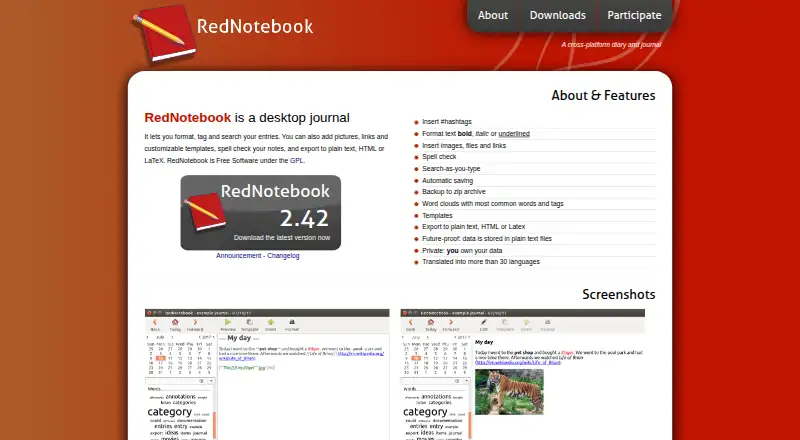
RedNotebook is a free, open-source desktop journal for people who want structured personal writing on Windows or Linux. Entries are dated and accessible through calendar navigation, while hashtags and text/date search help organize and revisit older writing. The app supports formatted text, preview mode, images, files, links, customizable templates and spell-checking. Its offline desktop design suits users who prefer keeping journal data locally in plain-text files.
The feature set goes beyond basic note-taking. Automatic saving and ZIP backups provide built-in data protection, while word clouds show frequently used words and tags. Journals can be exported to plain text, PDF, HTML and LaTeX, giving users several ways to preserve or reuse their writing. Dropbox, Syncthing, FTP and SSH are documented as options for synchronizing journal folders, but these connections rely on external tools rather than an integrated cross-device service. That makes RedNotebook a strong fit for users who value local files, flexible exports and control over their journal structure.
Platform coverage is the main boundary. RedNotebook is available for Windows and Linux, with no official macOS support and no mobile coverage. The documentation describes encryption through external tools or encrypted storage, rather than built-in end-to-end encryption or a journal lock. Users seeking a free, open-source desktop journal with attachments, search, backups and broad export support should find the scope well aligned. Those who need mobile or macOS access, built-in privacy controls or a more integrated synchronization workflow should choose an alternative.
Your product? Our editors can test RedNotebook in depth and publish a review, labelled as paid · from $149/mo →
RedNotebook pricing
RedNotebook fact sheet
| Free plan | Yes |
|---|---|
| Paid from | Free |
| Media attachments | Yes |
| Offline access | Yes |
| Privacy lock | Not verified |
| End-to-end encryption | Not verified |
| Export formats | Multiple |
| Platform coverage | Desktop |
| Search and filters | Yes |
| Deployment | Desktop |
| Platforms | Windows, Linux |
| Support | Email, Community, Docs |
| Built for | Solo, Small business (editorial estimate) |
| Integrations | 4 integrations: Dropbox, Syncthing, FTP, SSH |
| Pricing | Free plan |
| Website | rednotebook.app |
| Facts checked | 20 Sep 2026 |
RedNotebook integrations
RedNotebook lists 4 integrations on its own site.
- Dropbox
- Syncthing
- FTP
- SSH
Alternatives to RedNotebook
- Day OneA broad, privacy-focused journal with a strong free tier and richer paid features.9.4
- DiariumDiarium combines rich journaling, contextual views, offline access and flexible storage options.9.2
- JourneyA flexible journal for private memories across desktop, mobile, and web.9.1



See all RedNotebook alternatives →
Also Ranked In
RedNotebook is ranked in 2 of our directories.
Used RedNotebook? Be the first to review it
The editor score above is our own research. What this page doesn't have yet is a reader's view — what you used RedNotebook for, what worked and what didn't. No stars are seeded and no review is paid for; an editor reads every one before it appears.
Write a reviewTwo minutes · verified accounts only · read by an editor before it appears
Featured on iTechGuides

RedNotebook is listed in our Journal Apps directory. Add the badge to your site — it links back to this page.
<a href="https://www.itechguides.com/products/rednotebook/"><img src="https://www.itechguides.com/best/badge/rednotebook.svg" alt="Featured on iTechGuides" width="230" height="46"></a>
Reviewed by iTechGuides Editors · Editorial team · Updated Oct 2026
Advertiser disclosure: iTechGuides is reader-supported. Vendors can pay for top positions in our rankings and for a place on other products' pages, and we may earn a commission when you click some links. Bought places stand at the number bought; this page and our disclosure say so. Paying vendors may get a fuller, more detailed review from our editors, and that review can change their score. How we rank.
Last updated · How we research and update