
Recoveryfix Video Repair
Recoveryfix Video Repair: A Windows repair tool with batch processing, reference files, and broad format coverage. Ranked #15 of 26 in Video Repair Software by our editors (7.9/10); pricing: Paid; best for windows batch and reference repair.
At a glance
- Editor score7.9 / 10
- PricingPaid
- Best forWindows batch and reference repair
- Free planNo
- Paid from$49 one-time
- Repair modeAutomatic
- Facts checked20 Sep 2026
Where it wins
- Batch repair processes multiple video files in one operation.
- Reference-file workflow addresses highly corrupted videos.
- Preserves video quality, resolution, metadata, and structure.
Where it doesn't
- Windows-only software limits platform choice.
- A reference file is required for the reference-file workflow.
- Paid licenses start at $49 with no free plan.
Our verdict on Recoveryfix Video Repair
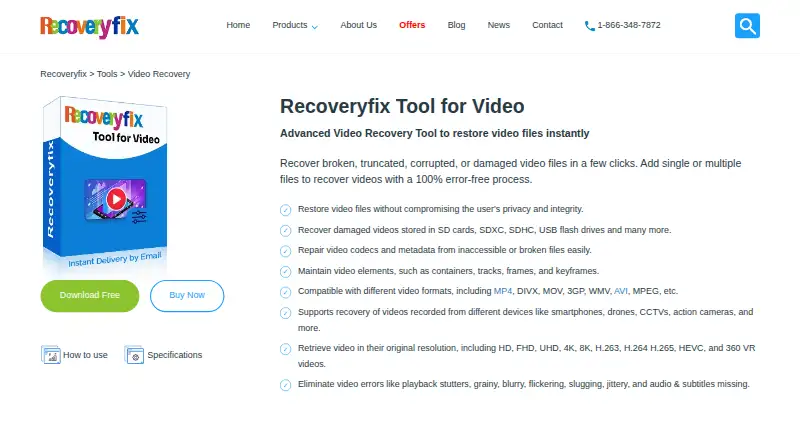
Recoveryfix Video Repair is Windows desktop software for repairing corrupted, damaged, broken, or inaccessible video files. It suits individuals, organizations, and data-recovery providers that need automatic repair across files from cameras, smartphones, drones, CCTV systems, removable media, and other sources. Supported formats include MP4, MOV, MPEG, MJPEG, MTS, M4V, MKV, AVI, AVCHD, WEBM, ASF, WMV, FLV, DIVX, 3G2, TS, 3GP, F4V, ProRes, XAVC, MXF, R3D, and BRAW. Repaired files can be saved to a chosen system location, with recovery reports exported in CSV format.
Its strongest fit is batch and reference-based repair. Multiple video files can be processed in one operation, while the reference-file workflow is intended for highly corrupted videos and requires a reference file. The product also emphasizes preservation of video quality, resolution, metadata, and structure, which matters when the repaired file needs to retain more than basic playability. This combination gives it a broader workflow than a tool focused only on one format or one file at a time.
Pricing is organized by use case. The Personal License costs $49 one-time for personal or home use, with installation on two computers, lifetime validity, and a 30-day money-back guarantee. The Corporate License costs $99 one-time and adds organizational use with unlimited computer installation. The Technician License costs $179 one-time for data-recovery providers, AMC companies, and consultants, also with unlimited computer installation, lifetime validity, and a 30-day money-back guarantee. Choose it for Windows-based batch repair and reference-file work; choose another option if Mac support is required.
Your product? Our editors can test Recoveryfix Video Repair in depth and publish a review, labelled as paid · from $149/mo →
Recoveryfix Video Repair pricing
All 3 Recoveryfix Video Repair plans and prices →
Recoveryfix Video Repair fact sheet
| Free plan | No |
|---|---|
| Paid from | $49 one-time |
| Repair mode | Automatic |
| Supported formats | MP4, MOV, MPEG, MJPEG, MTS, M4V, MKV, AVI, AVCHD, WEBM, ASF, WMV, FLV, DIVX, 3G2, TS, 3GP, F4V, ProRes, XAVC, MXF, R3D, BRAW |
| Maximum file size | Not verified |
| Reference file needed | Yes |
| Batch repair | Yes |
| Preview before saving | Not verified |
| Money-back guarantee | 30 days |
| Deployment | Desktop |
| Platforms | Windows |
| Support | Email, Live chat · 24/7 |
| Built for | Solo, Small business, Mid-market, Enterprise (editorial estimate) |
| Pricing | Paid (source) |
| Website | video.recoveryfix.com |
| Facts checked | 20 Sep 2026 |
Alternatives to Recoveryfix Video Repair
- VidRepairA free, open-source Windows repair tool with automatic recovery and validation.9.3
- Bitwar Video RepairA broad-format desktop repair tool with batch processing, previews, and 4K support.9.2
- RepairMyVideoA free web service for repairing large, damaged video files with playability checks.9.1



See all Recoveryfix Video Repair alternatives →
Used Recoveryfix Video Repair? Be the first to review it
The editor score above is our own research. What this page doesn't have yet is a reader's view — what you used Recoveryfix Video Repair for, what worked and what didn't. No stars are seeded and no review is paid for; an editor reads every one before it appears.
Write a reviewTwo minutes · verified accounts only · read by an editor before it appears
Featured on iTechGuides

Recoveryfix Video Repair is listed in our Video Repair Software directory. Add the badge to your site — it links back to this page.
<a href="https://www.itechguides.com/products/recoveryfix-video-repair/"><img src="https://www.itechguides.com/best/badge/recoveryfix-video-repair.svg" alt="Featured on iTechGuides" width="230" height="46"></a>
Reviewed by iTechGuides Editors · Editorial team · Updated Oct 2026
Advertiser disclosure: iTechGuides is reader-supported. Vendors can pay for top positions in our rankings and for a place on other products' pages, and we may earn a commission when you click some links. Bought places stand at the number bought; this page and our disclosure say so. Paying vendors may get a fuller, more detailed review from our editors, and that review can change their score. How we rank.
Last updated · How we research and update