ReceiptOCR
ReceiptOCR: A focused OCR service for receipt workflows that need structured accounting exports. Ranked #25 of 29 in OCR API Software by our editors (5.8/10); pricing: Paid; best for receipt workflows with accounting exports.
At a glance
- Editor score5.8 / 10
- PricingPaid
- Best forReceipt workflows with accounting exports
- Free planNo
- Paid from$24/mo
- Structure extractionYes
- Facts checked20 Sep 2026
Where it wins
- Extracts receipt, invoice, line-item, and table data
- Exports to Excel, CSV, QuickBooks, and JSON
- Supports bulk uploads, multi-page files, and a REST API
Where it doesn't
- No free plan for evaluating the service
- Starter is limited to one seat
- Custom integrations and AI models require Enterprise
Our verdict on ReceiptOCR
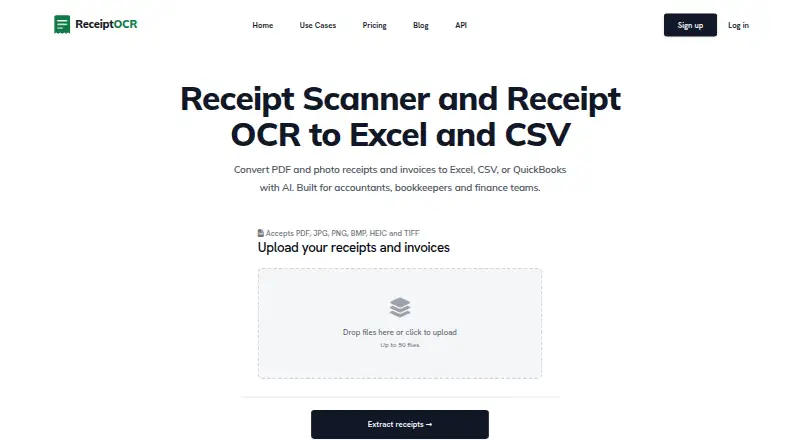
ReceiptOCR is a browser-based receipt and invoice extraction service for accountants, bookkeepers, auditors, accounts payable teams, and finance departments. It accepts PDF, JPG, PNG, BMP, HEIC, and TIFF files, then extracts vendor details, dates, taxes, totals, invoice numbers, due dates, line items, and structured tables. Results can be exported to Excel, CSV, and QuickBooks, while the API supports JSON results and programmatic workflows.
The published plans show a paid-only structure. Starter costs $49 per month, or $24 per month with annual billing, and includes AI-powered visual OCR, Excel XLSX/CSV export, multi-page receipts and invoices, five AI Smart Reports per month, and one seat. Plus costs $149 per month, or $74 per month with annual billing, adding unlimited pages per document, bulk uploads of up to 50 files at once, custom extraction templates and tables, QuickBooks export, and 20 AI Smart Reports per month. Pro adds API access and up to five seats, while Enterprise adds custom integrations, custom processing pipelines, custom AI models, SSO/SAML, role-based access control, and unlimited seats.
ReceiptOCR fits teams that need more than basic text recognition, particularly when line items, tables, categorization, merchant normalization, and accounting exports matter. Its integrations include QuickBooks, Xero, and NetSuite, and its REST API provides upload, extraction, and result endpoints, with PHP, JavaScript, and Python listed for SDK support. Choose it when receipt processing connects directly to spreadsheet, accounting, or finance systems. It is less suitable for buyers seeking a free starting tier, since the service begins with a paid Starter plan, or for organizations that need custom enterprise controls without moving to Enterprise.
Questions about ReceiptOCR
Does ReceiptOCR have a free plan? No free plan is listed; paid plans start at $49/mo (Starter).
How much does ReceiptOCR cost? ReceiptOCR lists 2 paid plans; the lowest is Starter at $49/mo.
What does ReceiptOCR run on? Web. It runs in the cloud.
What does ReceiptOCR integrate with? 3 integrations: QuickBooks, Xero and NetSuite.
Who is ReceiptOCR built for? Solo users, small businesses, mid-market companies and enterprises (our editorial estimate).
Your product? Our editors can test ReceiptOCR in depth and publish a review, labelled as paid · from $149/mo →
ReceiptOCR pricing
All 4 ReceiptOCR plans and prices →
ReceiptOCR fact sheet
| Free plan | No |
|---|---|
| Paid from | $24/mo |
| Structure extraction | Yes |
| Handwriting OCR | Not verified |
| Table extraction | Yes |
| Asynchronous processing | Yes |
| Maximum file size | Not verified |
| SDK languages | PHP, JavaScript, Python |
| Deployment | Cloud |
| Platforms | Web |
| Compliance & security | SSO/SAML |
| Support | Email, Docs |
| Built for | Solo, Small business, Mid-market, Enterprise (editorial estimate) |
| Integrations | 3 integrations: QuickBooks, Xero, NetSuite |
| Pricing | Paid (source) |
| Website | receiptocr.ai |
| Facts checked | 20 Sep 2026 |
ReceiptOCR integrations
ReceiptOCR lists 3 integrations on its own site.
- QuickBooks
- Xero
- NetSuite
Alternatives to ReceiptOCR
- PaddleOCRA broad OCR toolkit for building self-hosted document AI pipelines.9.1
- Mistral OCRA low-cost OCR API with structured outputs, tables, confidence scores, and batch processing.9.0
- Tesseract OCRA flexible, free OCR engine for developers who need local processing and structured output.8.8

See all ReceiptOCR alternatives →
Also Ranked In
ReceiptOCR is ranked in 2 of our directories.
Used ReceiptOCR? Be the first to review it
The editor score above is our own research. What this page doesn't have yet is a reader's view — what you used ReceiptOCR for, what worked and what didn't. No stars are seeded and no review is paid for; an editor reads every one before it appears.
Write a reviewTwo minutes · verified accounts only · read by an editor before it appears
Featured on iTechGuides

ReceiptOCR is listed in our OCR API Software directory. Add the badge to your site — it links back to this page.
<a href="https://www.itechguides.com/products/receiptocr/"><img src="https://www.itechguides.com/best/badge/receiptocr.svg" alt="Featured on iTechGuides" width="230" height="46"></a>
Reviewed by iTechGuides Editors · Editorial team · Updated Nov 2026
Advertiser disclosure: iTechGuides is reader-supported. Vendors can pay for top positions in our rankings and for a place on other products' pages, and we may earn a commission when you click some links. Bought places stand at the number bought; this page and our disclosure say so. Paying vendors may get a fuller, more detailed review from our editors, and that review can change their score. How we rank.
Last updated · How we research and update