
Realistic Paint Studio
Realistic Paint Studio: An approachable choice for realistic digital-media workflows across desktop and iPad. Ranked #35 of 46 in Digital Painting Software by our editors (6.0/10); pricing: Paid; best for beginners exploring realistic digital media.
At a glance
- Editor score6.0 / 10
- PricingPaid
- Best forBeginners exploring realistic digital media
- Free planNo
- Paid from$25 one-time
- Layer supportYes
- Facts checked20 Sep 2026
Where it wins
- Realistic color engine with drawing, watercolor, and oil workflows
- Textured canvases, layers, folders, and reference layers
- Interactive brush demonstrations and step-by-step tutorials
Where it doesn't
- No free plan is available
- Desktop and iPad offerings use separate purchase models
- Focused on painting workflows rather than general-purpose image editing
Our verdict on Realistic Paint Studio
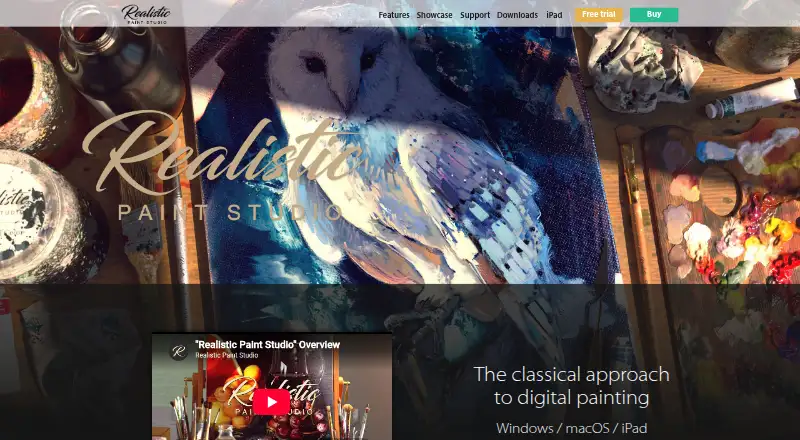
Realistic Paint Studio is digital painting software for artists who want drawing, watercolor, and oil workflows modeled on physical art materials. It is aimed particularly at beginners exploring realistic digital media, with a simplified interface, traditional-media brush collections, textured canvases, sketchbooks, paper surfaces, and palette presets. The software supports Windows, macOS, and iPad, and includes pressure-sensitive brush behavior for supported stylus input.
Its strongest area is the connection between material-focused tools and guided learning. The specialized Realistic Color engine and color wheel support color-focused painting, while liquid watercolor drops and trails add a distinct watercolor effect. Users can work with layers, folders, duplication, merging, and reference layers, giving the software a useful organizational foundation for multi-part artwork. Interactive brush demonstrations and step-by-step tutorials further suit people developing familiarity with digital painting, while 3D showcase scenes provide a way to present finished work.
Pricing is straightforward on desktop: the Windows/macOS perpetual license costs $25 one time and includes additional VIP content. The iPad version is available through in-app purchases listed by Apple, so the desktop and tablet offerings follow different purchasing models. Realistic Paint Studio is a strong fit for beginners who want a focused painting environment, traditional-media textures, and approachable instruction. Artists needing a broader image-editing workspace or tools outside its drawing, watercolor, and oil emphasis may prefer a more general-purpose application.
Your product? Our editors can test Realistic Paint Studio in depth and publish a review, labelled as paid · from $149/mo →
Realistic Paint Studio pricing
All 2 Realistic Paint Studio plans and prices →
Realistic Paint Studio fact sheet
| Free plan | No |
|---|---|
| Paid from | $25 one-time |
| Brush customization | Not verified |
| Layer support | Yes |
| Pressure sensitivity | Yes |
| Supported platforms | Windows, macOS, iPad |
| Color management | Not verified |
| Stroke stabilization | Not verified |
| Deployment | Desktop, Mobile |
| Platforms | Windows, macOS, iOS |
| Pricing | Paid (source) |
| Website | realisticpaint.com |
| Facts checked | 20 Sep 2026 |
Alternatives to Realistic Paint Studio
- KritaA broad, professional-grade painting toolkit with no paid plan and wide platform coverage.9.4
- Clip Studio PaintA broad digital art workspace spanning illustration, comics, 3D, animation, and cloud tools.9.3
- ProcreateA polished iPad painting workflow with broad creative tools and limited platform coverage.9.1



See all Realistic Paint Studio alternatives →
Used Realistic Paint Studio? Be the first to review it
The editor score above is our own research. What this page doesn't have yet is a reader's view — what you used Realistic Paint Studio for, what worked and what didn't. No stars are seeded and no review is paid for; an editor reads every one before it appears.
Write a reviewTwo minutes · verified accounts only · read by an editor before it appears
Featured on iTechGuides

Realistic Paint Studio is listed in our Digital Painting Software directory. Add the badge to your site — it links back to this page.
<a href="https://www.itechguides.com/products/realistic-paint-studio/"><img src="https://www.itechguides.com/best/badge/realistic-paint-studio.svg" alt="Featured on iTechGuides" width="230" height="46"></a>
Reviewed by iTechGuides Editors · Editorial team · Updated Oct 2026
Advertiser disclosure: iTechGuides is reader-supported. Vendors can pay for top positions in our rankings and for a place on other products' pages, and we may earn a commission when you click some links. Bought places stand at the number bought; this page and our disclosure say so. Paying vendors may get a fuller, more detailed review from our editors, and that review can change their score. How we rank.
Last updated · How we research and update