
Ray
Ray: A broad subtitle toolkit for large media libraries, with a sizable upfront cost. Ranked #36 of 99 in AI Video Caption Generators by our editors (4.1/10); pricing: Free plan; best for power users captioning large media libraries locally.
At a glance
- Editor score4.1 / 10
- PricingFree plan
- Best forPower users captioning large media libraries locally
- Free planYes
- Paid from$180/yr
- Caption stylingYes
- Facts checked22 Sep 2026
Where it wins
- Translates subtitles into 200+ languages with speaker labels and color-coding
- Bulk processing supports workflows of up to 1 million files
- Burn captions into video and connect with media libraries such as Plex and Jellyfin
Where it doesn't
- Subtitle export is limited to SRT
- Ray Local costs $149 one time, while cloud and API options cost more
- The extensive feature set may be more than occasional captioning requires
Our verdict on Ray
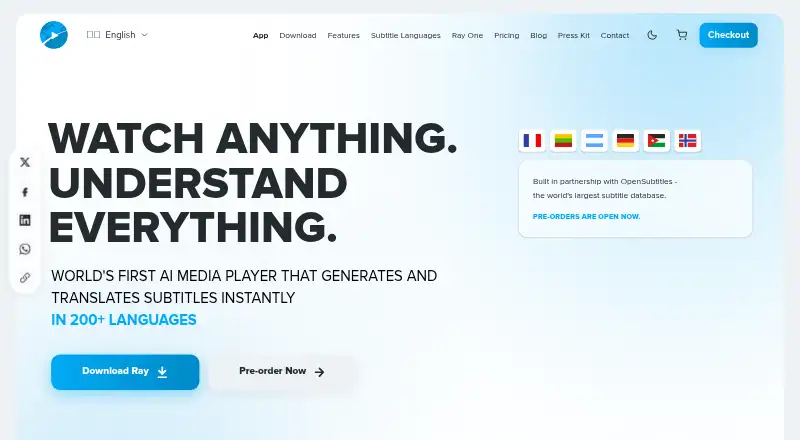
Ray is an AI media player that generates subtitles from audio and supports translation, synchronization, search, and playback. It is aimed at viewers, language learners, creators, educators, studios, and media companies that need caption workflows alongside media playback. Desktop versions are available for Windows, macOS, and Linux, with local and cloud processing options. Its breadth makes it especially relevant to people managing substantial libraries rather than those who only need a quick caption file now and then.
The local lifetime license costs $149 once and includes all app features, all three modes, digital remastering, and no renewals. Ray Cloud — Subtitle Only is $180 per year for unlimited subtitle-only cloud processing, generation and translation, and OpenSubtitles integration. Ray Cloud — Lifetime Access costs $669 once and includes unlimited cloud processing for life, the local player, and Ray Beam cross-device syncing. The API plans are a larger commitment: API Annual Plan costs $2,388 per year, while API Lifetime costs $2,499 once. Both include processing allowances and request limits, with the lifetime plan including future endpoints. The free plan offers a way to start before choosing a paid tier.
For large-scale workflows, Ray combines batch processing of up to 1 million files with speaker labeling, permanent caption burn-in, AI dubbing with matched voices, and live screen, camera, and audio capture with subtitles. Integrations include Plex, Jellyfin, Emby, Kodi, Stremio, and OpenSubtitles, giving it a clear fit with media-library setups. One meaningful constraint is that subtitle export is SRT only; buyers who require other export formats should look elsewhere. Ray suits power users who value local processing and library integrations, while occasional captioners may find its price and feature breadth unnecessary.
Your product? Our editors can test Ray in depth and publish a review, labelled as paid · from $149/mo →
Ray pricing
Ray fact sheet
| Free plan | Yes |
|---|---|
| Paid from | $180/yr |
| Max video length | Not verified |
| Caption languages | Not verified |
| Caption styling | Yes |
| Subtitle export | Srt only |
| Burn-in captions | Yes |
| Speaker identification | Yes |
| Brand caption presets | Not verified |
| Deployment | Cloud, Desktop |
| Platforms | Windows, macOS, Linux |
| Built for | Solo, Small business, Mid-market, Enterprise (editorial estimate) |
| Integrations | 6 integrations: OpenSubtitles, Plex, Jellyfin, Emby, Kodi, Stremio |
| Pricing | Free plan (source) |
| Website | rayplayer.com |
| Facts checked | 22 Sep 2026 |
Ray integrations
Ray lists 6 integrations on its own site.
- OpenSubtitles
- Plex
- Jellyfin
- Emby
- Kodi
- Stremio
Alternatives to Ray
- WhisperA flexible local transcription engine, but not a complete caption-editing product.9.2
- CaptionHubA workflow-rich caption and localization platform for enterprise video teams.8.8
- SubmagicAn all-in-one caption editor with styling, text editing, B-roll, and publishing tools.8.7


Used Ray? Be the first to review it
The editor score above is our own research. What this page doesn't have yet is a reader's view — what you used Ray for, what worked and what didn't. No stars are seeded and no review is paid for; an editor reads every one before it appears.
Write a reviewTwo minutes · verified accounts only · read by an editor before it appears
Featured on iTechGuides

Ray is listed in our AI Video Caption Generators directory. Add the badge to your site — it links back to this page.
<a href="https://www.itechguides.com/products/ray/"><img src="https://www.itechguides.com/best/badge/ray.svg" alt="Featured on iTechGuides" width="230" height="46"></a>
Reviewed by iTechGuides Editors · Editorial team · Updated Oct 2026
Advertiser disclosure: iTechGuides is reader-supported. Vendors can pay for top positions in our rankings and for a place on other products' pages, and we may earn a commission when you click some links. Bought places stand at the number bought; this page and our disclosure say so. Paying vendors may get a fuller, more detailed review from our editors, and that review can change their score. How we rank.
Last updated · How we research and update