QWERTZ Launcher
QWERTZ Launcher: A free, focused launcher for separate Vanilla, Forge, and Fabric profiles. Ranked #48 of 75 in Minecraft Launchers by our editors (5.4/10); pricing: Free plan; best for users needing simple isolated profiles.
At a glance
- Editor score5.4 / 10
- PricingFree plan
- Best forUsers needing simple isolated profiles
- Free planYes
- Paid fromFree
- Facts checked22 Sep 2026
Where it wins
- Supports Vanilla, Forge, and Fabric installations
- Runs on Windows, macOS, and Linux
- Offers isolated instances and configurable JVM selection
Where it doesn't
- Modpack management is narrower than its profile features
- Automatic update workflows are not a core feature
- Windows releases are documented; other systems use source execution
Our verdict on QWERTZ Launcher
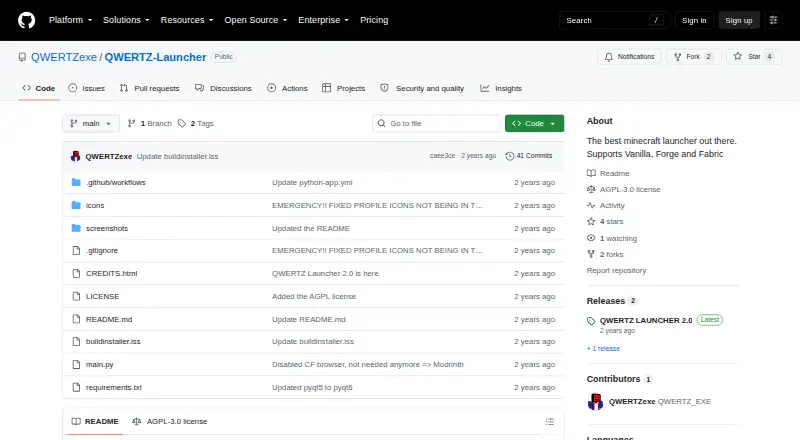
QWERTZ Launcher is an open-source desktop launcher for Minecraft users who want separate profiles for different installations. It supports Vanilla, Forge, and Fabric, with profile controls for Minecraft version selection, loader selection, and Java runtime configuration. Multiple isolated launcher instances help keep configurations apart, while Microsoft account login and offline account profiles cover different account setups. The launcher supports Windows, macOS, and Linux, making it a practical fit for users who value platform coverage without a paid plan.
Its strongest area is profile control. Each instance can be isolated, and users can choose a built-in or custom JVM, configure session refreshing, and manage multiple Microsoft accounts. A Qt6 interface provides the desktop front end, while the built-in CurseForge browser connects the launcher to CurseForge for mod discovery. These features suit users who prefer to organize installations themselves and want direct control over loaders, versions, accounts, and Java settings.
QWERTZ Launcher has a narrower focus than launchers built around broader modpack workflows or update automation. Its described feature set emphasizes individual installations, loader support, account handling, and JVM selection rather than a full modpack management experience. Windows users have documented releases, while macOS and Linux users can run the launcher from source. Choose QWERTZ Launcher for free, open-source profile isolation across three desktop platforms; choose an alternative if packaged modpack workflows or automatic updating are central requirements.
Your product? Our editors can test QWERTZ Launcher in depth and publish a review, labelled as paid · from $149/mo →
QWERTZ Launcher pricing
QWERTZ Launcher fact sheet
| Free plan | Yes |
|---|---|
| Paid from | Free |
| Desktop OS support | Not verified |
| Separate instances | Yes |
| Modpack import | Not verified |
| Mod loader support | Multiple |
| Java runtime management | Yes |
| Built-in modpack catalog | Not verified |
| Automatic updates | Not verified |
| Deployment | Desktop |
| Platforms | Windows, macOS, Linux |
| Built for | Solo, Small business (editorial estimate) |
| Integrations | 2 integrations: Microsoft, CurseForge |
| Pricing | Free plan |
| Website | github.com |
| Facts checked | 22 Sep 2026 |
QWERTZ Launcher integrations
QWERTZ Launcher lists 2 integrations on its own site.
- Microsoft
- CurseForge
Alternatives to QWERTZ Launcher
- Prism LauncherA free, open-source launcher for organizing isolated Minecraft instances and modpacks.9.4
- RefractA broad, free launcher for players moving libraries and modpacks from other launchers.9.2
- Spectra LauncherA free, open-source launcher with strong instance, mod, and modpack workflows.9.1


See all QWERTZ Launcher alternatives →
Used QWERTZ Launcher? Be the first to review it
The editor score above is our own research. What this page doesn't have yet is a reader's view — what you used QWERTZ Launcher for, what worked and what didn't. No stars are seeded and no review is paid for; an editor reads every one before it appears.
Write a reviewTwo minutes · verified accounts only · read by an editor before it appears
Featured on iTechGuides

QWERTZ Launcher is listed in our Minecraft Launchers directory. Add the badge to your site — it links back to this page.
<a href="https://www.itechguides.com/products/qwertz-launcher/"><img src="https://www.itechguides.com/best/badge/qwertz-launcher.svg" alt="Featured on iTechGuides" width="230" height="46"></a>
Reviewed by iTechGuides Editors · Editorial team · Updated Oct 2026
Advertiser disclosure: iTechGuides is reader-supported. Vendors can pay for top positions in our rankings and for a place on other products' pages, and we may earn a commission when you click some links. Bought places stand at the number bought; this page and our disclosure say so. Paying vendors may get a fuller, more detailed review from our editors, and that review can change their score. How we rank.
Last updated · How we research and update