
QuickOTP Authenticator Passkey
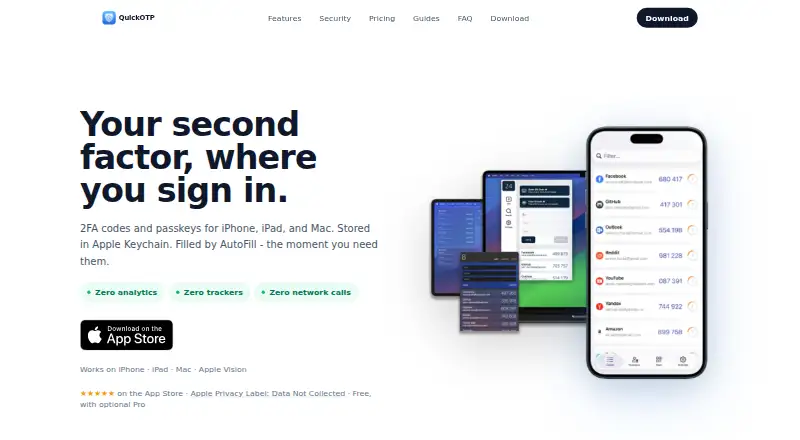
QuickOTP Authenticator Passkey: A focused Apple authenticator with offline codes, autofill, passkeys, and encrypted backups. Ranked #62 of 111 in Authenticator Apps by our editors (3.0/10); pricing: Free plan; best for apple users wanting autofill and passkey support.
At a glance
- Editor score3.0 / 10
- PricingFree plan
- Best forApple users wanting autofill and passkey support
- Free planYes
- Facts checked22 Sep 2026
Where it wins
- Supports TOTP codes, Apple passkeys, and one-tap autofill
- Stores authentication data locally in encrypted Apple Keychain
- Includes encrypted backup, restore, export, and migration tools
Where it doesn't
- Available only on iOS and macOS
- Advanced features require optional Pro purchases
- Passkey support is tied to Apple's Credential Provider
Our verdict on QuickOTP Authenticator Passkey
QuickOTP Authenticator Passkey is an authenticator app for iPhone, iPad, and Mac. It generates TOTP codes, supports passkeys through Apple's Credential Provider, and fills sign-in codes with one tap. Offline access makes it suitable for Apple users who want authentication codes without relying on an internet connection. Setup supports both QR-code scanning and manual secret entry, while Face ID or Touch ID can add biometric protection.
The product's strongest fit is its Apple ecosystem alignment. Authentication data is stored locally in Apple Keychain, and the app supports Google, Microsoft, GitHub, and AWS accounts through standard TOTP setup. Passkey support is built around Apple's Credential Provider, so it is most relevant to people already using iOS or macOS. Backup and restore are encrypted, and export and migration tools are available for moving authentication data. Users on other platforms should choose an authenticator with broader device coverage.
Pricing follows a freemium model. Basic use is free, while the published plan names include Pro Subscription and Lifetime - Anniversary. The Pro Subscription entries describe optional Pro features, including export and migration tools, appearance customization, and additional protection controls; the Lifetime - Anniversary plan is described as a lifetime purchase. That structure gives casual users a usable starting point, while people who need migration or extra controls may need a paid option. QuickOTP is a good choice for Apple-focused users who value offline access and local storage, but less suitable for households or teams that need a wider platform ecosystem.
Your product? Our editors can test QuickOTP Authenticator Passkey in depth and publish a review, labelled as paid · from $149/mo →
QuickOTP Authenticator Passkey pricing
All 2 QuickOTP Authenticator Passkey plans and prices →
QuickOTP Authenticator Passkey fact sheet
| Free plan | Yes |
|---|---|
| Paid from | Not verified |
| Code type | Totp |
| Push approvals | Not verified |
| Encrypted backup | Yes |
| Multi-device sync | Not verified |
| Team administration | Not verified |
| Supported platforms | iOS, macOS |
| Deployment | Desktop, Mobile |
| Platforms | iOS, macOS |
| Compliance & security | GDPR |
| Built for | Solo, Small business (editorial estimate) |
| Integrations | 4 integrations: Google, Microsoft, GitHub, AWS |
| Pricing | Free plan (source) |
| Website | quickotp.app |
| Facts checked | 22 Sep 2026 |
QuickOTP Authenticator Passkey integrations
QuickOTP Authenticator Passkey lists 4 integrations on its own site.
- Microsoft
- GitHub
- AWS
Alternatives to QuickOTP Authenticator Passkey
- Proton AuthenticatorA mature free option for secure 2FA codes across mobile and desktop platforms.9.4
- Google AuthenticatorA free, straightforward authenticator with offline codes, sync, and QR transfers.9.2
- AuthyA focused free authenticator for mobile users who need synced TOTP tokens.9.1


See all QuickOTP Authenticator Passkey alternatives →
Used QuickOTP Authenticator Passkey? Be the first to review it
The editor score above is our own research. What this page doesn't have yet is a reader's view — what you used QuickOTP Authenticator Passkey for, what worked and what didn't. No stars are seeded and no review is paid for; an editor reads every one before it appears.
Write a reviewTwo minutes · verified accounts only · read by an editor before it appears
Featured on iTechGuides

QuickOTP Authenticator Passkey is listed in our Authenticator Apps directory. Add the badge to your site — it links back to this page.
<a href="https://www.itechguides.com/products/quickotp-authenticator-passkey/"><img src="https://www.itechguides.com/best/badge/quickotp-authenticator-passkey.svg" alt="Featured on iTechGuides" width="230" height="46"></a>
Reviewed by iTechGuides Editors · Editorial team · Updated Oct 2026
Advertiser disclosure: iTechGuides is reader-supported. Vendors can pay for top positions in our rankings and for a place on other products' pages, and we may earn a commission when you click some links. Bought places stand at the number bought; this page and our disclosure say so. Paying vendors may get a fuller, more detailed review from our editors, and that review can change their score. How we rank.
Last updated · How we research and update