
Quell
Quell: A paid inbox assistant for triage, voice-based drafts, and follow-up tracking. Ranked #29 of 46 in AI Email Assistants by our editors (5.7/10); pricing: 14-day trial; best for gmail and Outlook follow-up tracking.
At a glance
- Editor score5.7 / 10
- Pricing14-day trial
- Best forGmail and Outlook follow-up tracking
- Free planNo
- Inbox triageYes
- Facts checked19 Sep 2026
Where it wins
- Daily digests and AI classification help organize incoming mail.
- Tracks waiting-on responses and can create follow-up chasers.
- Drafts replies in your voice, with approval required before sending.
Where it doesn't
- There is no free plan; access starts with a paid plan.
- Pro limits users to 2 connected inboxes and 50 classified threads per day.
- Messages require review or approval before they can be sent.
Our verdict on Quell
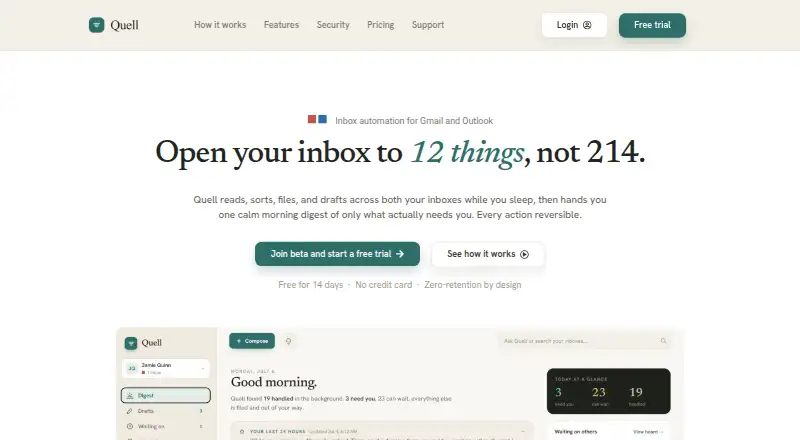
Quell is an AI-powered inbox assistant for individuals managing Gmail or Outlook. It classifies incoming mail, produces daily digests, drafts replies in the user's voice, and tracks messages awaiting a response. It can also organize mail with labels, tags, folders, and archiving, while tracking bills and appointments. The web app, Chrome extension, and Android app give it several ways to fit into an email workflow, and the plain-English mailbox assistant can carry out actions such as creating drafts or archiving messages with user approval.
The standout use case is follow-up management rather than sending email autonomously. Quell tracks waiting-on responses and can create chasers, while its activity logging and one-click undo give users visibility and a way to reverse actions. According to the product description, email content is processed in memory rather than storing full message bodies. The terms require review or approval before messages are sent, so Quell is better suited to people who want help organizing and drafting than to those seeking unattended auto-send. Gmail and Outlook are the supported email platforms, with Google Gemini and Microsoft Graph among the listed integrations.
Quell has a 14-day free trial, but no free plan; the trial is not ongoing free access. The Pro plan provides 2 connected inboxes, 50 new AI-classified threads per day, 20 AI drafts per day, 30 AI assistant messages per day, and bill and schedule tracking. High Volume raises those limits to 4 inboxes, 160 classified threads, 70 shared drafts and auto-replies, and 75 assistant messages per day, and adds custom automation rules. Teams & companies adds license assignment and permissions management through a dashboard. Choose Quell if follow-up tracking and assisted inbox organization justify a paid plan; look elsewhere if a free tier or automatic sending without approval is essential.
Your product? Our editors can test Quell in depth and publish a review, labelled as paid · from $149/mo →
Quell pricing
All 3 Quell plans and prices →
Quell fact sheet
| Free plan | No |
|---|---|
| Paid from | Not verified |
| Inbox triage | Yes |
| AI reply drafting | Yes |
| Automatic sending | No |
| Thread summaries | Yes |
| Follow-up actions | Yes |
| Email platforms | Not verified |
| Free trial | 14 days |
| Deployment | Cloud, Mobile, Browser extension |
| Platforms | Web, Android, Chrome extension |
| Integrations | 5 integrations: Gmail, Outlook, Google Gemini, Microsoft Graph, Stripe |
| Pricing | 14-day trial (source) |
| Website | meetquell.com |
| Facts checked | 19 Sep 2026 |
Quell integrations
Quell lists 5 integrations on its own site.
- Gmail
- Outlook
- Google Gemini
- Microsoft Graph
- Stripe
Alternatives to Quell
- Spark +AIA broad AI email toolkit across four platforms, with paid AI features starting at $10 per user monthly.9.2
- Superhuman GoA cross-platform AI assistant with email help, connected apps, and custom automations.8.8
- Mailbutler Smart AssistantA broad email toolkit with AI assistance on Smart and Business plans.8.6



Used Quell? Be the first to review it
The editor score above is our own research. What this page doesn't have yet is a reader's view — what you used Quell for, what worked and what didn't. No stars are seeded and no review is paid for; an editor reads every one before it appears.
Write a reviewTwo minutes · verified accounts only · read by an editor before it appears
Featured on iTechGuides

Quell is listed in our AI Email Assistants directory. Add the badge to your site — it links back to this page.
<a href="https://www.itechguides.com/products/quell/"><img src="https://www.itechguides.com/best/badge/quell.svg" alt="Featured on iTechGuides" width="230" height="46"></a>
Reviewed by iTechGuides Editors · Editorial team · Updated Oct 2026
Advertiser disclosure: iTechGuides is reader-supported. Vendors can pay for top positions in our rankings and for a place on other products' pages, and we may earn a commission when you click some links. Bought places stand at the number bought; this page and our disclosure say so. Paying vendors may get a fuller, more detailed review from our editors, and that review can change their score. How we rank.
Last updated · How we research and update