
Qtable
Qtable: A QR menu editor with dish analytics and waiter calls, but no online ordering. Ranked #31 of 42 in Digital Menu Software by our editors (5.1/10); pricing: 14-day trial; best for small teams needing a searchable QR menu.
At a glance
- Editor score5.1 / 10
- Pricing14-day trial
- Best forSmall teams needing a searchable QR menu
- Free planNo
- Paid from$135/yr
- QR menuYes
- Facts checked25 Sep 2026
Where it wins
- Turn PDFs, photos, URLs, or text into editable menu content
- Keep one QR code and menu address as menu content changes
- Add dietary tags, allergen badges, dish analytics, and waiter calls
Where it doesn't
- Online ordering is not supported
- The 14-day trial requires a payment card
- Enterprise annual pricing is custom
Our verdict on Qtable
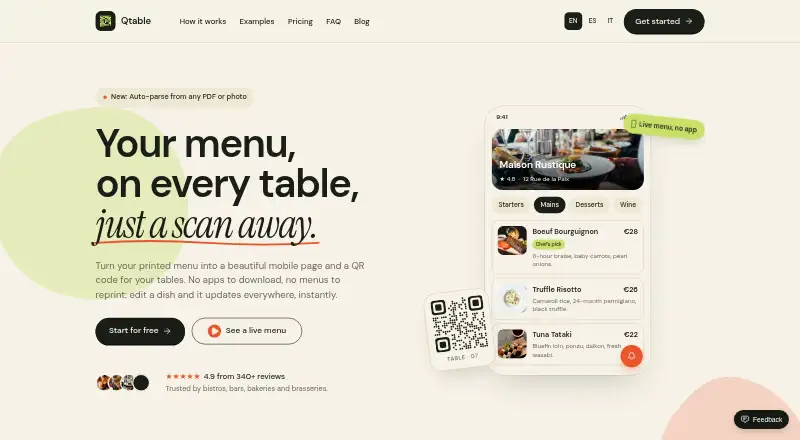
Qtable converts restaurant menu PDFs, photos, URLs, or pasted text into browser-based mobile menus that guests open through a QR code, without downloading an app. Restaurants can edit categories, dish names, descriptions, prices, and variants, then add photos, allergen badges, and dietary tags. The product suits cafés, bars, and hospitality teams that want to publish and maintain a digital menu, particularly small teams seeking a searchable QR menu. It runs in the cloud and is available on the web.
Pricing is tiered by restaurant count and AI credits. Basic costs $14 per month or $135 per year for one restaurant, five menus, and 30 AI credits per month. Pro is $29 monthly or $279 annually for three restaurants with five menus each and 80 AI credits per month. Business costs $69 monthly or $665 annually for up to five restaurants, five menus each, and 250 AI credits per month. Each lists unlimited scans and all menu features. Enterprise starts at $149 per month for six or more restaurants, with a custom AI allowance; annual pricing is custom. A 14-day trial is available and requires a card.
The central strength is menu maintenance: edits update the published menu while its address and QR code stay the same. Branded QR codes can use a custom logo and colors, and guests can tap to call a waiter; dish analytics provide another way to review menu activity. This is a focused menu-publishing tool rather than an ordering system: online ordering is unsupported. Teams that need menus, dietary information, and guest-to-staff calls in a browser may find the scope appropriate. Restaurants that need guests to place orders online should choose a product that includes ordering instead.
Your product? Our editors can test Qtable in depth and publish a review, labelled as paid · from $149/mo →
Qtable pricing
All 4 Qtable plans and prices →
Qtable fact sheet
| Free plan | No |
|---|---|
| Paid from | $135/yr |
| QR menu | Yes |
| Touchscreen menus | Not verified |
| Online ordering | No |
| Menu languages | Multiple |
| Locations included | 1 |
| Menu items | Not verified |
| Menu analytics | Yes |
| Free trial | 14 days · card required |
| Deployment | Cloud |
| Platforms | Web |
| Compliance & security | GDPR |
| Support | |
| Built for | Solo, Small business, Mid-market, Enterprise (editorial estimate) |
| Pricing | 14-day trial (source) |
| Website | qtable.ai |
| Facts checked | 25 Sep 2026 |
Alternatives to Qtable
- FlipdishConnect branded web and app ordering with POS, delivery, kiosks and restaurant operations.8.6
- MenutechA strong fit for multi-location teams needing multilingual, QR-ready menu operations.8.3
- FineDineA broad web-based menu and ordering platform for restaurants managing multiple locations.7.9


Used Qtable? Be the first to review it
The editor score above is our own research. What this page doesn't have yet is a reader's view — what you used Qtable for, what worked and what didn't. No stars are seeded and no review is paid for; an editor reads every one before it appears.
Write a reviewTwo minutes · verified accounts only · read by an editor before it appears
Featured on iTechGuides

Qtable is listed in our Digital Menu Software directory. Add the badge to your site — it links back to this page.
<a href="https://www.itechguides.com/products/qtable/"><img src="https://www.itechguides.com/best/badge/qtable.svg" alt="Featured on iTechGuides" width="230" height="46"></a>
Reviewed by iTechGuides Editors · Editorial team · Updated Oct 2026
Advertiser disclosure: iTechGuides is reader-supported. Vendors can pay for top positions in our rankings and for a place on other products' pages, and we may earn a commission when you click some links. Bought places stand at the number bought; this page and our disclosure say so. Paying vendors may get a fuller, more detailed review from our editors, and that review can change their score. How we rank.
Last updated · How we research and update