
QPrompt
QPrompt: A capable free teleprompter for multi-screen prompting, with no voice tracking or recording. Ranked #20 of 32 in Teleprompter Software by our editors (7.1/10); pricing: Free plan; best for open-source multi-screen prompting.
At a glance
- Editor score7.1 / 10
- PricingFree plan
- Best forOpen-source multi-screen prompting
- Free planYes
- Paid fromFree
- Facts checked20 Sep 2026
Where it wins
- Free GPLv3 license permits commercial use
- Prompts across multiple connected screens
- Rich text, markers, timing, and accessibility features
Where it doesn't
- No voice tracking or recording features
- Android support is limited to an older build
- Verified team features are not included
Our verdict on QPrompt
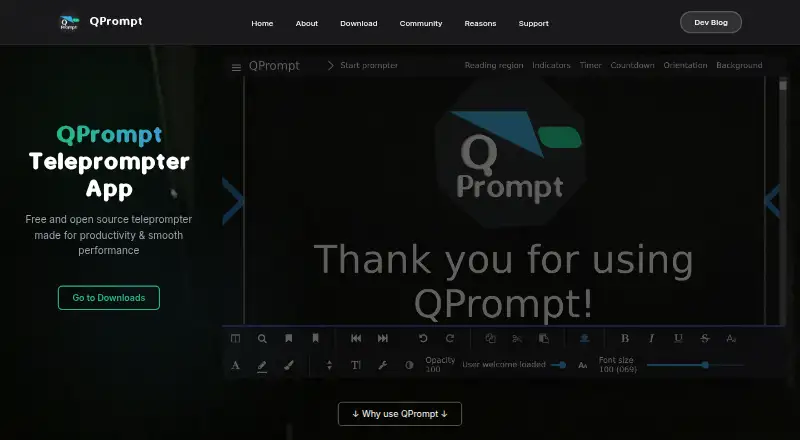
QPrompt is free, open-source teleprompter software for event teleprompter operators, video creators, and individuals or small teams. It supports Windows, macOS, Linux, and Android, with script editing, formatted text import, adjustable reading areas, semi-transparent prompting backgrounds, and multi-screen output. Accessibility options include OpenDyslexic and reading guides, while customizable keyboard shortcuts support operator workflows.
The published Free plan costs $0 USD and is GPLv3 licensed, with commercial use permitted. QPrompt’s platform coverage spans desktop operating systems and Android, although Android is represented by an older QPrompt 1.1.2 build rather than the current stable release. Its ecosystem connections include KDE Connect for remote control and LibreOffice for formatted text workflows. Keyboard-emulating devices can also control prompting, giving operators several ways to manage scripts without relying on a dedicated remote integration.
QPrompt’s strongest area is the depth of its prompting controls. Named and unnamed script markers, a built-in script chronometer, reading-area adjustments for camera eye contact, transparent backgrounds, and multi-screen prompting cover the core needs of live event and video workflows. It is less suited to buyers who need voice tracking, recording, or verified team features. Choose QPrompt when free, open-source software, commercial permission, accessibility options, and multi-screen output matter most; choose an alternative when automated voice following or built-in recording is central to the workflow.
Your product? Our editors can test QPrompt in depth and publish a review, labelled as paid · from $149/mo →
QPrompt pricing
All 1 QPrompt plans and prices →
QPrompt fact sheet
| Free plan | Yes |
|---|---|
| Paid from | Free |
| Supported platforms | windows, macos, linux, android |
| Voice tracking | Not verified |
| Remote control | Yes |
| Video recording | Not verified |
| Script length limit | Not verified |
| Display modes | Both |
| Team script sharing | Not verified |
| Deployment | Desktop, Mobile |
| Platforms | Windows, macOS, Linux, Android |
| Support | Community, Docs |
| Built for | Solo, Small business (editorial estimate) |
| Integrations | 2 integrations: KDE Connect, LibreOffice |
| Pricing | Free plan (source) |
| Website | qprompt.app |
| Facts checked | 20 Sep 2026 |
QPrompt integrations
QPrompt lists 2 integrations on its own site.
- KDE Connect
- LibreOffice
Alternatives to QPrompt
- EasyPrompterA flexible teleprompter for solo presenters, live operators, and multi-display productions.9.4
- Teleprompter.comA broad creator video toolkit with voice scrolling, recording, editing, and team workspaces.9.2
- SpeakflowA flexible teleprompter for voice-led recording, remote control, and team collaboration.9.0



See all QPrompt alternatives →
Used QPrompt? Be the first to review it
The editor score above is our own research. What this page doesn't have yet is a reader's view — what you used QPrompt for, what worked and what didn't. No stars are seeded and no review is paid for; an editor reads every one before it appears.
Write a reviewTwo minutes · verified accounts only · read by an editor before it appears
Featured on iTechGuides

QPrompt is listed in our Teleprompter Software directory. Add the badge to your site — it links back to this page.
<a href="https://www.itechguides.com/products/qprompt/"><img src="https://www.itechguides.com/best/badge/qprompt.svg" alt="Featured on iTechGuides" width="230" height="46"></a>
Reviewed by iTechGuides Editors · Editorial team · Updated Oct 2026
Advertiser disclosure: iTechGuides is reader-supported. Vendors can pay for top positions in our rankings and for a place on other products' pages, and we may earn a commission when you click some links. Bought places stand at the number bought; this page and our disclosure say so. Paying vendors may get a fuller, more detailed review from our editors, and that review can change their score. How we rank.
Last updated · How we research and update