PyBurn Studio
PyBurn Studio: A cross-platform optical-disc workflow with authoring, queues, verification, and job history. Ranked #20 of 26 in DVD Authoring Software by our editors (6.8/10); pricing: Open source; best for cross-platform technical disc workflows.
At a glance
- Editor score6.8 / 10
- PricingOpen source
- Best forCross-platform technical disc workflows
- Paid fromFree
- Platform supportCross_platform
- Facts checked22 Sep 2026
Where it wins
- Supports DVD-Video and Blu-ray BDMV authoring
- Runs on Linux, Windows, and macOS
- Adds queued jobs, verification, retries, and persistent history
Where it doesn't
- Linux and macOS workflows use command-line tools
- The workflow is oriented toward technical desktop users
- Open-source distribution has no paid-tier feature structure
Our verdict on PyBurn Studio
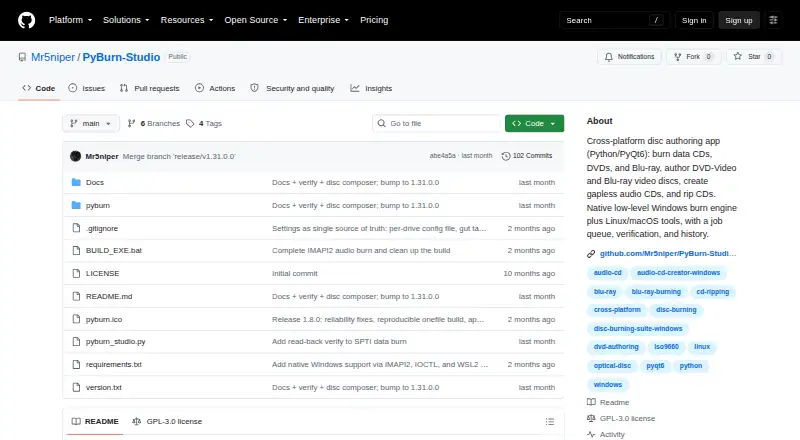
PyBurn Studio is an open-source Python and PyQt6 desktop application for authoring, burning, verifying, and ripping optical discs. It supports data CDs, DVDs, and Blu-ray discs, along with Audio CD creation and ripping to MP3, FLAC, or WAV. Its platform coverage spans Linux, Windows, and macOS, making it a fit for technical users who need one optical-disc workflow across desktop operating systems rather than a narrowly focused DVD-only tool.
Its authoring stack is divided by disc type. DVD-Video authoring uses FFmpeg and dvdauthor, while Blu-ray BDMV authoring uses tsMuxeR. The application also supports queued jobs with live progress reporting, post-burn data verification, and persistent job history with retry support. These features give recurring disc workflows a clear operational structure, particularly when users need to monitor multiple jobs or revisit previous work.
PyBurn Studio is strongest for users who value broad optical-disc coverage and cross-platform operation in an open-source desktop application. It is less suited to buyers seeking a heavily guided consumer workflow or a paid product organized around service tiers and vendor support. Windows users can access native disc operations where available, while Linux and macOS workflows use command-line tools, so the overall fit depends on comfort with a more technical environment. Choose it for flexible authoring, burning, ripping, verification, and job management across platforms; choose an alternative when the priority is a simpler DVD-focused experience.
Your product? Our editors can test PyBurn Studio in depth and publish a review, labelled as paid · from $149/mo →
PyBurn Studio pricing
PyBurn Studio fact sheet
| Free plan | Not verified |
|---|---|
| Paid from | Free |
| Platform support | Cross_platform |
| Chapter tools | Not verified |
| Disc output | Not verified |
| Subtitle support | Not verified |
| Dual-layer DVD support | Not verified |
| DVD standards | Not verified |
| Blu-ray authoring | Yes |
| Deployment | Desktop |
| Platforms | Windows, macOS, Linux |
| Support | Docs, Community |
| Built for | Solo, Small business (editorial estimate) |
| Pricing | Open source |
| Website | github.com |
| Facts checked | 22 Sep 2026 |
Alternatives to PyBurn Studio
- DVDStylerA capable free choice for creating interactive DVD-Video discs across desktop platforms.9.3
- TMPGEnc Authoring Works 7A deep authoring suite for complex optical-media projects, with a high one-time price.9.0
- AnyMP4 DVD CreatorA paid desktop authoring tool with broad disc, chapter, subtitle, and menu controls.8.8


See all PyBurn Studio alternatives →
Also Ranked In
PyBurn Studio is ranked in 2 of our directories.
Used PyBurn Studio? Be the first to review it
The editor score above is our own research. What this page doesn't have yet is a reader's view — what you used PyBurn Studio for, what worked and what didn't. No stars are seeded and no review is paid for; an editor reads every one before it appears.
Write a reviewTwo minutes · verified accounts only · read by an editor before it appears
Featured on iTechGuides

PyBurn Studio is listed in our DVD Authoring Software directory. Add the badge to your site — it links back to this page.
<a href="https://www.itechguides.com/products/pyburn-studio/"><img src="https://www.itechguides.com/best/badge/pyburn-studio.svg" alt="Featured on iTechGuides" width="230" height="46"></a>
Reviewed by iTechGuides Editors · Editorial team · Updated Oct 2026
Advertiser disclosure: iTechGuides is reader-supported. Vendors can pay for top positions in our rankings and for a place on other products' pages, and we may earn a commission when you click some links. Bought places stand at the number bought; this page and our disclosure say so. Paying vendors may get a fuller, more detailed review from our editors, and that review can change their score. How we rank.
Last updated · How we research and update