Project IGI Game Converter
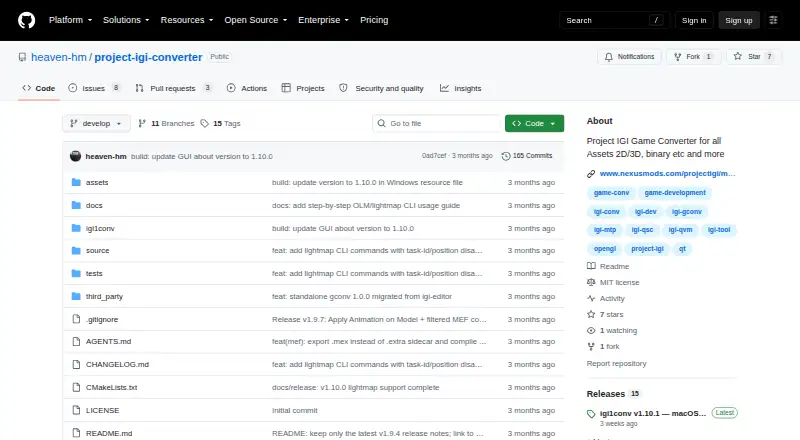
Project IGI Game Converter: A broad Windows toolkit for inspecting, converting, batch-processing, and repacking Project IGI files. Ranked #14 of 23 in Game Asset Extractors by our editors (8.0/10); pricing: Free plan; best for project IGI asset conversion and extraction.
At a glance
- Editor score8.0 / 10
- PricingFree plan
- Best forProject IGI asset conversion and extraction
- Free planYes
- Paid fromFree
- Asset typestextures, 3D meshes, scripts, resource archives, terrain, fonts, skeletal animations, audio, AI navigation graphs, lightmaps
- Facts checked21 Sep 2026
Where it wins
- Handles archives, meshes, textures, scripts, audio, terrain, and more
- Combines GUI inspection with recursive batch and command-line processing
- Supports extraction, conversion, and repacking in an open-source tool
Where it doesn't
- Windows-oriented rather than cross-platform
- Focused on Project IGI 1 asset formats
- Does not include AI features
Our verdict on Project IGI Game Converter
Project IGI Game Converter is a Windows desktop GUI and command-line utility for modders and researchers working with Project IGI 1 files. It covers resource archives, textures, 3D meshes, scripts, terrain, fonts, skeletal animations, audio, AI navigation graphs, and lightmaps. The GUI provides file-tree navigation with directory search, interactive 3D viewing for MEF and OBJ models, 2D preview and editing for TEX, SPR, and PIC textures, plus script and hexadecimal inspection.
Its main strength is breadth within the Project IGI 1 format family. The tool can extract and repack RES archives, convert proprietary meshes to OBJ, convert textures to PNG and TGA, and decompile or compile scripts. It also supports animation, terrain, audio, font, and AI-graph processing. Recursive batch processing and command-line support make it suitable for repeatable conversion or extraction workflows, while the GUI gives users a way to browse and inspect files interactively.
The product is free and open source, with a Windows-oriented build and command examples documented for its repository. Its published capabilities center on Project IGI 1 formats, including RES, QVM, QSC, TEX, SPR, PIC, MEF, MTP, DAT, FNT, LMP, CTR, graph*.dat, IFF, WAV, and OLM. Choose it when Project IGI 1 asset access, conversion, inspection, or archive repacking is the priority. Choose another tool if you need a cross-platform application, support beyond this format family, or built-in AI features.
Your product? Our editors can test Project IGI Game Converter in depth and publish a review, labelled as paid · from $149/mo →
Project IGI Game Converter pricing
Project IGI Game Converter fact sheet
| Free plan | Yes |
|---|---|
| Paid from | Free |
| Asset types | textures, 3D meshes, scripts, resource archives, terrain, fonts, skeletal animations, audio, AI navigation graphs, lightmaps |
| Game file formats | .res, .qvm, .qsc, .tex, .spr, .pic, .mef, .mtp, .dat, .fnt, .lmp, .ctr, graph*.dat, .IFF, .wav, .olm |
| Model formats | .mef, .obj |
| Texture formats | .tex, .spr, .pic, .png, .tga |
| Batch extraction | Yes |
| Command-line support | Yes |
| Archive repacking | Yes |
| Deployment | Desktop |
| Platforms | Windows |
| Support | Docs |
| Built for | Solo, Small business (editorial estimate) |
| Pricing | Free plan |
| Website | github.com |
| Facts checked | 21 Sep 2026 |
Alternatives to Project IGI Game Converter
- QuickBMSA broad, free toolkit for scripted extraction, reimporting, and mod packaging.9.4
- Source 2 ViewerA deep Source 2 asset toolkit with GUI inspection, conversion, automation, and VPK repacking.9.3
- NoesisA free Windows utility for extracting, inspecting, converting, and batch-exporting game assets.9.1

See all Project IGI Game Converter alternatives →
Used Project IGI Game Converter? Be the first to review it
The editor score above is our own research. What this page doesn't have yet is a reader's view — what you used Project IGI Game Converter for, what worked and what didn't. No stars are seeded and no review is paid for; an editor reads every one before it appears.
Write a reviewTwo minutes · verified accounts only · read by an editor before it appears
Featured on iTechGuides

Project IGI Game Converter is listed in our Game Asset Extractors directory. Add the badge to your site — it links back to this page.
<a href="https://www.itechguides.com/products/project-igi-game-converter/"><img src="https://www.itechguides.com/best/badge/project-igi-game-converter.svg" alt="Featured on iTechGuides" width="230" height="46"></a>
Reviewed by iTechGuides Editors · Editorial team · Updated Oct 2026
Advertiser disclosure: iTechGuides is reader-supported. Vendors can pay for top positions in our rankings and for a place on other products' pages, and we may earn a commission when you click some links. Bought places stand at the number bought; this page and our disclosure say so. Paying vendors may get a fuller, more detailed review from our editors, and that review can change their score. How we rank.
Last updated · How we research and update