Privascan
Privascan: A privacy-focused iPhone scanner with generous free scanning and a $9.99 Pro unlock. Ranked #47 of 75 in Mobile Scanning Apps by our editors (4.0/10); pricing: Free plan; best for privacy-focused iPhone scanning.
At a glance
- Editor score4.0 / 10
- PricingFree plan
- Best forPrivacy-focused iPhone scanning
- Free planYes
- Paid from$9.99 one-time
- OCR includedYes
- Facts checked23 Sep 2026
Where it wins
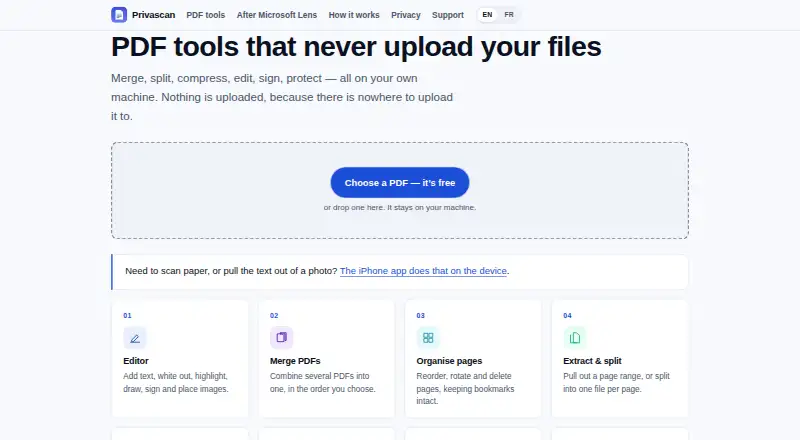
- On-device OCR and offline processing without a Privascan server
- Free plan includes unlimited scans and searchable PDF export
- Pro adds PDF tools, password protection, and filing suggestions
Where it doesn't
- No Android app
- No listed third-party integrations
- Pro features require a one-time purchase
Our verdict on Privascan
Privascan is an iPhone document-scanning app for people who want to capture paper documents, extract text, create searchable PDFs, and keep files on their device. Automatic document-edge detection and image enhancement filters support the scanning workflow, while on-device OCR creates searchable and selectable PDF exports. Processing works offline without a Privascan server, making the app suited to users who prioritize local document handling. Browser-based PDF tools extend the product beyond its iPhone app.
The free plan includes unlimited scans, on-device OCR, searchable PDF export, and exports without a watermark. Pro costs $9.99 as a one-time purchase. That tier adds PDF merge, import, reorder, extract, split, and compression tools, along with password-protected exports. It also adds export presets, file-naming rules, folders, and on-device filing suggestions. The plan structure is straightforward: core scanning and OCR are available without a recurring payment, while more advanced PDF management and organization features sit behind Pro.
Privascan fits an iOS-centered workflow, with the iPhone app complemented by browser-based PDF tools and system share-sheet exports. Its feature set is broader than basic capture because it combines scanning, OCR, PDF editing, export controls, and local filing suggestions. The main trade-off is platform and ecosystem coverage: there is no Android app, and no third-party integrations are listed. Choose Privascan if offline processing, local OCR, searchable PDFs, and a one-time Pro purchase match your needs. Choose another app if Android support or connected integrations are essential.
Your product? Our editors can test Privascan in depth and publish a review, labelled as paid · from $149/mo →
Privascan pricing
All 2 Privascan plans and prices →
Privascan fact sheet
| Free plan | Yes |
|---|---|
| Paid from | $9.99 one-time |
| iOS app | Yes |
| Android app | No |
| OCR included | Yes |
| Searchable PDF | Yes |
| Auto capture | Yes |
| Multipage PDF | Yes |
| Scan limit | Not verified |
| Deployment | Mobile, Browser extension |
| Platforms | iOS, Web |
| Support | |
| Built for | Solo, Small business (editorial estimate) |
| Pricing | Free plan (source) |
| Website | privascan.app |
| Facts checked | 23 Sep 2026 |
Alternatives to Privascan
- Adobe ScanA capable free scanner with strong OCR and useful Adobe ecosystem connections.9.4
- Zoho ScannerA broad scanning app for Zoho users who need OCR, workflows, signing, and sync.9.2
- SmallpdfA broad PDF toolkit that adds OCR and scanning across web, desktop, and mobile.9.0



See all Privascan alternatives →
Used Privascan? Be the first to review it
The editor score above is our own research. What this page doesn't have yet is a reader's view — what you used Privascan for, what worked and what didn't. No stars are seeded and no review is paid for; an editor reads every one before it appears.
Write a reviewTwo minutes · verified accounts only · read by an editor before it appears
Featured on iTechGuides

Privascan is listed in our Mobile Scanning Apps directory. Add the badge to your site — it links back to this page.
<a href="https://www.itechguides.com/products/privascan/"><img src="https://www.itechguides.com/best/badge/privascan.svg" alt="Featured on iTechGuides" width="230" height="46"></a>
Reviewed by iTechGuides Editors · Editorial team · Updated Oct 2026
Advertiser disclosure: iTechGuides is reader-supported. Vendors can pay for top positions in our rankings and for a place on other products' pages, and we may earn a commission when you click some links. Bought places stand at the number bought; this page and our disclosure say so. Paying vendors may get a fuller, more detailed review from our editors, and that review can change their score. How we rank.
Last updated · How we research and update