PreservePDF
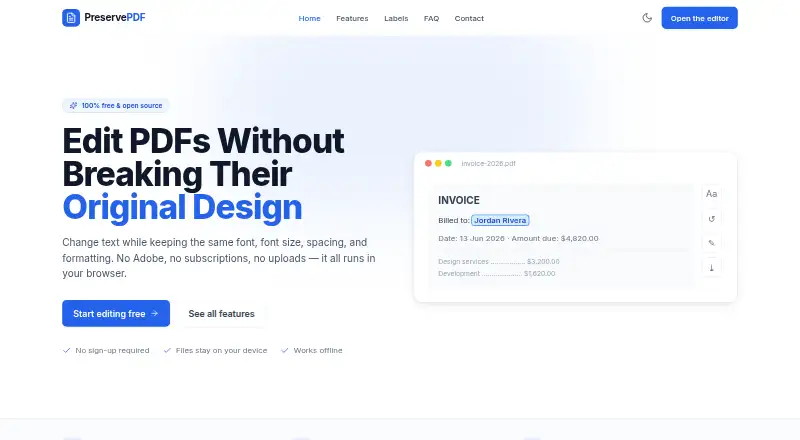
PreservePDF: A free, open-source PDF editor for private, layout-preserving browser edits. Ranked #56 of 102 in PDF Editors by our editors (3.5/10); pricing: Free plan; best for privacy-focused users editing PDFs in-browser.
At a glance
- Editor score3.5 / 10
- PricingFree plan
- Best forPrivacy-focused users editing PDFs in-browser
- Free planYes
- Paid fromFree
- OCRYes
- Facts checked20 Sep 2026
Where it wins
- Edits PDF text while preserving fonts, spacing, alignment, and layout
- Local browser processing supports offline use and on-device OCR
- Includes find-and-replace, redaction, signatures, and genuine PDF export
Where it doesn't
- Web platform focus may not suit users seeking native desktop apps
- Conversion features are not verified
- Form capabilities are not verified
Our verdict on PreservePDF
PreservePDF is a browser-based PDF editor for changing existing PDF text while retaining fonts, spacing, alignment, and page layout. It is aimed at privacy-focused users who want to edit documents in a web browser without sending files away for processing. The editor supports direct text changes, find-and-replace across documents, text boxes, redaction blocks, signatures, OCR for scanned PDFs, and removal of owner-level editing restrictions. It requires no account, is free, and is open source under the MIT license.
Pricing is straightforward: PreservePDF is completely free, with no paid tiers described. Its local browser processing is the central fit for users who prioritize control over document handling. Documents can be processed on-device, and offline use is supported. The product can also be self-hosted or run locally, giving technically inclined users another way to keep the editing workflow close to their own environment. This combination of free access, open-source licensing, and local operation gives PreservePDF a clear position for personal, professional, or sensitive document edits.
Its standout capability is direct PDF text editing with layout preservation, complemented by on-device OCR for scanned PDFs and genuine edited-PDF export rather than flattened images. That makes it more focused than a broad document-conversion suite. Users who need text editing, redaction, signatures, and search-and-replace should find the feature set well aligned with that job. Users who depend on verified conversion or form features, or who prefer a native desktop application, should consider an alternative with those capabilities. PreservePDF is the stronger choice for focused, local browser editing rather than wide PDF workflow coverage.
Your product? Our editors can test PreservePDF in depth and publish a review, labelled as paid · from $149/mo →
PreservePDF pricing
PreservePDF fact sheet
| Free plan | Yes |
|---|---|
| Paid from | Free |
| Text editing | Yes |
| Annotation tools | Yes |
| OCR | Yes |
| PDF conversion | Not verified |
| Form creation | Not verified |
| Supported platforms | web |
| Deployment | Cloud, Self-hosted |
| Platforms | Web |
| Support | Email, Community |
| Built for | Solo, Small business, Mid-market (editorial estimate) |
| Pricing | Free plan |
| Website | alphabasline.com |
| Facts checked | 20 Sep 2026 |
Alternatives to PreservePDF
- Foxit PDF EditorA mature PDF workspace with deep editing, OCR, forms, security, and integrations.9.3
- iLovePDFA broad PDF toolkit with free access, offline desktop processing, and cross-device apps.9.2
- SmallpdfA broad PDF toolkit for simple editing across web, Windows, mobile, and Chrome.9.1


See all PreservePDF alternatives →
Used PreservePDF? Be the first to review it
The editor score above is our own research. What this page doesn't have yet is a reader's view — what you used PreservePDF for, what worked and what didn't. No stars are seeded and no review is paid for; an editor reads every one before it appears.
Write a reviewTwo minutes · verified accounts only · read by an editor before it appears
Featured on iTechGuides

PreservePDF is listed in our PDF Editors directory. Add the badge to your site — it links back to this page.
<a href="https://www.itechguides.com/products/preservepdf/"><img src="https://www.itechguides.com/best/badge/preservepdf.svg" alt="Featured on iTechGuides" width="230" height="46"></a>
Reviewed by iTechGuides Editors · Editorial team · Updated Oct 2026
Advertiser disclosure: iTechGuides is reader-supported. Vendors can pay for top positions in our rankings and for a place on other products' pages, and we may earn a commission when you click some links. Bought places stand at the number bought; this page and our disclosure say so. Paying vendors may get a fuller, more detailed review from our editors, and that review can change their score. How we rank.
Last updated · How we research and update