presenterm
presenterm: A free, open-source choice for technical presenters who prefer Markdown and terminals. Ranked #59 of 93 in Presentation Software by our editors (3.4/10); pricing: Free plan; best for technical presenters using Markdown and diagrams.
At a glance
- Editor score3.4 / 10
- PricingFree plan
- Best forTechnical presenters using Markdown and diagrams
- Free planYes
- Paid fromFree
- Facts checked20 Sep 2026
Where it wins
- Markdown authoring with code highlighting, Mermaid, D2, LaTeX, and Typst
- Terminal presentations with themes, transitions, speaker notes, and live reload
- Exports to PDF or HTML and runs on Linux, macOS, and Windows
Where it doesn't
- No collaboration features for shared presentation authoring
- No AI, office-file compatibility, or broader integrations
- Presentation workflow is centered on terminals rather than mobile apps
Our verdict on presenterm
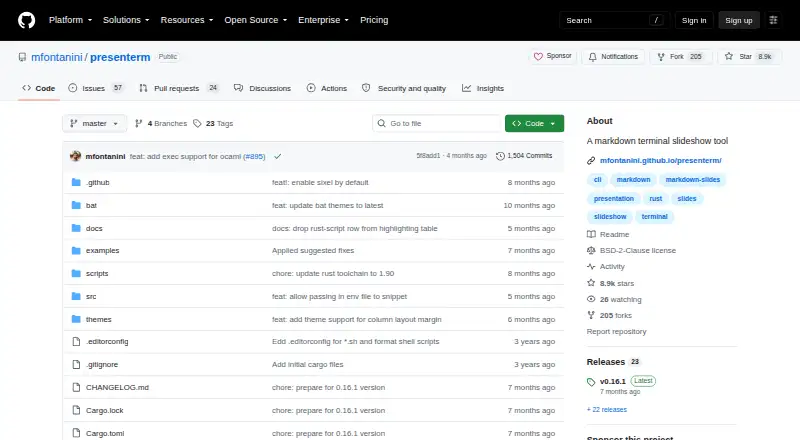
presenterm is an open-source command-line presentation tool for developers and technical presenters who prefer writing slide decks as Markdown and presenting from a terminal. It supports Linux, macOS, and Windows, with terminal-rendered images and animated GIFs, custom themes, layout controls, slide transitions, and automatic reload when files change. The workflow is text-first rather than office-suite-oriented, making it a focused fit for people who already work comfortably with Markdown, code, and command-line tools.
Its strongest area is technical content. Syntax highlighting supports code-focused slides, while Mermaid and D2 render diagrams and LaTeX and Typst handle formulas. Speaker notes can run through a separate listener instance, and decks can be exported to PDF or HTML when a terminal presentation is not the right delivery format. These features give technical presenters room to combine explanations, code, diagrams, and mathematical notation without switching between separate authoring systems. The trade-off is a narrower ecosystem: presenterm does not provide collaboration, AI features, office-file compatibility, or broader integrations.
There is no paid tier described for presenterm; it is distributed as open-source software under the BSD-2-Clause license. That makes it suitable for individuals and teams seeking a free, text-based presentation workflow across desktop operating systems. It is less appropriate for buyers who need shared editing, mobile coverage, office-document workflows, or integrated presentation services. Choose presenterm when Markdown, terminal delivery, diagrams, formulas, and export control matter most; choose an alternative when collaboration and ecosystem breadth are central requirements.
Your product? Our editors can test presenterm in depth and publish a review, labelled as paid · from $149/mo →
presenterm pricing
presenterm fact sheet
| Free plan | Yes |
|---|---|
| Paid from | Free |
| AI assistance | Not verified |
| Real-time collaboration | Not verified |
| PowerPoint import | Not verified |
| PowerPoint export | Not verified |
| Offline access | Not verified |
| Presenter mode | Yes |
| Supported platforms | Linux, macOS, Windows |
| Deployment | Desktop |
| Platforms | Windows, macOS, Linux |
| Support | Docs |
| Built for | Solo, Small business (editorial estimate) |
| Pricing | Free plan |
| Website | github.com |
| Facts checked | 20 Sep 2026 |
Alternatives to presenterm
- Microsoft PowerPointA broad presentation workspace spanning web, desktop, mobile, collaboration, AI, and rehearsal tools.9.4
- Apple KeynoteA polished free presentation tool for Apple ecosystem users, with optional AI features.9.1
- Zoho ShowA capable free option for teams that need collaboration, offline work, and PPTX support.9.0



See all presenterm alternatives →
Used presenterm? Be the first to review it
The editor score above is our own research. What this page doesn't have yet is a reader's view — what you used presenterm for, what worked and what didn't. No stars are seeded and no review is paid for; an editor reads every one before it appears.
Write a reviewTwo minutes · verified accounts only · read by an editor before it appears
Featured on iTechGuides

presenterm is listed in our Presentation Software directory. Add the badge to your site — it links back to this page.
<a href="https://www.itechguides.com/products/presenterm/"><img src="https://www.itechguides.com/best/badge/presenterm.svg" alt="Featured on iTechGuides" width="230" height="46"></a>
Guides on presentation software
- 5 Best AI Presentation and PowerPoint Design Tools in 2026Aug 2026
- Best AI Tools for Effortless Presentation Design Compared 2025: 2026 Buyer’s UpdateAug 2026
- Best Presentation Apps for iPad and iPhone: Keynote, PowerPoint, Google Slides, Canva, and PreziAug 2026
Reviewed by iTechGuides Editors · Editorial team · Updated Oct 2026
Advertiser disclosure: iTechGuides is reader-supported. Vendors can pay for top positions in our rankings and for a place on other products' pages, and we may earn a commission when you click some links. Bought places stand at the number bought; this page and our disclosure say so. Paying vendors may get a fuller, more detailed review from our editors, and that review can change their score. How we rank.
Last updated · How we research and update