
Presenta
Presenta: A free mockup studio for device scenes, browser frames, and AI site captures. Ranked #4 of 27 in Mockup Libraries by our editors (8.7/10); pricing: Free plan; best for free device mockups with AI site capture.
At a glance
- Editor score8.7 / 10
- PricingFree plan
- Best forFree device mockups with AI site capture
- Free planYes
- Paid from$8/mo
- Editable formatsPNG, JPG, WebP
- Facts checked20 Sep 2026
Where it wins
- Free studio includes device frames, effects, layers, and image exports.
- AI Site Shots create mockups from website URLs.
- Supports multi-artboard compositions and timeline authoring.
Where it doesn't
- Verified coverage centers on device and browser mockups.
- Video export is limited to the Pro monthly plan.
- Advanced Pro features require a paid plan.
Our verdict on Presenta
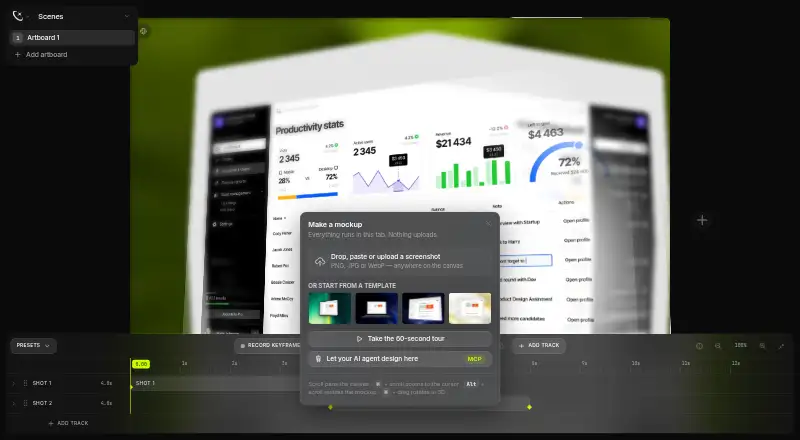
Presenta is a browser-based mockup generator for designers, developers, marketers, and teams creating visuals from screenshots. It accepts PNG, JPG, and WebP uploads, as well as clipboard-pasted screenshots, then places them in device and browser frames. The studio covers smartphone, tablet, laptop, desktop, watch, and browser mockups, with controls for backgrounds, gradients, patterns, shadows, 3D transforms, depth of field, text, images, shapes, and multi-artboard compositions.
The Free plan provides mockup composition, device frames, backgrounds and shadows, 3D effects, text and image layers, and PNG, JPG, and WebP export. The Pro options add different capabilities: the $20 one-time plan includes AI Site Shots, one-click background removal, transparent PNG exports, Pro templates, use on 3 devices, and future Pro features. The $8-per-month Pro plan includes Site Shots by URL, WebM video export, background removal, a transparent canvas, and Pro templates. The free studio has no account or usage limits, making it suitable for creating static mockups without an upfront payment.
Presenta is a focused choice for browser-based device and browser scenes rather than a broad mockup library. AI Site Shots can turn website URLs into mockup content, while configurable shadows, 3D effects, depth of field, layers, and timeline authoring support more composed presentations. Web and API access suit browser workflows and integrations, and commercial licensing is available. Choose Presenta if you need free screenshot mockups, layered device compositions, or URL-based site captures. Consider another option if your work depends on mockup categories outside device and browser frames or requires video export without a Pro plan.
Your product? Our editors can test Presenta in depth and publish a review, labelled as paid · from $149/mo →
Presenta pricing
All 2 Presenta plans and prices →
Presenta fact sheet
| Free plan | Yes |
|---|---|
| Paid from | $8/mo |
| Mockup categories | Device, browser, smartphone, tablet, laptop, desktop, and watch mockups |
| Editable formats | PNG, JPG, WebP |
| Asset count | Not verified |
| Commercial license | Yes |
| Video mockups | Yes |
| Download limit | Not verified |
| Deployment | Cloud, Browser extension |
| Platforms | Web |
| Support | |
| Built for | Solo, Small business, Mid-market (editorial estimate) |
| Pricing | Free plan (source) |
| Website | presenta.design |
| Facts checked | 20 Sep 2026 |
Alternatives to Presenta
- Artboard StudioA broad browser mockup library with AI creation, video support, and a free plan.9.4
- Mockuuups StudioA broad mockup library with plugins, API access, and a free tier.9.2
- LS GraphicsA broad mockup library with 3D, source-file, and unlimited-download options.8.9



See all Presenta alternatives →
Presenta vs the competition
- Presenta vs Artboard Studio
- Presenta vs Mockuuups Studio
- Presenta vs LS Graphics
- Presenta vs Monkr
- Presenta vs MockStage
- Presenta vs Mediamodifier Mockup Generator



Compare Presenta with any tool side by side →
Also Ranked In
Presenta is ranked in 2 of our directories.
Used Presenta? Be the first to review it
The editor score above is our own research. What this page doesn't have yet is a reader's view — what you used Presenta for, what worked and what didn't. No stars are seeded and no review is paid for; an editor reads every one before it appears.
Write a reviewTwo minutes · verified accounts only · read by an editor before it appears
Featured on iTechGuides

Presenta is listed in our Mockup Libraries directory. Add the badge to your site — it links back to this page.
<a href="https://www.itechguides.com/products/presenta/"><img src="https://www.itechguides.com/best/badge/presenta.svg" alt="Featured on iTechGuides" width="230" height="46"></a>
Reviewed by iTechGuides Editors · Editorial team · Updated Oct 2026
Advertiser disclosure: iTechGuides is reader-supported. Vendors can pay for top positions in our rankings and for a place on other products' pages, and we may earn a commission when you click some links. Bought places stand at the number bought; this page and our disclosure say so. Paying vendors may get a fuller, more detailed review from our editors, and that review can change their score. How we rank.
Last updated · How we research and update