PoseCap
PoseCap: A focused Windows tool for webcam-to-Blender body capture without a mocap suit. Ranked #19 of 26 in AI Motion Capture Software by our editors (7.2/10); pricing: Free plan; best for free Blender pose capture.
At a glance
- Editor score7.2 / 10
- PricingFree plan
- Best forFree Blender pose capture
- Free planYes
- Paid fromFree
- Real-time captureYes
- Facts checked21 Sep 2026
Where it wins
- Free and open-source with webcam and video-file capture
- Streams full-body poses into Blender and records timeline keyframes
- Converts Mixamo and Unreal characters with smoothing and limb filters
Where it doesn't
- Windows 10/11 and Blender 4.2 LTS or newer are required
- Facial tracking is not included
- The project is an early-development installable preview
Our verdict on PoseCap
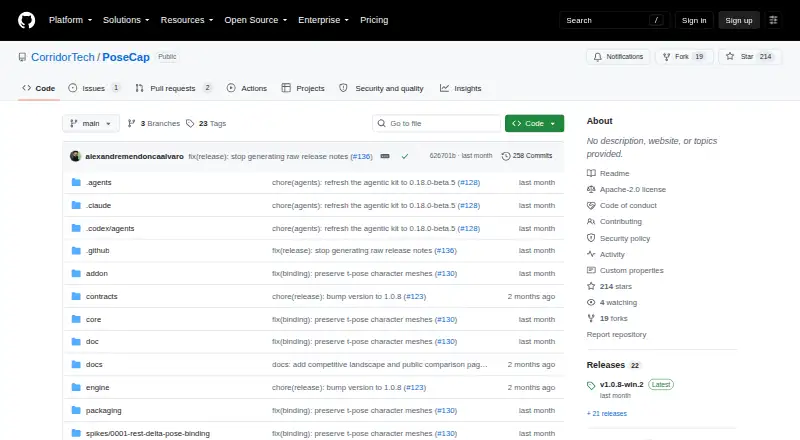
PoseCap is a Windows desktop Blender extension and local engine for markerless full-body motion capture. It is designed for Blender animators who want to create body animation from a webcam or video file rather than using mocap suits, markers, or external motion-capture software. The free, open-source project supports real-time capture, single-pose capture, and streaming motion directly into Blender characters.
Its strongest fit is the Blender-centered workflow. PoseCap can record applied motion as timeline keyframes, convert Mixamo and Unreal characters, and use either MediaPipe Lite or PEAR capture backends. Pose smoothing, limb filters, and camera-pitch correction provide controls for refining captured body movement. This makes the product more relevant to creators already working in Blender than to teams seeking a broad motion-capture pipeline across multiple applications or platforms.
The main trade-off is scope. PoseCap supports body capture but not facial tracking, and its platform requirements are specific: Windows 10/11 with Blender 4.2 LTS or newer. The repository describes the software as an early-development installable preview, so it suits users comfortable with a focused open-source project and a Blender-first process. SMPL-family body models also have separate licensing requirements, especially for commercial use. Choose PoseCap for free webcam or video-based body animation in Blender; choose an alternative if you need facial capture, wider platform support, or a more mature production workflow.
Your product? Our editors can test PoseCap in depth and publish a review, labelled as paid · from $149/mo →
PoseCap pricing
All 1 PoseCap plans and prices →
PoseCap fact sheet
| Free plan | Yes |
|---|---|
| Paid from | Free |
| Capture source | Both |
| Real-time capture | Yes |
| Hand tracking | Not verified |
| Facial tracking | No |
| Export formats | Not verified |
| API access | Not verified |
| Platform support | Windows 10/11; Blender 4.2 LTS or newer |
| Deployment | Desktop |
| Platforms | Windows |
| Support | Docs |
| Built for | Solo, Small business, Mid-market (editorial estimate) |
| Pricing | Free plan (source) |
| Website | github.com |
| Facts checked | 21 Sep 2026 |
Alternatives to PoseCap
- QuickMagicA broad browser-based capture suite with tracking, retargeting, cleanup, and API workflows.9.3
- DeepMotion Animate 3DA broad markerless capture toolkit for creators who need retargeting and cleanup.9.1
- Autodesk Flow StudioA broad web platform for turning live-action footage into editable 3D scenes.9.0


See all PoseCap alternatives →
Also Ranked In
PoseCap is ranked in 2 of our directories.
Used PoseCap? Be the first to review it
The editor score above is our own research. What this page doesn't have yet is a reader's view — what you used PoseCap for, what worked and what didn't. No stars are seeded and no review is paid for; an editor reads every one before it appears.
Write a reviewTwo minutes · verified accounts only · read by an editor before it appears
Featured on iTechGuides

PoseCap is listed in our AI Motion Capture Software directory. Add the badge to your site — it links back to this page.
<a href="https://www.itechguides.com/products/posecap/"><img src="https://www.itechguides.com/best/badge/posecap.svg" alt="Featured on iTechGuides" width="230" height="46"></a>
Reviewed by iTechGuides Editors · Editorial team · Updated Oct 2026
Advertiser disclosure: iTechGuides is reader-supported. Vendors can pay for top positions in our rankings and for a place on other products' pages, and we may earn a commission when you click some links. Bought places stand at the number bought; this page and our disclosure say so. Paying vendors may get a fuller, more detailed review from our editors, and that review can change their score. How we rank.
Last updated · How we research and update