
Pool Office Manager
Pool Office Manager: A mature pool-service workflow with strong field tools, QuickBooks support, and a higher entry price. Ranked #9 of 25 in Pool Service Software by our editors (8.4/10); pricing: 30-day trial; best for established businesses needing mature workflows.
At a glance
- Editor score8.4 / 10
- Pricing30-day trial
- Best forEstablished businesses needing mature workflows
- Free planNo
- Paid from$25/user/mo
- Recurring service plansYes
- Founded2014 · 4179 Lyman Dr, Columbus, OH 43026, United States
- Facts checked20 Sep 2026
Where it wins
- Chemical readings, dosing calculations, inventory, and service reports
- Offline mobile tools with GPS, photos, checklists, and technician workflows
- Work orders, contracts, signatures, portals, invoicing, and QuickBooks integrations
Where it doesn't
- The first-user plan costs $125 per month
- Additional users cost $25 per user per month
- No free plan or AI features
Our verdict on Pool Office Manager
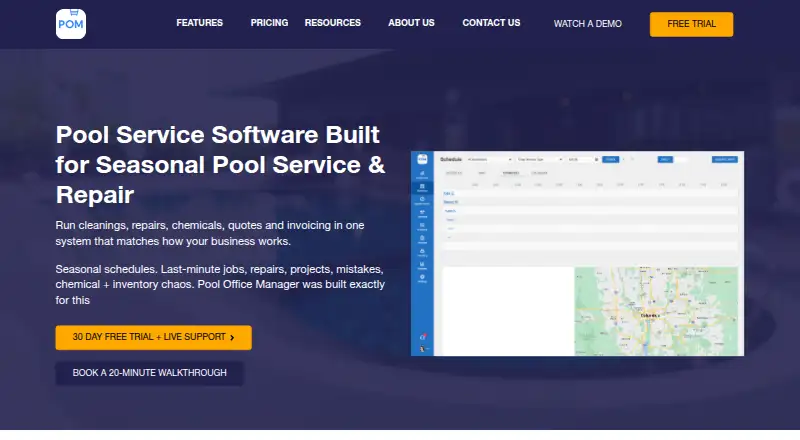
Pool Office Manager is cloud-based software for pool service and repair businesses managing recurring maintenance, repairs, openings, closings, and changing seasonal routes. It combines route optimization, map-based scheduling, recurring and one-off jobs, customer records, work orders, quotes, contracts, digital signatures, invoicing, reporting, and customer communication. Technicians can work through iOS and Android apps with GPS, photos, checklists, chemical readings, calculated dosing, and offline operation. It is aimed at established and growing companies that need one system for office administration and field service.
Its strongest fit is the depth of its pool-specific workflow. Chemical readings and dosing calculations sit alongside chemical and parts inventory tracking, while recurring, one-off, and bulk invoicing support different service models. The customer portal allows invoice viewing and autopay setup, and post-service notifications and custom reports extend the workflow beyond scheduling. Route optimization and map-based scheduling are useful for businesses coordinating changing routes, while work orders, quotes, contracts, and digital signatures cover repair and service administration.
Pricing is structured around a $125-per-month first-user plan with full platform access, unlimited customers, jobs, photos, pictures, quotes, jobs, and invoices, plus updates, feature upgrades, support, and training. Additional users cost $25 per user per month, and seasonal users can be deactivated during the off-season. QuickBooks Online, QuickBooks Desktop, and Stripe are supported; QuickBooks integration is listed at an additional $25 per month. A 30-day free trial is available. Pool Office Manager suits businesses that will use its broad workflow and field capabilities, while smaller operations seeking a lower starting price or AI features may prefer a narrower alternative.
Questions about Pool Office Manager
Does Pool Office Manager have a free plan? No free plan is listed; paid plans start at $25/user/mo (Additional user).
How much does Pool Office Manager cost? Pool Office Manager lists 2 paid plans; the lowest is Additional user at $25/user/mo.
Is there a free trial of Pool Office Manager? Yes: a 30-day free trial.
What does Pool Office Manager run on? Web, iOS and Android. It runs in the cloud and as a mobile app.
What does Pool Office Manager integrate with? 3 integrations: QuickBooks Online, QuickBooks Desktop and Stripe.
Who is Pool Office Manager built for? Small businesses and mid-market companies (our editorial estimate).
Your product? Our editors can test Pool Office Manager in depth and publish a review, labelled as paid · from $149/mo →
Pool Office Manager pricing
All 2 Pool Office Manager plans and prices →
Pool Office Manager fact sheet
| Free plan | No |
|---|---|
| Paid from | $25/user/mo |
| Route scheduling | Yes |
| Recurring service plans | Yes |
| Chemical readings | Yes |
| Technician mobile app | Yes |
| Customer portal | Yes |
| Work orders | Yes |
| Invoicing | Yes |
| Free trial | 30 days |
| Deployment | Cloud, Mobile |
| Platforms | Web, iOS, Android |
| Support | Phone |
| Built for | Small business, Mid-market (editorial estimate) |
| Integrations | 3 integrations: QuickBooks Online, QuickBooks Desktop, Stripe |
| Pricing | 30-day trial (source) |
| Website | poolofficemanager.com |
| Facts checked | 20 Sep 2026 |
Pool Office Manager integrations
Pool Office Manager lists 3 integrations on its own site.
- QuickBooks Online
- QuickBooks Desktop
- Stripe
Alternatives to Pool Office Manager
- SkimmerA focused pool-service platform with location-based pricing and deep field workflows.9.4
- Pool BrainA broad pool-service platform covering field work, chemicals, billing, and customer access.9.2
- PoolDialA broad pool-operations platform with offline field tools and AI features.9.0



See all Pool Office Manager alternatives →
Used Pool Office Manager? Be the first to review it
The editor score above is our own research. What this page doesn't have yet is a reader's view — what you used Pool Office Manager for, what worked and what didn't. No stars are seeded and no review is paid for; an editor reads every one before it appears.
Write a reviewTwo minutes · verified accounts only · read by an editor before it appears
Featured on iTechGuides

Pool Office Manager is listed in our Pool Service Software directory. Add the badge to your site — it links back to this page.
<a href="https://www.itechguides.com/products/pool-office-manager/"><img src="https://www.itechguides.com/best/badge/pool-office-manager.svg" alt="Featured on iTechGuides" width="230" height="46"></a>
Reviewed by iTechGuides Editors · Editorial team · Updated Nov 2026
Advertiser disclosure: iTechGuides is reader-supported. Vendors can pay for top positions in our rankings and for a place on other products' pages, and we may earn a commission when you click some links. Bought places stand at the number bought; this page and our disclosure say so. Paying vendors may get a fuller, more detailed review from our editors, and that review can change their score. How we rank.
Last updated · How we research and update