Podcapture
Podcapture: A simple per-episode recorder for remote guests, with free local recording and cloud delivery. Ranked #16 of 22 in Podcast Recording Software by our editors (7.8/10); pricing: Paid; best for occasional guests needing simple per-episode pricing.
At a glance
- Editor score7.8 / 10
- PricingPaid
- Best forOccasional guests needing simple per-episode pricing
- Free planNo
- Paid from$9/unit one-time
- Separate participant tracksYes
- Facts checked21 Sep 2026
Where it wins
- Local audio and video recording on each participant’s device
- Guests join without accounts, downloads, or installations
- Separate participant files delivered to Google Drive or Dropbox
Where it doesn't
- Free episodes are limited to 60 minutes and two guests
- Pro costs $9 per episode for longer recordings and more guests
- Browser-only workflow with no AI features
Our verdict on Podcapture
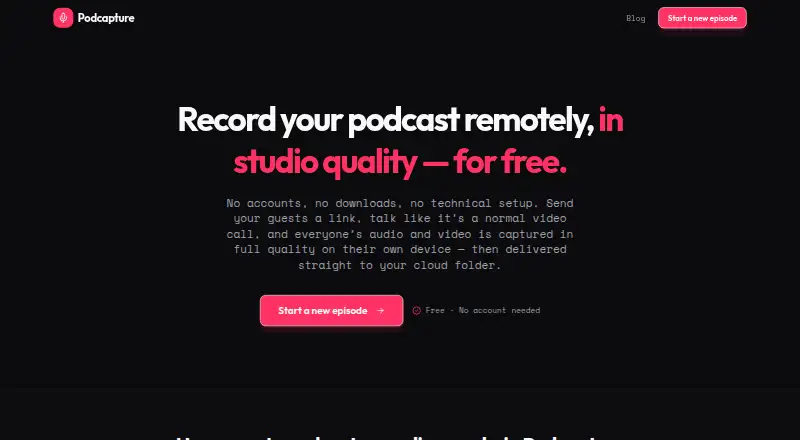
Podcapture is a browser-based remote podcast recording tool for hosts and guests. Participants join through an invite link without accounts, downloads, or installations, while each device records audio and video locally. The service creates separate audio and video files for each participant, supports a lightweight video call during recording, and delivers files to a shared cloud folder. It is aimed at creators who want straightforward remote recording without a recurring subscription.
The pricing is simple. The Free plan costs $0 per episode and includes up to 60 minutes of recording, up to two guests, local recording, and delivery to a shared cloud folder. The Pro episode plan costs $9 per episode as a one-time charge. It includes the Free features, removes the recording-length limit, supports up to eight guests, and allows an upgrade during recording. This model suits occasional recording more naturally than a monthly plan, particularly when episode volume varies.
Podcapture’s strongest focus is recording quality and recovery: each participant records locally, files are saved every few seconds for crash-safe protection, and full-quality video is recorded alongside audio. Google Drive and Dropbox provide familiar delivery destinations. The trade-off is a narrow workflow centered on capture and file delivery. There are no AI features, and the browser-only platform may not suit teams seeking a broader production environment. Choose Podcapture for occasional remote episodes with a small or expanding guest group; choose another tool if editing, transcription, or wider workflow automation is central to the recording process.
Your product? Our editors can test Podcapture in depth and publish a review, labelled as paid · from $149/mo →
Podcapture pricing
All 2 Podcapture plans and prices →
Podcapture fact sheet
| Free plan | No |
|---|---|
| Paid from | $9/unit one-time |
| Separate participant tracks | Yes |
| Local recording | Yes |
| Maximum participants | Not verified |
| Audio export format | Not verified |
| Video recording | Yes |
| Automatic transcription | Not verified |
| Recording platform | Browser |
| Deployment | Cloud |
| Platforms | Web |
| Support | Email, Docs |
| Built for | Solo, Small business (editorial estimate) |
| Integrations | 2 integrations: Google Drive, Dropbox |
| Pricing | Paid (source) |
| Website | podcapture.app |
| Facts checked | 21 Sep 2026 |
Podcapture integrations
Podcapture lists 2 integrations on its own site.
- Google Drive
- Dropbox
Alternatives to Podcapture
- RiversideA full recording-to-publishing workspace for creators who want polished remote production.9.4
- Adobe PodcastA capable browser studio for remote recording and AI-assisted podcast editing.9.2
- AsyncA full podcast workflow with a free plan and scalable recording, editing, and AI tools.9.1



See all Podcapture alternatives →
Used Podcapture? Be the first to review it
The editor score above is our own research. What this page doesn't have yet is a reader's view — what you used Podcapture for, what worked and what didn't. No stars are seeded and no review is paid for; an editor reads every one before it appears.
Write a reviewTwo minutes · verified accounts only · read by an editor before it appears
Featured on iTechGuides

Podcapture is listed in our Podcast Recording Software directory. Add the badge to your site — it links back to this page.
<a href="https://www.itechguides.com/products/podcapture/"><img src="https://www.itechguides.com/best/badge/podcapture.svg" alt="Featured on iTechGuides" width="230" height="46"></a>
Reviewed by iTechGuides Editors · Editorial team · Updated Oct 2026
Advertiser disclosure: iTechGuides is reader-supported. Vendors can pay for top positions in our rankings and for a place on other products' pages, and we may earn a commission when you click some links. Bought places stand at the number bought; this page and our disclosure say so. Paying vendors may get a fuller, more detailed review from our editors, and that review can change their score. How we rank.
Last updated · How we research and update