
PixPin
PixPin: A capable free desktop capture tool for annotated screenshots, OCR and recordings. Ranked #17 of 75 in Screenshot Annotation Software by our editors (7.5/10); pricing: Free plan; best for windows/macOS users wanting fast annotated captures.
At a glance
- Editor score7.5 / 10
- PricingFree plan
- Best forWindows/macOS users wanting fast annotated captures
- Free planYes
- Redaction toolsYes
- Facts checked24 Sep 2026
Where it wins
- UI-aware capture handles regions, windows, full screens and scrolling content
- Annotations include redaction, shapes, arrows, markers, text and highlights
- On-device OCR, pinning and annotated video or GIF recording broaden its utility
Where it doesn't
- Desktop-only support limits use across other platforms
- No integrations or browser extension for web-based workflows
- No team collaboration features for shared review processes
Our verdict on PixPin
PixPin is a desktop capture utility for Windows and macOS, aimed at people who need to document screens quickly and mark up the results. Its documented audiences include designers, developers, product managers, support staff, researchers and educators. Capture modes cover screen regions, windows, full screens and scrolling pages, with UI element detection intended to target interface components. The freemium model makes the core tool accessible to solo users and small teams, while a membership subscription adds further capabilities.
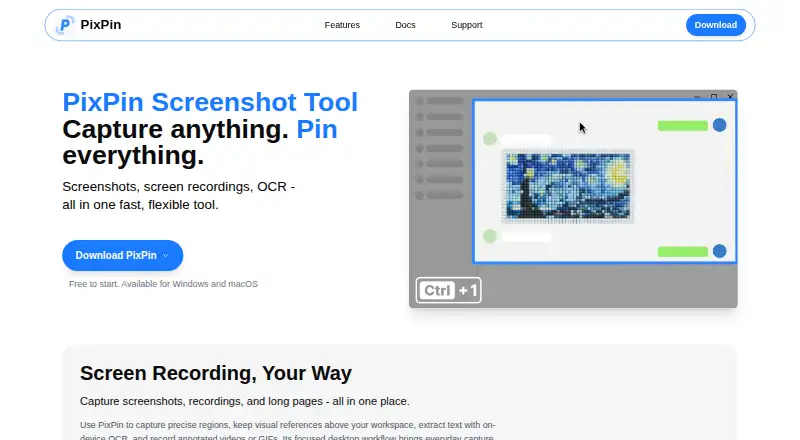
The feature set extends well beyond a basic screenshot tool. PixPin can stitch scrolling content into a long image, then apply shapes, arrows, numbered markers, pencil strokes, highlighter marks and text. Mosaic, blur and Smart Erase options help obscure sensitive areas. On-device OCR recognizes text for copying, while pinning keeps images, text, colors or files above other windows. Screen video and GIF recording can include annotations, and automatic or manual saving settings support different capture habits. Together, these functions make PixPin useful for visual bug reports, tutorials, research notes and support explanations.
Its fit is narrower when work depends on a broader software ecosystem. PixPin runs as a desktop app on Windows and macOS, without integrations, browser extension support or team-collaboration features. That setup suits individuals who value local capture and annotation over shared review or web access. Buyers needing coordinated workflows, connected apps or cross-platform coverage should consider an alternative with those capabilities. For solo creators and small groups seeking a free-first capture utility with OCR, redaction and recording in one desktop package, PixPin is a focused option.
Your product? Our editors can test PixPin in depth and publish a review, labelled as paid · from $149/mo →
PixPin pricing
PixPin fact sheet
| Free plan | Yes |
|---|---|
| Paid from | Not verified |
| Redaction tools | Yes |
| Measurement tools | Not verified |
| Team collaboration | No |
| Browser extension | No |
| Export formats | Not verified |
| Maximum file size | Not verified |
| Deployment | Desktop |
| Platforms | Windows, macOS |
| Support | Email, Docs |
| Built for | Solo, Small business (editorial estimate) |
| Pricing | Free plan |
| Website | pixpin.com |
| Facts checked | 24 Sep 2026 |
Alternatives to PixPin
- SnagitA paid desktop suite for detailed screenshot capture, annotation, OCR, and short video creation.9.3
- ShareXA highly configurable Windows capture tool for annotation, OCR, recording, and automated sharing.9.1
- ScreenpressoA broad Windows capture toolkit with strong annotation, OCR, document, and sharing features.8.9



Used PixPin? Be the first to review it
The editor score above is our own research. What this page doesn't have yet is a reader's view — what you used PixPin for, what worked and what didn't. No stars are seeded and no review is paid for; an editor reads every one before it appears.
Write a reviewTwo minutes · verified accounts only · read by an editor before it appears
Featured on iTechGuides

PixPin is listed in our Screenshot Annotation Software directory. Add the badge to your site — it links back to this page.
<a href="https://www.itechguides.com/products/pixpin/"><img src="https://www.itechguides.com/best/badge/pixpin.svg" alt="Featured on iTechGuides" width="230" height="46"></a>
Reviewed by iTechGuides Editors · Editorial team · Updated Oct 2026
Advertiser disclosure: iTechGuides is reader-supported. Vendors can pay for top positions in our rankings and for a place on other products' pages, and we may earn a commission when you click some links. Bought places stand at the number bought; this page and our disclosure say so. Paying vendors may get a fuller, more detailed review from our editors, and that review can change their score. How we rank.
Last updated · How we research and update