
Pixelcut
Pixelcut: A flexible background remover for ecommerce catalogs, creators, and marketing teams. Ranked #2 of 93 in AI Background Removers by our editors (9.1/10); pricing: Free plan; best for high-volume creators and ecommerce teams.
At a glance
- Editor score9.1 / 10
- PricingFree plan
- Best forHigh-volume creators and ecommerce teams
- Free planYes
- Replacement backgroundsYes
- Facts checked23 Sep 2026
Where it wins
- Manual edge refinement improves control over difficult subjects.
- Batch processing supports up to 10,000 images with ZIP downloads.
- API, video removal, and replacement backgrounds broaden workflows.
Where it doesn't
- The Free plan limits background removal and upscaling.
- Pro includes 1,000 batch exports monthly.
- Video background removal supports MP4 files.
Our verdict on Pixelcut
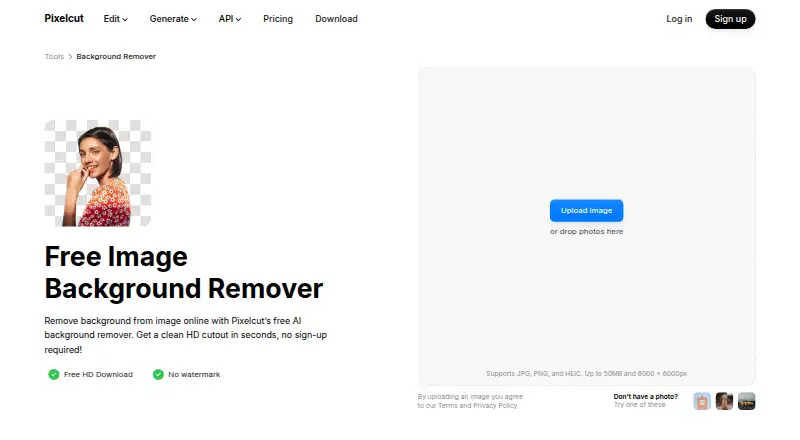
Pixelcut is an AI photo and video editor built for ecommerce sellers, creators, marketers, brands, and small businesses. Its background remover uses automatic subject detection, then supports manual edge refinement for more control. Users can export transparent PNGs, replace backgrounds with colors or white backgrounds, generate AI backgrounds, upscale images, retouch photos, and remove backgrounds from MP4 video files. It is available on the web, iOS, Android, and through an API, with a Claude integration also listed.
The pricing structure supports both lightweight editing and commercial production. The Free plan costs $0 per month with annual billing and includes limited background removal, limited upscaling, and free exports without a watermark. Pro costs $8 per month with annual billing and adds 600 AI credits monthly, unlimited background removal and upscaling, a three-person team, 1,000 batch exports monthly, and a commercial license. Business costs $24 per month with annual billing and increases the allowance to 3,600 AI credits monthly, a 10-person team, and 2,000 batch exports monthly, while retaining unlimited background removal and upscaling plus commercial use.
For catalog work, Pixelcut’s batch tools are a clear strength: they support consistent sizing and padding, ZIP downloads, and batch background removal for up to 10,000 images. The API can support automated workflows, while replacement backgrounds and product-visual generation extend the tool beyond simple cutouts. The main trade-off is plan-based capacity: the Free plan is limited, and paid tiers impose monthly batch-export limits. Pixelcut suits teams producing large volumes of product imagery and creators who need image, video, and API workflows; occasional users needing only basic background removal may find the paid feature set more than they need.
Your product? Our editors can test Pixelcut in depth and publish a review, labelled as paid · from $149/mo →
Pixelcut pricing
All 3 Pixelcut plans and prices →
Pixelcut fact sheet
| Free plan | Yes |
|---|---|
| Paid from | Not verified |
| Replacement backgrounds | Yes |
| Batch processing | Yes |
| API access | Yes |
| Maximum output resolution | Not verified |
| Monthly image allowance | Not verified |
| Export formats | PNG; API additionally supports JPEG input, alpha mask, and foreground-plus-alpha-mask ZIP output |
| Commercial use | Yes |
| Deployment | Cloud, Mobile |
| Platforms | Web, iOS, Android |
| Support | Docs |
| Built for | Solo, Small business, Mid-market (editorial estimate) |
| Pricing | Free plan (source) |
| Website | pixelcut.ai |
| Facts checked | 23 Sep 2026 |
Alternatives to Pixelcut
- remove.bgA versatile background remover for teams that need automation, integrations, and high-resolution exports.9.3
- PhotoroomA broad image editor that combines background removal with AI, batch, team, and API workflows.9.0
- SlazzerA broad background-removal toolkit for creators, ecommerce teams, and developers.8.9



See all Pixelcut alternatives →
Pixelcut vs the competition
- Pixelcut vs remove.bg
- Pixelcut vs Photoroom
- Pixelcut vs Slazzer
- Pixelcut vs Cutout.Pro
- Pixelcut vs LocalBG
- Pixelcut vs Kavij


Compare Pixelcut with any tool side by side →
Also Ranked In
Pixelcut is ranked in 14 of our directories; the 6 strongest besides AI Background Removers.
Used Pixelcut? Be the first to review it
The editor score above is our own research. What this page doesn't have yet is a reader's view — what you used Pixelcut for, what worked and what didn't. No stars are seeded and no review is paid for; an editor reads every one before it appears.
Write a reviewTwo minutes · verified accounts only · read by an editor before it appears
Featured on iTechGuides

Pixelcut is listed in our AI Background Removers directory. Add the badge to your site — it links back to this page.
<a href="https://www.itechguides.com/products/pixelcut/"><img src="https://www.itechguides.com/best/badge/pixelcut.svg" alt="Featured on iTechGuides" width="230" height="46"></a>
Reviewed by iTechGuides Editors · Editorial team · Updated Oct 2026
Advertiser disclosure: iTechGuides is reader-supported. Vendors can pay for top positions in our rankings and for a place on other products' pages, and we may earn a commission when you click some links. Bought places stand at the number bought; this page and our disclosure say so. Paying vendors may get a fuller, more detailed review from our editors, and that review can change their score. How we rank.
Last updated · How we research and update