
Pixel FX Designer
Pixel FX Designer: A focused, affordable desktop tool for authoring and exporting pixel particle effects. Ranked #18 of 25 in 2D Game Animation Software by our editors (6.6/10); pricing: Paid; best for desktop pixel particle-effect authoring.
At a glance
- Editor score6.6 / 10
- PricingPaid
- Best forDesktop pixel particle-effect authoring
- Free planNo
- Paid from$19.95 one-time
- Animation methodFrame-based
- Facts checked20 Sep 2026
Where it wins
- Editable emitters, timelines, paths, and basic physics controls
- Pixel styling with palettes, dithering, pixelation, and layered rendering
- PNG spritesheet, GIF, and JSON export with loop animation support
Where it doesn't
- No free plan; the product costs $19.95 as a one-time purchase
- Focused on particle effects rather than broader 2D animation workflows
- Designed for Windows and macOS desktops, not mobile platforms
Our verdict on Pixel FX Designer
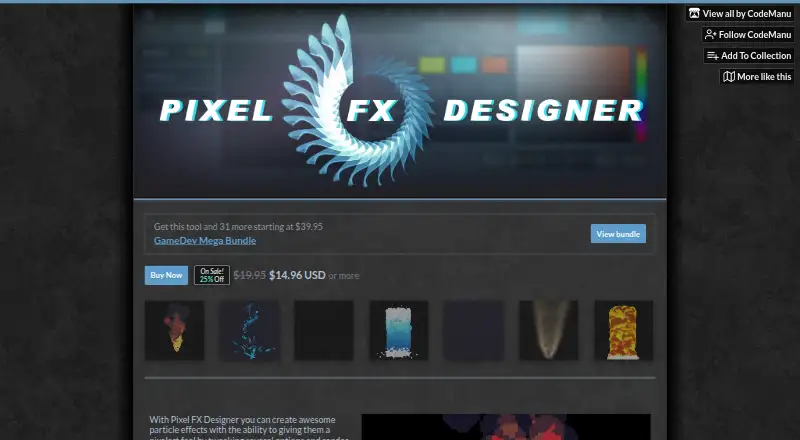
Pixel FX Designer is a Windows and macOS desktop tool for game developers and artists creating pixel-art particle effects for 2D projects. Its workflow centers on particle emitters, editable parameters, timeline editing, path drawing, basic physics controls, custom particle shapes, and layered rendering. It also supports palette, dithering, pixelation, glow, outline, sepia, and other post-processing controls. The product suits creators who need a dedicated authoring environment for effects such as animated particles, rather than a general-purpose animation package.
The pricing model is straightforward: Pixel FX Designer has one paid plan at $19.95 USD as a one-time purchase, with future updates included. There is no free plan. For that purchase, the feature set covers particle authoring, frame-based animation, manual rendering of particle movement, looping, and export to PNG spritesheets, GIF, or JSON project data. JSON export supports recreation of particle effects in a game engine, while image and GIF exports serve workflows that need rendered animation assets.
Its main strength is focus. Artists can adjust particle behavior and appearance in one desktop application, then refine the result with pixel-specific controls and post-processing effects. The narrow scope is also the key boundary: this is a particle-effect tool, not a broad 2D animation suite. Choose Pixel FX Designer if your project needs pixel-styled effects, editable particle motion, and practical asset exports at a one-time price. Choose another category tool if you need a wider animation pipeline beyond particle authoring or a platform outside Windows and macOS.
Your product? Our editors can test Pixel FX Designer in depth and publish a review, labelled as paid · from $149/mo →
Pixel FX Designer pricing
All 1 Pixel FX Designer plans and prices →
Pixel FX Designer fact sheet
| Free plan | No |
|---|---|
| Paid from | $19.95 one-time |
| Animation method | Frame-based |
| Runtime export | Yes |
| Mesh deformation | Not verified |
| Frame-by-frame tools | Yes |
| Particle effects | Yes |
| Runtime targets | Not verified |
| Deployment | Desktop |
| Platforms | Windows, macOS |
| Support | Community, Docs |
| Built for | Solo, Small business (editorial estimate) |
| Pricing | Paid (source) |
| Website | codemanu.itch.io |
| Facts checked | 20 Sep 2026 |
Alternatives to Pixel FX Designer
- SpineA deep 2D rigging tool for game teams that can manage a paid workflow.9.4
- CreatureA capable Windows tool for advanced 2D game animation and deformation workflows.9.1
- RiveA broad cross-platform animation workspace with game-ready runtimes and collaboration.8.8


See all Pixel FX Designer alternatives →
Used Pixel FX Designer? Be the first to review it
The editor score above is our own research. What this page doesn't have yet is a reader's view — what you used Pixel FX Designer for, what worked and what didn't. No stars are seeded and no review is paid for; an editor reads every one before it appears.
Write a reviewTwo minutes · verified accounts only · read by an editor before it appears
Featured on iTechGuides

Pixel FX Designer is listed in our 2D Game Animation Software directory. Add the badge to your site — it links back to this page.
<a href="https://www.itechguides.com/products/pixel-fx-designer/"><img src="https://www.itechguides.com/best/badge/pixel-fx-designer.svg" alt="Featured on iTechGuides" width="230" height="46"></a>
Reviewed by iTechGuides Editors · Editorial team · Updated Oct 2026
Advertiser disclosure: iTechGuides is reader-supported. Vendors can pay for top positions in our rankings and for a place on other products' pages, and we may earn a commission when you click some links. Bought places stand at the number bought; this page and our disclosure say so. Paying vendors may get a fuller, more detailed review from our editors, and that review can change their score. How we rank.
Last updated · How we research and update