PixCull
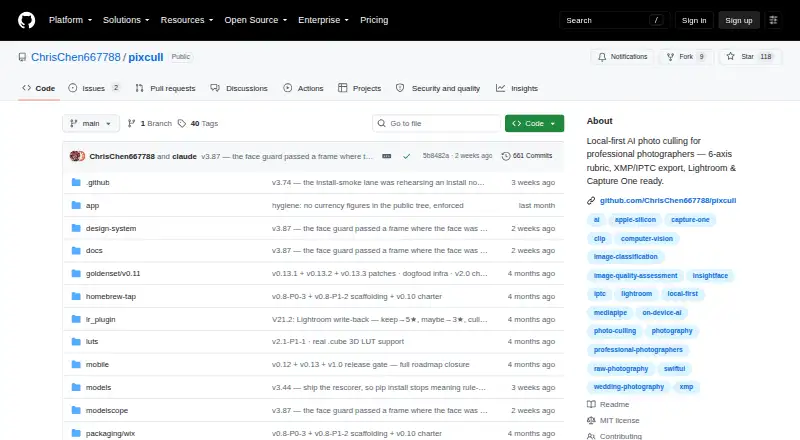
PixCull: A macOS culling tool for photographers who want detailed local quality analysis. Ranked #15 of 29 in AI Photo Culling Software by our editors (7.6/10); pricing: Open source; best for mac users wanting detailed local quality scoring.
At a glance
- Editor score7.6 / 10
- PricingOpen source
- Best forMac users wanting detailed local quality scoring
- Paid fromFree
- AI quality scoringYes
- Founded2025
- Facts checked20 Sep 2026
Where it wins
- Six-axis scoring explains why images receive their quality decisions.
- Handles RAW, JPG, and HEIC files with face and burst analysis.
- Exports XMP and IPTC sidecars for Lightroom and Capture One workflows.
Where it doesn't
- Available only on macOS.
- Current versions enable MiniMax judging by default.
- The project was founded in 2025 and has a shorter operating history.
Our verdict on PixCull
PixCull is an open-source, local-first AI photo-culling tool for professional photographers, studios, and teams. It analyzes RAW, JPG, and HEIC files, then assigns keep, maybe, or cull decisions. Its workflow combines six-axis image-quality scoring with rationales, face clustering, burst-peak ranking, similar-photo lookup, and detectors for blur, eye state, exposure, and composition. The macOS app also supports standalone HTML gallery export and an optional iOS companion source package.
Its standout feature is the depth of its review model. Rather than offering only a single quality judgment, PixCull scores images across six axes and explains the reasoning. Local face clustering and recognition can work across runs, while burst ranking helps narrow sequences and similar-photo lookup supports broader review. These features give photographers several ways to inspect a large shoot before exporting decisions. RAW, JPG, and HEIC intake further suits mixed photo libraries.
PixCull fits workflows built around Adobe Lightroom and Capture One through XMP and IPTC sidecar export, tether workflows, and documented integration support. Its local-first design is relevant for teams that want on-device processing, but the project also documents optional external model calls. MiniMax judging is enabled by default in current versions and can be disabled, so teams should review that setting before adopting the workflow. Mac users seeking detailed, explainable culling should consider PixCull; photographers on other platforms or teams seeking a longer-established project should look elsewhere.
Your product? Our editors can test PixCull in depth and publish a review, labelled as paid · from $149/mo →
PixCull pricing
PixCull fact sheet
| Free plan | Not verified |
|---|---|
| Paid from | Free |
| AI quality scoring | Yes |
| Subject detection | Yes |
| Duplicate detection | Yes |
| RAW photo support | Yes |
| Blur detection | Yes |
| Closed-eye detection | Yes |
| Lightroom export | Yes |
| Deployment | Self-hosted, Desktop |
| Platforms | macOS |
| Support | Docs, Community |
| Built for | Solo, Small business, Mid-market (editorial estimate) |
| Integrations | 4 integrations: Adobe Lightroom, Capture One, DeepSeek, MiniMax |
| Pricing | Open source |
| Website | github.com |
| Facts checked | 20 Sep 2026 |
PixCull integrations
PixCull lists 4 integrations on its own site.
- Adobe Lightroom
- Capture One
- DeepSeek
- MiniMax
Alternatives to PixCull
- AftershootAn all-in-one desktop workflow for high-volume photo post-production.9.4
- FacetA free, open-source culling engine with broad AI analysis and local deployment.9.2
- FilterPixelA cloud-based desktop culling tool with genre analysis, editing profiles, and broad export support.9.0



See all PixCull alternatives →
Used PixCull? Be the first to review it
The editor score above is our own research. What this page doesn't have yet is a reader's view — what you used PixCull for, what worked and what didn't. No stars are seeded and no review is paid for; an editor reads every one before it appears.
Write a reviewTwo minutes · verified accounts only · read by an editor before it appears
Featured on iTechGuides

PixCull is listed in our AI Photo Culling Software directory. Add the badge to your site — it links back to this page.
<a href="https://www.itechguides.com/products/pixcull/"><img src="https://www.itechguides.com/best/badge/pixcull.svg" alt="Featured on iTechGuides" width="230" height="46"></a>
Reviewed by iTechGuides Editors · Editorial team · Updated Oct 2026
Advertiser disclosure: iTechGuides is reader-supported. Vendors can pay for top positions in our rankings and for a place on other products' pages, and we may earn a commission when you click some links. Bought places stand at the number bought; this page and our disclosure say so. Paying vendors may get a fuller, more detailed review from our editors, and that review can change their score. How we rank.
Last updated · How we research and update