
Pink Arrows
Pink Arrows: A focused, open-source tool for quick local screenshot markup across major platforms. Ranked #68 of 75 in Screenshot Annotation Software by our editors (3.0/10); pricing: Free plan; best for minimal cross-platform arrow markup.
At a glance
- Editor score3.0 / 10
- PricingFree plan
- Best forMinimal cross-platform arrow markup
- Free planYes
- Paid fromFree
- Redaction toolsNo
- Facts checked20 Sep 2026
Where it wins
- Free and open-source with no accounts or installation
- Supports web, Windows, macOS, and Linux
- Quick markup with arrows, shapes, text, emojis, and PNG export
Where it doesn't
- No redaction or measurement tools
- No team collaboration or browser extension
- Exports annotated images only as PNG files
Our verdict on Pink Arrows
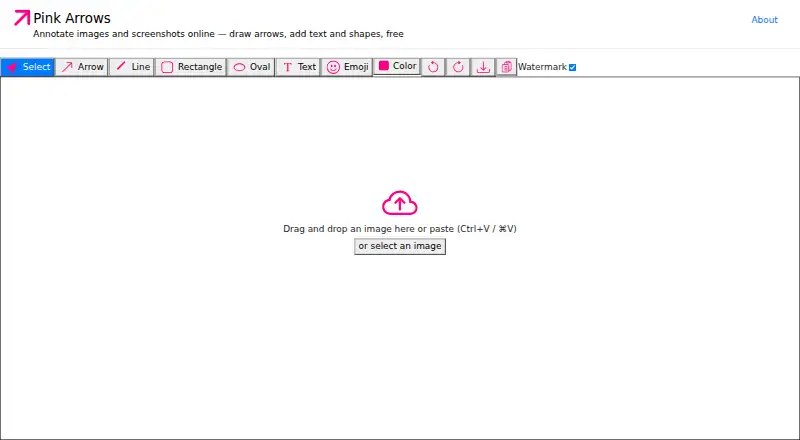
Pink Arrows is a free, open-source web application for annotating images and screenshots. It is aimed at people who need lightweight visual markup for bug reports, tutorials, callouts, and internal screenshot communication. Users can paste, drag, or select an image, then add arrows, line segments, rectangles, ovals, text labels, and emoji stamps. The tool is available on the web and is also listed for Windows, macOS, and Linux, making it a practical fit for mixed-device workflows.
The workflow is intentionally local and lightweight. Images are processed in the browser, with no account, installation, or server-side image upload required. Clipboard paste and copy, drag-and-drop input, keyboard shortcuts, and undo and redo support help keep the annotation flow direct. Once the markup is complete, users can copy the image to the clipboard or download it as a PNG. Its open-source model and free access also suit individuals and teams that need a simple utility without paid tiers or account administration.
Pink Arrows is strongest when the task is to point, label, circle, or highlight part of an image quickly. Its scope is narrower than tools built for structured review or detailed visual analysis: it does not provide redaction, measurement tools, team collaboration, or a browser extension, and PNG is the listed export format. Choose it for straightforward local annotation across common desktop platforms. Choose an alternative when screenshot work requires sensitive-information masking, dimensions, shared review workflows, browser capture, or multiple export formats.
Your product? Our editors can test Pink Arrows in depth and publish a review, labelled as paid · from $149/mo →
Pink Arrows pricing
Pink Arrows fact sheet
| Free plan | Yes |
|---|---|
| Paid from | Free |
| Redaction tools | No |
| Measurement tools | No |
| Team collaboration | No |
| Browser extension | No |
| Export formats | PNG |
| Maximum file size | Not verified |
| Deployment | Cloud, Self-hosted |
| Platforms | Web, Windows, macOS, Linux |
| Built for | Solo, Small business (editorial estimate) |
| Pricing | Free plan |
| Website | pinkarrows.app |
| Facts checked | 20 Sep 2026 |
Alternatives to Pink Arrows
- SnagitA paid desktop suite for detailed screenshot capture, annotation, OCR, and short video creation.9.3
- ShareXA highly configurable Windows capture tool for annotation, OCR, recording, and automated sharing.9.1
- ScreenpressoA broad Windows capture toolkit with strong annotation, OCR, document, and sharing features.8.9



See all Pink Arrows alternatives →
Used Pink Arrows? Be the first to review it
The editor score above is our own research. What this page doesn't have yet is a reader's view — what you used Pink Arrows for, what worked and what didn't. No stars are seeded and no review is paid for; an editor reads every one before it appears.
Write a reviewTwo minutes · verified accounts only · read by an editor before it appears
Featured on iTechGuides

Pink Arrows is listed in our Screenshot Annotation Software directory. Add the badge to your site — it links back to this page.
<a href="https://www.itechguides.com/products/pink-arrows/"><img src="https://www.itechguides.com/best/badge/pink-arrows.svg" alt="Featured on iTechGuides" width="230" height="46"></a>
Reviewed by iTechGuides Editors · Editorial team · Updated Oct 2026
Advertiser disclosure: iTechGuides is reader-supported. Vendors can pay for top positions in our rankings and for a place on other products' pages, and we may earn a commission when you click some links. Bought places stand at the number bought; this page and our disclosure say so. Paying vendors may get a fuller, more detailed review from our editors, and that review can change their score. How we rank.
Last updated · How we research and update