
Pikimov
Pikimov: A free local editor for creators who need compositing, tracking, and AI tools. Ranked #71 of 78 in AI Video Editors by our editors (3.0/10); pricing: Free plan; best for free creators needing AI compositing tools.
At a glance
- Editor score3.0 / 10
- PricingFree plan
- Best forFree creators needing AI compositing tools
- Free planYes
- Paid fromFree
- Facts checked24 Sep 2026
Where it wins
- Free exports up to 4K at 60fps with no watermark
- AI background removal, motion tracking, and subtitle generation
- Local editing and rendering across web and desktop platforms
Where it doesn't
- The standalone offline desktop app is not a conventional paid plan
- It is not open source
- Subtitle generation does not extend to transcript-based editing
Our verdict on Pikimov
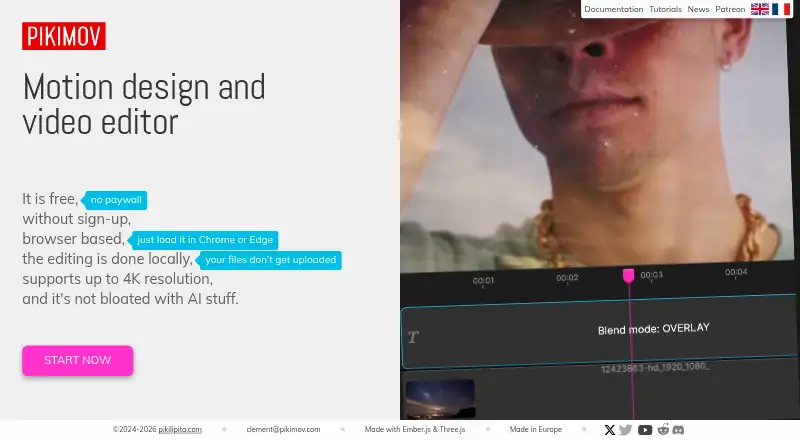
Pikimov is a free video and motion design editor for creators making social media videos, motion graphics, and composited scenes. It combines standard tools such as crop, cut, trim, and transitions with 2D and 3D compositing, keyframe animation, masking, effects, particles, motion tracking, rotoscoping, and AI background removal. Editing and rendering happen locally on the user’s computer, without uploading project files, making it a fit for creators who want broad visual tools without a subscription or sign-up.
The Free plan includes no sign-up, no paywall, no watermark, and exports up to 4K at 60fps. That is a clear advantage for creators who need high-resolution output without adding recurring software costs. The browser application supports Windows, macOS, Linux, and compatible Chromebook browsers. A standalone offline desktop app is available as a Patreon supporter reward rather than as a conventional paid tier, so the product’s plan structure remains focused on free access instead of tiered feature packaging.
Pikimov’s strongest distinction is its combination of local processing with compositing-oriented features. Automatic motion tracking, manual and automatic rotoscoping, particle presets, deformation, blur, glitch, text effects, and keyframes give it more visual depth than a basic cut-and-trim editor. Subtitle generation is included, while the published feature set does not extend to transcript-based editing, silence removal, or AI audio cleanup. Choose Pikimov if free local editing and compositing matter most; choose an alternative if you need a conventional paid desktop plan or a broader AI audio and transcript workflow.
Your product? Our editors can test Pikimov in depth and publish a review, labelled as paid · from $149/mo →
Pikimov pricing
Pikimov fact sheet
| Free plan | Yes |
|---|---|
| Paid from | Free |
| Text-based editing | Not verified |
| Automatic captions | Not verified |
| Silence removal | Not verified |
| AI audio cleanup | Not verified |
| Maximum export resolution | 4k |
| Supported platforms | web, windows, macos, linux |
| Deployment | Desktop |
| Platforms | Web, Windows, macOS, Linux |
| Support | Email, Community, Docs |
| Built for | Solo, Small business (editorial estimate) |
| Pricing | Free plan |
| Website | pikimov.com |
| Facts checked | 24 Sep 2026 |
Alternatives to Pikimov
- DaVinci ResolveA full post-production suite with an unusually capable free version.9.4
- Adobe PremiereA deep Adobe-centered editor for professional video work and collaborative production.9.3
- Avid Media ComposerA deep editor for teams needing transcript tools, high-resolution media, and shared projects.9.1


See all Pikimov alternatives →
Used Pikimov? Be the first to review it
The editor score above is our own research. What this page doesn't have yet is a reader's view — what you used Pikimov for, what worked and what didn't. No stars are seeded and no review is paid for; an editor reads every one before it appears.
Write a reviewTwo minutes · verified accounts only · read by an editor before it appears
Featured on iTechGuides

Pikimov is listed in our AI Video Editors directory. Add the badge to your site — it links back to this page.
<a href="https://www.itechguides.com/products/pikimov/"><img src="https://www.itechguides.com/best/badge/pikimov.svg" alt="Featured on iTechGuides" width="230" height="46"></a>
Reviewed by iTechGuides Editors · Editorial team · Updated Oct 2026
Advertiser disclosure: iTechGuides is reader-supported. Vendors can pay for top positions in our rankings and for a place on other products' pages, and we may earn a commission when you click some links. Bought places stand at the number bought; this page and our disclosure say so. Paying vendors may get a fuller, more detailed review from our editors, and that review can change their score. How we rank.
Last updated · How we research and update