
Pikes
Pikes: A connected AI product-content suite with broad workflows and a $49 monthly starting price. Ranked #12 of 26 in AI Product Photography Generators by our editors (8.1/10); pricing: Paid; best for marketing teams needing connected creative workflows.
At a glance
- Editor score8.1 / 10
- PricingPaid
- Best forMarketing teams needing connected creative workflows
- Free planNo
- Paid from$490/yr
- Virtual scene generationYes
- Facts checked20 Sep 2026
Where it wins
- Generates reference-based product scenes in lifestyle and studio styles
- Connects Meta, Klaviyo, Figma, and Claude via MCP
- Supports batch generation, background removal, video ads, API, and MCP workflows
Where it doesn't
- Starts at $49 per month and has no free plan
- Credit usage varies by model, resolution, video duration, and operation
- Broader creative workflows may exceed the needs of simple image-generation users
Our verdict on Pikes
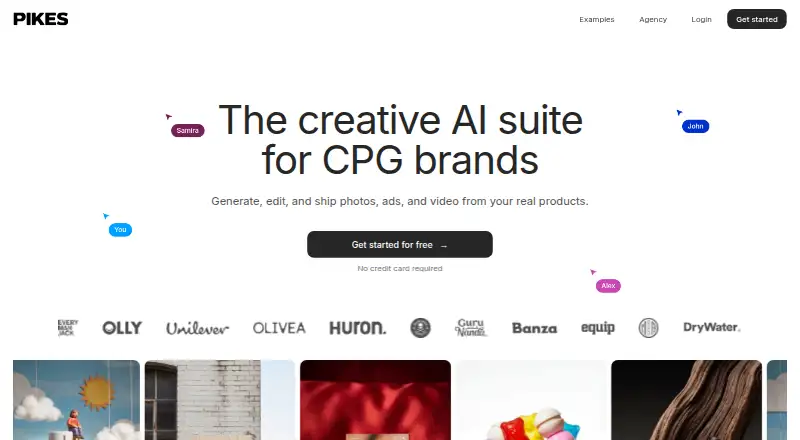
Pikes is an AI creative suite for consumer packaged goods and other product brands. It generates and edits product photos, lifestyle imagery, campaign assets, and video from real product references. Shared product libraries, brand guidelines, templates, feedback boards, scheduled content generation, and automated workflows make it suited to marketing teams managing recurring product content across channels.
The published plans show three paid tiers. Starter costs $49 per month with 750 credits each month, or $490 per plan with annual billing and credits allocated monthly. Growth costs $99 per month with 2,000 credits each month, or $594 per plan annually with credits allocated monthly. Pro costs $299 per month with 6,000 credits each month, or $1,794 per plan annually with credits allocated monthly. New accounts receive 20 one-time trial credits without a credit card; this is not a time-limited free plan. Credit usage varies by model, resolution, video duration, and operation.
Pikes stands out when product content needs to move between generation, editing, campaign production, and distribution. Meta and Klaviyo connections support channel workflows, Figma provides batch export, and Claude can connect through MCP. API and MCP access also cover automated image generation, editing, background removal, and batch jobs. Reference-based scenes, catalog variations, templates, and brand guidelines support repeatable creative production, while image-to-video ad creation extends the workflow beyond still images. Choose Pikes if connected creative operations and automation matter; a simpler image-generation tool may be a better fit for occasional standalone assets.
Questions about Pikes
Does Pikes have a free plan? No free plan is listed; paid plans start at $49/mo (Starter).
How much does Pikes cost? Pikes lists 3 paid plans; the lowest is Starter at $49/mo.
What does Pikes run on? Web. It runs in the cloud.
What does Pikes integrate with? 4 integrations: Meta, Klaviyo, Figma and Claude via MCP.
Who is Pikes built for? Small businesses, mid-market companies and enterprises (our editorial estimate).
Your product? Our editors can test Pikes in depth and publish a review, labelled as paid · from $149/mo →
Pikes pricing
All 3 Pikes plans and prices →
Pikes fact sheet
| Free plan | No |
|---|---|
| Paid from | $490/yr |
| Background removal | Yes |
| Virtual scene generation | Yes |
| Lifestyle shots | Yes |
| Catalog variations | Yes |
| Batch generation | Yes |
| API access | Yes |
| Deployment | Cloud |
| Platforms | Web |
| Support | Email, Docs |
| Built for | Small business, Mid-market, Enterprise (editorial estimate) |
| Integrations | 4 integrations: Meta, Klaviyo, Figma, Claude via MCP |
| Pricing | Paid (source) |
| Website | pikes.ai |
| Facts checked | 20 Sep 2026 |
Pikes integrations
Pikes lists 4 integrations on its own site.
- Meta
- Klaviyo
- Figma
- Claude via MCP
Alternatives to Pikes
- Tagshop AIA broad e-commerce creative suite with flexible plans, batch generation, and marketplace integrations.9.4
- GreenOnion AIA catalog-focused generator for turning one product photo into channel-ready image sets.9.3
- OmiA broad product-content platform for teams producing reusable visuals, scenes, videos and variants.9.2



Used Pikes? Be the first to review it
The editor score above is our own research. What this page doesn't have yet is a reader's view — what you used Pikes for, what worked and what didn't. No stars are seeded and no review is paid for; an editor reads every one before it appears.
Write a reviewTwo minutes · verified accounts only · read by an editor before it appears
Featured on iTechGuides

Pikes is listed in our AI Product Photography Generators directory. Add the badge to your site — it links back to this page.
<a href="https://www.itechguides.com/products/pikes/"><img src="https://www.itechguides.com/best/badge/pikes.svg" alt="Featured on iTechGuides" width="230" height="46"></a>
Reviewed by iTechGuides Editors · Editorial team · Updated Nov 2026
Advertiser disclosure: iTechGuides is reader-supported. Vendors can pay for top positions in our rankings and for a place on other products' pages, and we may earn a commission when you click some links. Bought places stand at the number bought; this page and our disclosure say so. Paying vendors may get a fuller, more detailed review from our editors, and that review can change their score. How we rank.
Last updated · How we research and update