
PicWish Old Photo Restoration
PicWish Old Photo Restoration: A broad restoration toolkit with flexible platforms and a free starting point. Ranked #3 of 29 in AI Image Restoration Software by our editors (9.1/10); pricing: Free plan; best for broad-platform old-photo restoration.
At a glance
- Editor score9.1 / 10
- PricingFree plan
- Best forBroad-platform old-photo restoration
- Free planYes
- Scratch repairYes
- Founded2021
- Facts checked20 Sep 2026
Where it wins
- Repairs scratches, cracks, creases, stains, blur, noise, and fading
- Combines face enhancement, colorization, and 2x or 4x enlargement
- Available on web, Windows, macOS, iOS, and Android
Where it doesn't
- Free Plan downloads are limited to non-HD files per day
- HD downloads for most online features require the Pro Plan
- Restoration controls center on three damage levels: mild, moderate, and severe
Our verdict on PicWish Old Photo Restoration
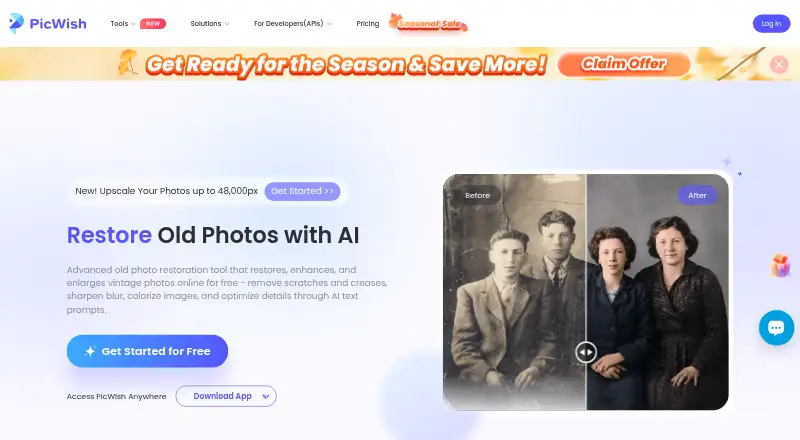
PicWish Old Photo Restoration is an AI image restoration tool for individuals, families, and other users preserving vintage or damaged photographs. It addresses common deterioration—including scratches, cracks, creases, stains, blur, noise, and fading—while also enhancing facial details, colorizing black-and-white images, and enlarging results by 2x or 4x. The workflow is focused: upload a photo, choose a damage level, optionally add a text prompt for further detail optimization, and download the restored image. Its web, Windows, macOS, iOS, and Android availability gives it a broad platform fit.
The pricing structure supports evaluation before payment. The Free Plan costs $0 per month and includes free previews for most features, access to free tools, and limited non-HD downloads per day. The Pro Plan adds daily HD downloads for most online features and extra credits. Pay as you go Credits are also available, with credits remaining permanently valid after purchase. This mix suits occasional restoration as well as users who need recurring HD downloads, although the Free Plan is more constrained for finished-file delivery.
Its strongest area is breadth within old-photo repair. Users can combine physical-damage removal, blur reduction, face unblurring, colorization, enlargement, and selectable damage severity in one tool rather than addressing each task separately. The trade-off is that the experience is centered on restoration rather than a wider photo-editing workflow, and the Free Plan’s non-HD daily download limit may not suit larger projects. Choose PicWish when you want multi-platform access and several restoration controls in one place; consider another option if your priority is a broader editing suite or fewer download restrictions.
Your product? Our editors can test PicWish Old Photo Restoration in depth and publish a review, labelled as paid · from $149/mo →
PicWish Old Photo Restoration pricing
All 3 PicWish Old Photo Restoration plans and prices →
PicWish Old Photo Restoration fact sheet
| Free plan | Yes |
|---|---|
| Paid from | Not verified |
| Scratch repair | Yes |
| Blur repair | Yes |
| Fading repair | Yes |
| Face restoration | Yes |
| Batch processing | Not verified |
| Maximum output resolution | Not verified |
| Money-back guarantee | 7 days |
| Deployment | Cloud, Desktop, Mobile |
| Platforms | Web, Windows, macOS, iOS, Android |
| Compliance & security | ISO 27001, GDPR |
| Support | Live chat, Tickets |
| Built for | Solo, Small business (editorial estimate) |
| Pricing | Free plan (source) |
| Website | picwish.com |
| Facts checked | 20 Sep 2026 |
Alternatives to PicWish Old Photo Restoration
- ImageColorizerA broad AI restoration toolkit for varied photo repair, colorization, and enhancement.9.4
- insMind AI Photo RestorationA free AI photo restorer with broad repair tools and batch enhancement.9.2
- Nero AI Photo RestorationA broad restoration toolkit with batch processing and API access.8.9



See all PicWish Old Photo Restoration alternatives →
PicWish Old Photo Restoration vs the competition
- PicWish Old Photo Restoration vs ImageColorizer
- PicWish Old Photo Restoration vs insMind AI Photo Restoration
- PicWish Old Photo Restoration vs Nero AI Photo Restoration
- PicWish Old Photo Restoration vs Pinin
- PicWish Old Photo Restoration vs Media.io AI Photo Restorer
- PicWish Old Photo Restoration vs Rewind AI Photo Restorer



Compare PicWish Old Photo Restoration with any tool side by side →
Used PicWish Old Photo Restoration? Be the first to review it
The editor score above is our own research. What this page doesn't have yet is a reader's view — what you used PicWish Old Photo Restoration for, what worked and what didn't. No stars are seeded and no review is paid for; an editor reads every one before it appears.
Write a reviewTwo minutes · verified accounts only · read by an editor before it appears
Featured on iTechGuides

PicWish Old Photo Restoration is listed in our AI Image Restoration Software directory. Add the badge to your site — it links back to this page.
<a href="https://www.itechguides.com/products/picwish-old-photo-restoration/"><img src="https://www.itechguides.com/best/badge/picwish-old-photo-restoration.svg" alt="Featured on iTechGuides" width="230" height="46"></a>
Reviewed by iTechGuides Editors · Editorial team · Updated Oct 2026
Advertiser disclosure: iTechGuides is reader-supported. Vendors can pay for top positions in our rankings and for a place on other products' pages, and we may earn a commission when you click some links. Bought places stand at the number bought; this page and our disclosure say so. Paying vendors may get a fuller, more detailed review from our editors, and that review can change their score. How we rank.
Last updated · How we research and update