
Pianoscribe
Pianoscribe: A focused, private option for turning piano recordings into editable Standard MIDI. Ranked #25 of 29 in AI Audio-to-MIDI Software by our editors (6.9/10); pricing: Free plan; best for private local piano-to-MIDI conversion.
At a glance
- Editor score6.9 / 10
- PricingFree plan
- Best forPrivate local piano-to-MIDI conversion
- Free planYes
- Paid fromFree
- Polyphonic transcriptionYes
- Facts checked20 Sep 2026
Where it wins
- Local processing keeps recordings on the Windows computer
- Detects pitches, timing, dynamics, and pedal information
- Free open-source software with CUDA and DirectML options
Where it doesn't
- Focused primarily on piano recordings rather than broader instruments
- Standard MIDI output is the main editing and export path
- Windows is the only listed platform
Our verdict on Pianoscribe
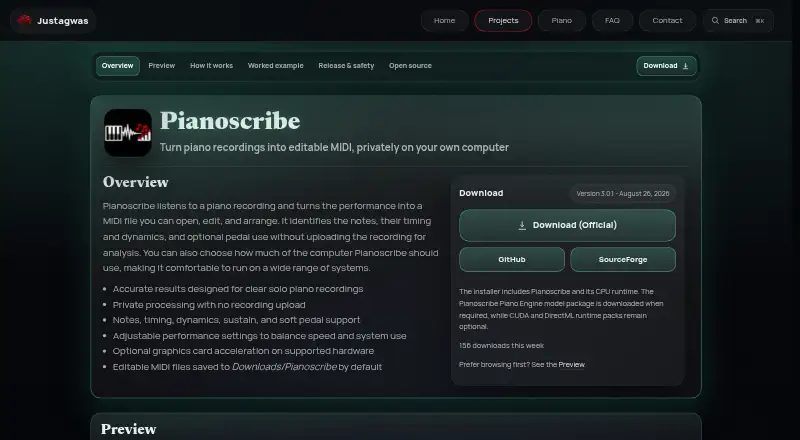
Pianoscribe is open-source Windows software for converting piano recordings into editable Standard MIDI files. It is aimed at musicians, arrangers, and producers who want to turn recorded piano performances into material they can edit in music-production or notation software. The application detects note pitches, timing, and dynamics, with optional transcription for sustain and soft pedals. It supports mono and multichannel audio input, including MP3, WAV, FLAC, OGG, M4A, AAC, WMA, AIFF, and AIF files.
Privacy is a central part of its design: processing happens locally on the user’s computer rather than uploading recordings for analysis. Users can adjust CPU performance controls and optionally enable CUDA or DirectML acceleration. That combination suits people working with private recordings or who prefer a local workflow. Pianoscribe is designed primarily for clear solo-piano recordings, so its narrow focus is a strength for piano transcription but a limitation for projects centered on other instruments or full ensemble arrangements.
The output is saved as an editable MIDI file in a configurable folder, giving users a practical handoff to downstream music-production or notation software. Its feature set centers on Standard MIDI rather than built-in notation export or broad integrations, so buyers looking for an integrated notation workflow or wider platform ecosystem should consider another option. Choose Pianoscribe when local processing, open-source availability, and piano-focused transcription matter most; choose an alternative when you need broader instrument coverage, built-in notation features, or a non-Windows workflow.
Your product? Our editors can test Pianoscribe in depth and publish a review, labelled as paid · from $149/mo →
Pianoscribe pricing
Pianoscribe fact sheet
| Free plan | Yes |
|---|---|
| Paid from | Free |
| Polyphonic transcription | Yes |
| Notation export | Not verified |
| DAW plugin | Not verified |
| Audio input formats | MP3, WAV, FLAC, OGG, M4A, AAC, WMA, AIFF, AIF |
| Maximum audio length | Not verified |
| Batch processing | Not verified |
| Deployment | Desktop |
| Platforms | Windows |
| Support | Email, Docs |
| Built for | Solo, Small business (editorial estimate) |
| Pricing | Free plan |
| Website | justagwas.com |
| Facts checked | 20 Sep 2026 |
Alternatives to Pianoscribe
- Klangio Transcription StudioA broad audio-to-score workspace with multi-instrument transcription and flexible exports.9.4
- SongscriptionA broad browser-based transcription tool with strong export and instrument coverage.9.2
- AnthemScoreA flexible AI transcription tool for turning recordings into editable notation and MIDI.9.1



See all Pianoscribe alternatives →
Used Pianoscribe? Be the first to review it
The editor score above is our own research. What this page doesn't have yet is a reader's view — what you used Pianoscribe for, what worked and what didn't. No stars are seeded and no review is paid for; an editor reads every one before it appears.
Write a reviewTwo minutes · verified accounts only · read by an editor before it appears
Featured on iTechGuides

Pianoscribe is listed in our AI Audio-to-MIDI Software directory. Add the badge to your site — it links back to this page.
<a href="https://www.itechguides.com/products/pianoscribe/"><img src="https://www.itechguides.com/best/badge/pianoscribe.svg" alt="Featured on iTechGuides" width="230" height="46"></a>
Reviewed by iTechGuides Editors · Editorial team · Updated Oct 2026
Advertiser disclosure: iTechGuides is reader-supported. Vendors can pay for top positions in our rankings and for a place on other products' pages, and we may earn a commission when you click some links. Bought places stand at the number bought; this page and our disclosure say so. Paying vendors may get a fuller, more detailed review from our editors, and that review can change their score. How we rank.
Last updated · How we research and update