
PhotoFunia
PhotoFunia: A focused free editor for quick, playful photo effects and sharing. Ranked #146 of 158 in Photo Editing Software by our editors (3.0/10); pricing: Free plan; best for free themed effects and face-swap edits.
At a glance
- Editor score3.0 / 10
- PricingFree plan
- Best forFree themed effects and face-swap edits
- Free planYes
- Paid fromFree
- PlatformMulti-platform
- Facts checked21 Sep 2026
Where it wins
- Large library of themed effects, filters, and text transformations
- Automatic face detection supports face-swap edits
- Web, iOS, and Android access with sharing options
Where it doesn't
- Focused on creative effects rather than comprehensive photo editing
- Remote processing requires uploaded images
- Less suited to professional retouching workflows
Our verdict on PhotoFunia
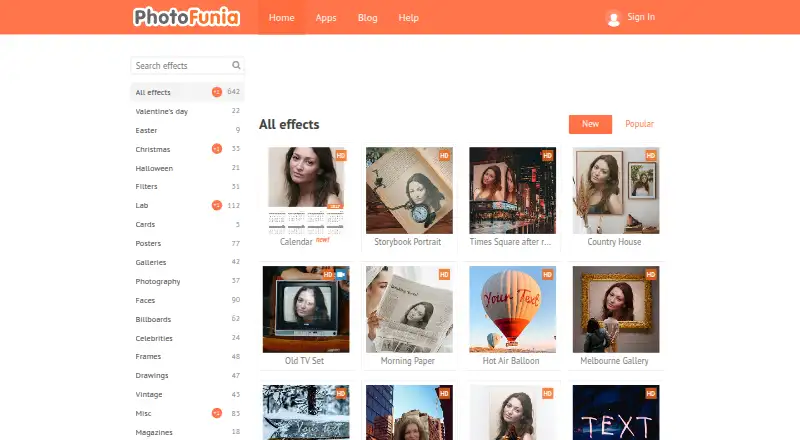
PhotoFunia is a free photo-effects editor for casual users who want to turn uploaded images into themed compositions, collages, face swaps, filters, and text-based designs. It runs on the web and has apps for iOS and Android, giving users several ways to create and share generated images. Supported formats include JPG, PNG, and GIF, while outputs can be saved, emailed, or shared socially. Its audience is primarily people looking for entertainment-focused edits rather than detailed, professional image correction.
Its strongest area is the breadth of effects within a narrow creative purpose. The library includes themed photo effects, shadow, aging, and black-and-white filters, along with automatic face detection for face swaps and tools for generating collages. The workflow centers on selecting an effect, uploading an image, and generating a result, which suits one-off edits and shareable compositions. Cloud-based remote processing supports the service across its web and mobile platforms, while also making image upload a central part of the experience.
PhotoFunia keeps its pricing simple with a Free plan covering online photo effects, photo uploads, and image sharing. That makes it accessible for casual experimentation, but its scope is more limited than a full photo-editing application. The product emphasizes preset transformations and generated designs instead of a broad retouching workflow, so users seeking advanced control over detailed image adjustments should consider a more comprehensive editor. Choose PhotoFunia for themed effects, collages, face swaps, and quick sharing; choose an alternative when professional retouching or deeper editing control is the priority.
Questions about PhotoFunia
Does PhotoFunia have a free plan? Yes, there is a free plan.
What does PhotoFunia run on? Web, iOS and Android. It runs in the cloud and as a mobile app.
Who is PhotoFunia built for? Solo users and small businesses (our editorial estimate).
Your product? Our editors can test PhotoFunia in depth and publish a review, labelled as paid · from $149/mo →
PhotoFunia pricing
All 1 PhotoFunia plans and prices →
PhotoFunia fact sheet
| Free plan | Yes |
|---|---|
| Paid from | Free |
| Platform | Multi-platform |
| RAW photo support | Not verified |
| Layer editing | Not verified |
| Masking tools | Not verified |
| Batch editing | Not verified |
| Cloud sync | Not verified |
| AI retouching | Not verified |
| Deployment | Cloud, Mobile |
| Platforms | Web, iOS, Android |
| Support | Email, Docs |
| Built for | Solo, Small business (editorial estimate) |
| Pricing | Free plan (source) |
| Website | photofunia.com |
| Facts checked | 21 Sep 2026 |
Alternatives to PhotoFunia
- Adobe PhotoshopA deep, multi-platform editor for compositing, retouching, RAW work, and AI-assisted edits.9.4
- Adobe LightroomA broad Lightroom workflow for RAW editing, masking, organization, and synchronized access.9.2
- Capture OneA deep choice for professional RAW and tethered workflows, without a free plan.9.0



See all PhotoFunia alternatives →
Used PhotoFunia? Be the first to review it
The editor score above is our own research. What this page doesn't have yet is a reader's view — what you used PhotoFunia for, what worked and what didn't. No stars are seeded and no review is paid for; an editor reads every one before it appears.
Write a reviewTwo minutes · verified accounts only · read by an editor before it appears
Featured on iTechGuides

PhotoFunia is listed in our Photo Editing Software directory. Add the badge to your site — it links back to this page.
<a href="https://www.itechguides.com/products/photofunia/"><img src="https://www.itechguides.com/best/badge/photofunia.svg" alt="Featured on iTechGuides" width="230" height="46"></a>
Reviewed by iTechGuides Editors · Editorial team · Updated Nov 2026
Advertiser disclosure: iTechGuides is reader-supported. Vendors can pay for top positions in our rankings and for a place on other products' pages, and we may earn a commission when you click some links. Bought places stand at the number bought; this page and our disclosure say so. Paying vendors may get a fuller, more detailed review from our editors, and that review can change their score. How we rank.
Last updated · How we research and update