Photo Metadata Editor
Photo Metadata Editor: A focused, privacy-conscious metadata editor for Windows photo and video workflows. Ranked #10 of 31 in Photo Metadata Editors by our editors (8.2/10); pricing: Free plan; best for windows users editing photos and video metadata.
At a glance
- Editor score8.2 / 10
- PricingFree plan
- Best forWindows users editing photos and video metadata
- Free planYes
- Paid fromFree
- Batch editingNo
- Facts checked21 Sep 2026
Where it wins
- Covers EXIF, XMP, IPTC, and QuickTime metadata fields
- Supports common image and video formats, including HEIC and MP4
- Local OCR, backups, presets, and write verification add control
Where it doesn't
- Windows-only availability limits cross-platform workflows
- Does not provide batch metadata editing
- RAW support is outside its documented format coverage
Our verdict on Photo Metadata Editor
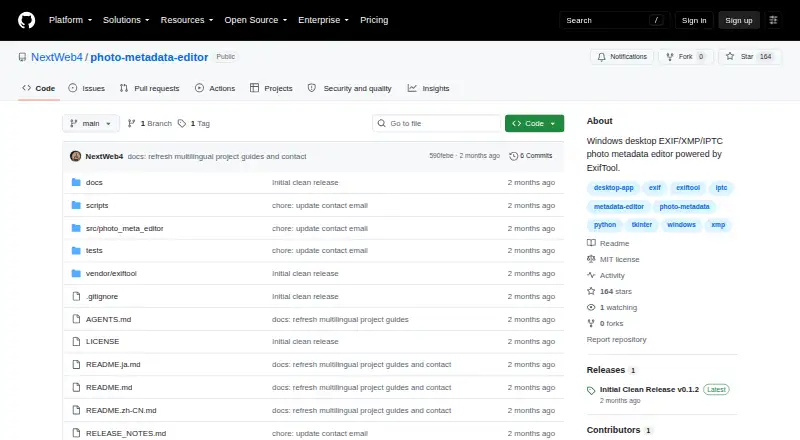
Photo Metadata Editor is an open-source Windows desktop application for viewing and editing metadata in photos and media files. It is aimed at photographers, archivists, and other Windows users who need direct control over descriptive, technical, copyright, capture-time, GPS, and location fields. The editor works with JPG, PNG, TIFF, HEIC, HEIF, WEBP, MOV, and MP4 files, while also displaying raw metadata and read-only camera and image facts. Its local processing model keeps photos and metadata on the computer rather than uploading them.
The metadata scope is broad for a desktop editor. Users can work with EXIF, XMP, IPTC, and QuickTime fields, including titles, descriptions, keywords, creators, copyright, capture time, camera information, software, GPS coordinates, and locations. Camera and GPS presets can help standardize repeated entries, and local OCR date detection provides an additional way to identify dates. Write verification uses a summary and read-back checks, while ExifTool backups support restoration when changes need to be reversed.
The main constraint is workflow scale: the documented process selects and edits one file at a time, so Photo Metadata Editor is not suited to batch metadata operations. It is also limited to Windows, and its documented format coverage does not include RAW files. With a free, open-source model and no paid tier distinction, it fits users who prioritize local processing, field-level control, and recovery options. Choose another tool if cross-platform access, RAW workflows, or batch editing are central requirements.
Your product? Our editors can test Photo Metadata Editor in depth and publish a review, labelled as paid · from $149/mo →
Photo Metadata Editor pricing
Photo Metadata Editor fact sheet
| Free plan | Yes |
|---|---|
| Paid from | Free |
| Metadata scope | Exif_iptc_xmp |
| Batch editing | No |
| RAW file support | Not verified |
| Platform | Desktop |
| GPS metadata tools | Yes |
| Metadata templates | Yes |
| Documented file formats | Not verified |
| Deployment | Desktop |
| Platforms | Windows |
| Built for | Solo, Small business (editorial estimate) |
| Pricing | Free plan |
| Website | github.com |
| Facts checked | 21 Sep 2026 |
Alternatives to Photo Metadata Editor
- ExifToolA free, open-source metadata toolkit for deep, cross-platform batch control.9.4
- PhotiniA complete open-source metadata editor with batch tools, geotagging, and RAW support.9.2
- GeoSetterA focused, free Windows tool for detailed metadata editing and GPS-based photo organization.9.0


See all Photo Metadata Editor alternatives →
Also Ranked In
Photo Metadata Editor is ranked in 2 of our directories.
Used Photo Metadata Editor? Be the first to review it
The editor score above is our own research. What this page doesn't have yet is a reader's view — what you used Photo Metadata Editor for, what worked and what didn't. No stars are seeded and no review is paid for; an editor reads every one before it appears.
Write a reviewTwo minutes · verified accounts only · read by an editor before it appears
Featured on iTechGuides

Photo Metadata Editor is listed in our Photo Metadata Editors directory. Add the badge to your site — it links back to this page.
<a href="https://www.itechguides.com/products/photo-metadata-editor/"><img src="https://www.itechguides.com/best/badge/photo-metadata-editor.svg" alt="Featured on iTechGuides" width="230" height="46"></a>
Reviewed by iTechGuides Editors · Editorial team · Updated Oct 2026
Advertiser disclosure: iTechGuides is reader-supported. Vendors can pay for top positions in our rankings and for a place on other products' pages, and we may earn a commission when you click some links. Bought places stand at the number bought; this page and our disclosure say so. Paying vendors may get a fuller, more detailed review from our editors, and that review can change their score. How we rank.
Last updated · How we research and update