
Pho
Pho: An open-source mobile backup app for original-quality transfers to your storage. Ranked #5 of 25 in Photo Backup Software by our editors (8.5/10); pricing: Free plan; best for low-cost open-source mobile-to-NAS backup.
At a glance
- Editor score8.5 / 10
- PricingFree plan
- Best forLow-cost open-source mobile-to-NAS backup
- Free planYes
- Paid from$19.99/yr
- Facts checked20 Sep 2026
Where it wins
- Backs up originals, RAW files, HEIC, HEVC, Live Photos, and video
- Supports SMB, WebDAV, NFS, Google Drive, and S3-compatible storage
- Adds filters, parallel uploads, encryption, and local-space management
Where it doesn't
- The free plan is limited to a local gallery and basic cloud sync
- Requires users to provide and manage compatible storage destinations
- Some advanced features require a Pro subscription or lifetime purchase
Our verdict on Pho
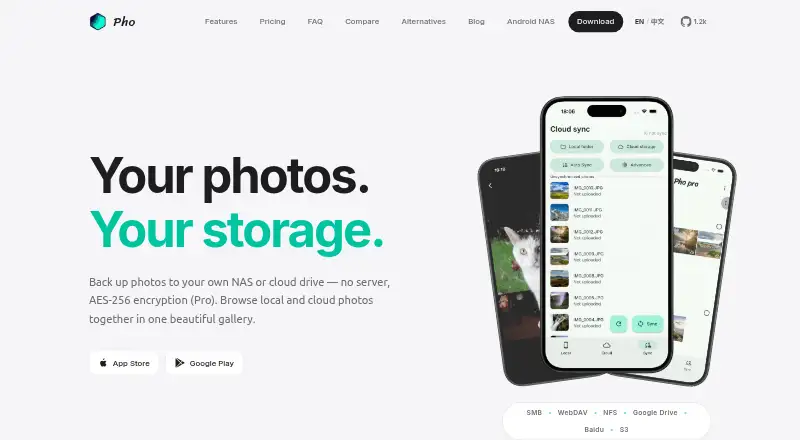
Pho is an open-source mobile photo backup and gallery app for iPhone and Android. It automatically syncs camera-roll originals to storage you provide, including NAS shares, WebDAV, NFS, Google Drive, Baidu Netdisk, and S3-compatible services. Files remain in ordinary date-based folders, while the app combines local and remote photos in one gallery. It is designed for people who want mobile backup without a companion server or hosted photo library, especially those managing a NAS or other bring-your-own-storage destination.
The pricing structure is straightforward. The Free plan costs $0 and includes a local gallery and basic cloud sync. Pro Monthly costs $1.99 per month, while Pro Annual costs $19.99 per year. Both paid plans add AES encryption, custom sync filters, multi-threaded or parallel sync, and priority support. Pro Lifetime costs $39.99 one time and includes all Pro features plus lifetime access. The paid tiers are most relevant when encryption, selective uploads, faster parallel transfers, or ongoing support matter more than basic backup.
Pho’s main strength is its storage flexibility. It supports direct sync to SMB, WebDAV, and NFS, along with Google Drive, Baidu Netdisk, AWS S3, Backblaze B2, Cloudflare R2, and MinIO. Background camera-roll backup, original-quality transfers, RAW support, a camera-only album, and a release-space tool cover practical mobile workflows. Choose Pho if you want an open-source app that connects directly to storage you control across iOS, macOS, and Android. It is a weaker fit if you want a fully hosted photo library or do not want to configure and maintain a storage destination.
Your product? Our editors can test Pho in depth and publish a review, labelled as paid · from $149/mo →
Pho pricing
Pho fact sheet
| Free plan | Yes |
|---|---|
| Paid from | $19.99/yr |
| Mobile photo backup | Yes |
| External drive backup | Yes |
| NAS backup | Yes |
| RAW photo support | Yes |
| Version history | Not verified |
| Storage model | Bring_your_own |
| Included storage | Not verified |
| Deployment | Mobile |
| Platforms | iOS, macOS, Android |
| Support | |
| Built for | Solo, Small business (editorial estimate) |
| Integrations | 9 integrations: SMB, WebDAV, NFS, Google Drive, Baidu Netdisk, AWS S3 … |
| Pricing | Free plan (source) |
| Website | pho.tools |
| Facts checked | 20 Sep 2026 |
Pho integrations
Pho lists 9 integrations on its own site.
- SMB
- WebDAV
- NFS
- Google Drive
- Baidu Netdisk
- AWS S3
- Backblaze B2
- Cloudflare R2
- MinIO
Alternatives to Pho
- PhotoSyncA flexible photo backup tool for users who want control over destinations and protocols.9.3
- SyncDropA flexible cross-platform backup tool for users who bring their own storage.9.2
- ImmichA feature-rich self-hosted library for backing up, organizing, and sharing personal media.9.0



Pho vs the competition


Compare Pho with any tool side by side →
Used Pho? Be the first to review it
The editor score above is our own research. What this page doesn't have yet is a reader's view — what you used Pho for, what worked and what didn't. No stars are seeded and no review is paid for; an editor reads every one before it appears.
Write a reviewTwo minutes · verified accounts only · read by an editor before it appears
Featured on iTechGuides

Pho is listed in our Photo Backup Software directory. Add the badge to your site — it links back to this page.
<a href="https://www.itechguides.com/products/pho/"><img src="https://www.itechguides.com/best/badge/pho.svg" alt="Featured on iTechGuides" width="230" height="46"></a>
Reviewed by iTechGuides Editors · Editorial team · Updated Oct 2026
Advertiser disclosure: iTechGuides is reader-supported. Vendors can pay for top positions in our rankings and for a place on other products' pages, and we may earn a commission when you click some links. Bought places stand at the number bought; this page and our disclosure say so. Paying vendors may get a fuller, more detailed review from our editors, and that review can change their score. How we rank.
Last updated · How we research and update