PenguinBurner
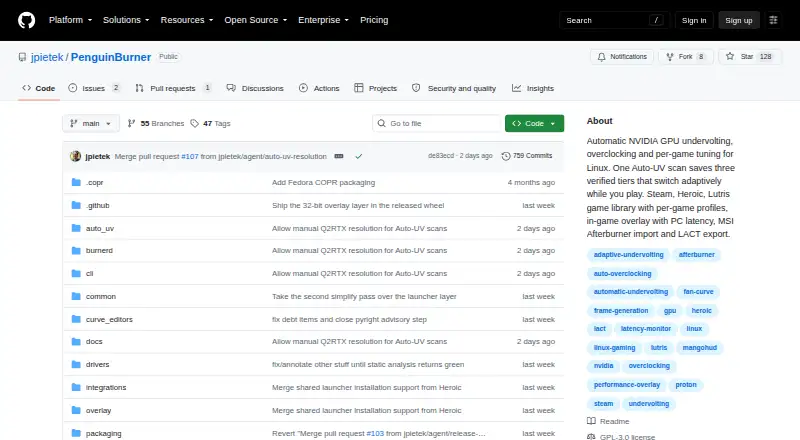
PenguinBurner: A focused, open-source tuner for Linux gamers with NVIDIA GPUs. Ranked #4 of 19 in GPU Overclocking Software by our editors (8.7/10); pricing: Free plan; best for linux gamers using NVIDIA GPUs.
At a glance
- Editor score8.7 / 10
- PricingFree plan
- Best forLinux gamers using NVIDIA GPUs
- Free planYes
- Paid fromFree
- Custom voltage controlYes
- Facts checked20 Sep 2026
Where it wins
- Automatic scans with verified efficiency, balanced, and performance tiers
- Per-game profiles with adaptive switching for Steam and Lutris
- Manual curves, fan and power controls, plus an in-game overlay
Where it doesn't
- Supports NVIDIA GPUs only
- Requires the proprietary NVIDIA driver and CUDA
- Linux is the only supported platform
Our verdict on PenguinBurner
PenguinBurner is an open-source Linux application for NVIDIA GPU undervolting, overclocking, fan tuning, and per-game configuration. It is aimed at Linux gamers with supported NVIDIA hardware who want automated tuning alongside manual control. The application scans for stable voltage-frequency settings, saves verified efficiency, balanced, and performance tiers, and can switch profiles adaptively based on game frame rate. Its scope is focused rather than broad: NVIDIA GPUs are supported, Linux is the supported operating system, and the proprietary NVIDIA driver and CUDA are required.
Tuning depth is the product’s main strength. Users can edit voltage-frequency curves manually, configure power limits within profiles, and create fan curves or use automatic silent fan curves. Per-game profiles add a practical layer of control, while the overlay displays FPS, latency, clocks, power, and temperature data in-game. This combination gives users both automated starting points and the controls needed to refine a profile for a specific game or performance target.
Its ecosystem fit is centered on Linux gaming libraries and existing tuning workflows. Steam and Lutris integration connects profiles to game libraries, while MSI Afterburner profile import and LACT configuration export support transfers between tools. PenguinBurner suits Linux users who want a free, open-source NVIDIA tuning application with scans, profiles, overlays, and detailed controls. It is not a fit for users on Windows, users with non-NVIDIA GPUs, or systems that do not use the required proprietary NVIDIA driver and CUDA.
Your product? Our editors can test PenguinBurner in depth and publish a review, labelled as paid · from $149/mo →
PenguinBurner pricing
PenguinBurner fact sheet
| Free plan | Yes |
|---|---|
| Paid from | Free |
| GPU vendor support | Nvidia |
| Custom voltage control | Yes |
| Fan curve control | Yes |
| Power limit control | Yes |
| Tuning profiles | Yes |
| On-screen overlay | Yes |
| Operating systems | Linux |
| Deployment | Desktop |
| Platforms | Linux |
| Support | Community, Docs |
| Built for | Solo, Small business (editorial estimate) |
| Integrations | 4 integrations: Steam, Lutris, MSI Afterburner, LACT |
| Pricing | Free plan |
| Website | github.com |
| Facts checked | 20 Sep 2026 |
PenguinBurner integrations
PenguinBurner lists 4 integrations on its own site.
- Steam
- Lutris
- MSI Afterburner
- LACT
Alternatives to PenguinBurner
- MSI AfterburnerA full-featured, free Windows tuner for multi-vendor GPU overclocking and monitoring.9.4
- ASUS GPU Tweak IIIA free, feature-rich Windows toolkit for guided GPU tuning, profiles, and monitoring.9.2
- Arc PowerA free Windows utility for deep Intel Arc tuning, monitoring, profiles, and overlays.8.9



See all PenguinBurner alternatives →
PenguinBurner vs the competition
- PenguinBurner vs MSI Afterburner
- PenguinBurner vs ASUS GPU Tweak III
- PenguinBurner vs Arc Power
- PenguinBurner vs Green Curve
- PenguinBurner vs TuxClocker
- PenguinBurner vs CoreCtrl
Compare PenguinBurner with any tool side by side →
Also Ranked In
PenguinBurner is ranked in 2 of our directories.
Used PenguinBurner? Be the first to review it
The editor score above is our own research. What this page doesn't have yet is a reader's view — what you used PenguinBurner for, what worked and what didn't. No stars are seeded and no review is paid for; an editor reads every one before it appears.
Write a reviewTwo minutes · verified accounts only · read by an editor before it appears
Featured on iTechGuides

PenguinBurner is listed in our GPU Overclocking Software directory. Add the badge to your site — it links back to this page.
<a href="https://www.itechguides.com/products/penguinburner/"><img src="https://www.itechguides.com/best/badge/penguinburner.svg" alt="Featured on iTechGuides" width="230" height="46"></a>
Reviewed by iTechGuides Editors · Editorial team · Updated Oct 2026
Advertiser disclosure: iTechGuides is reader-supported. Vendors can pay for top positions in our rankings and for a place on other products' pages, and we may earn a commission when you click some links. Bought places stand at the number bought; this page and our disclosure say so. Paying vendors may get a fuller, more detailed review from our editors, and that review can change their score. How we rank.
Last updated · How we research and update